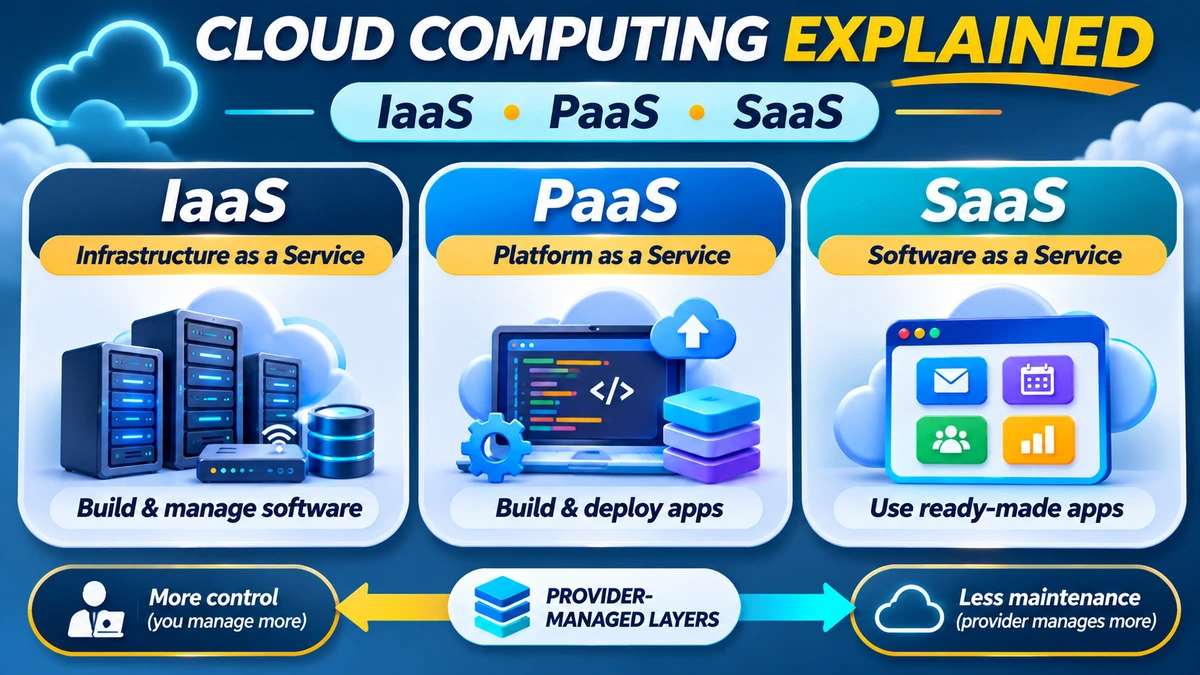
Quick answer: Cloud computing means accessing computing resources—such as servers, storage, databases and software—over a network when you need them, rather than owning and maintaining all the equipment yourself. Its three classic service models are IaaS (Infrastructure as a Service), PaaS (Platform as a Service) and SaaS (Software as a Service). IaaS gives you infrastructure to configure, PaaS provides a managed environment for building applications, and SaaS gives you a finished application to use.
If you use an online email service, work in a shared document or run a website on a rented virtual server, you have probably already experienced the cloud. But these services are not interchangeable. The central question is how much technology do you want to manage yourself? This beginner's guide explains the differences, what each model includes, their common costs, how security responsibilities are divided and which option makes sense for a student, a small business or a developer.
Fact-checked: 14 November 2026. The definitions follow the US National Institute of Standards and Technology (NIST), with practical examples cross-checked against Google Cloud, Microsoft Azure and AWS documentation. Product features and pricing can change; this article does not quote unverified live prices.
What is cloud computing in simple terms?
Instead of buying a computer server, finding a secure building for it, maintaining cooling and electricity, installing the operating system and handling every repair, an organisation can rent the computing resources it needs from a provider. Those resources might power an online shop, store business files, host a database, analyse information or deliver an application to customers.
NIST Special Publication 800-145 , published in 2011 and still widely used as a foundational classification, identifies five essential characteristics:
- On-demand self-service: customers can provision resources such as computing time or storage without a provider employee manually processing every request.
- Broad network access: resources can be accessed over a network through standard mechanisms from suitable computers or mobile devices.
- Resource pooling: a provider shares and dynamically allocates underlying resources among different customers while maintaining logical separation.
- Rapid elasticity: resources can expand or shrink as demand changes, sometimes automatically.
- Measured service: usage can be monitored, controlled and reported, often forming the basis of billing.
These characteristics distinguish full cloud services from an ordinary computer sitting in another office. Cloud resources still run on real physical hardware; the word “cloud” describes how that technology is delivered and managed, not an absence of servers.
IaaS vs PaaS vs SaaS: the essential comparison
| Question | IaaS | PaaS | SaaS |
|---|---|---|---|
| Full name | Infrastructure as a Service | Platform as a Service | Software as a Service |
| What you receive | Virtual servers, storage and networking | Managed environment to deploy your application | Complete application to use |
| What you mainly manage | Guest operating system, software, app and data | Your code, configuration and application data | Users, settings, access and your data usage |
| Control | Highest of the three over operating systems and infrastructure configuration | Moderate, focused on application behaviour | Less control of underlying software |
| Typical billing | Compute, storage, network and related usage | App runtime, capacity, requests or plan resources | Subscription, seats, usage or a combination |
| Illustrative services | Amazon EC2, Azure Virtual Machines, Google Compute Engine | Azure App Service, Google App Engine, AWS Elastic Beanstalk | Microsoft 365, Google Workspace |
| Best starting point | Need customised infrastructure or OS-level control | Build and deploy your own app with less server work | Use software without building it |
These are broad service models, not rigid boxes. A business may use all three. A managed database, container platform or serverless service might combine characteristics from several models, so check the exact provider contract rather than applying a label blindly. Google Cloud's October 2026 model comparison makes this distinction explicit.
1. IaaS explained: Infrastructure as a Service
IaaS lets an organisation rent core computing infrastructure such as virtual machines, disks, network resources and related services. The provider operates the physical facilities and underlying technology; customers typically control the operating system and most software installed on their virtual servers.
Imagine you are launching a shopping website. With IaaS, you might create a Linux virtual machine, install a web server, configure a database, deploy the website and set up monitoring and backups. You choose the server size and software environment. You also need to patch the guest operating system, manage credentials, apply firewall rules and make sure the application works.
Common examples include Amazon EC2, Microsoft Azure Virtual Machines and Google Compute Engine. Google's IaaS explanation confirms that the customer is generally responsible for the guest operating system, middleware and applications, while the provider manages physical hardware and virtualisation.
When is IaaS useful?
- Hosting an existing business application needing specific operating-system packages.
- Running a test server with a customised software stack.
- Moving a traditional server-based workload to the cloud without rebuilding the whole application.
- Supporting jobs requiring specialised virtual-machine configurations.
Advantages: flexibility, administrator-level control and the ability to scale virtual resources without owning a data centre. Trade-offs: greater responsibility for security updates, software management, uptime, system configuration and cost monitoring. IaaS gives you infrastructure—not a promise that your software will maintain itself.
2. PaaS explained: Platform as a Service
PaaS provides a managed environment for building, deploying and running software. You still write the application and decide how it behaves, but the platform handles much of the underlying server and operating-system management.
Suppose you develop a student-registration website or customer-booking API. Rather than configuring a Linux server from the beginning, you may upload source code or deploy a supported application package to a managed platform. It can provide a runtime, application hosting, deployment tools, monitoring integrations and scaling options.
Examples include Azure App Service, Google App Engine and AWS Elastic Beanstalk. Microsoft's App Service documentation describes hosting web apps and APIs without the customer managing the underlying infrastructure.
When is PaaS useful?
- A startup developing a web application or customer portal.
- A school building an online registration system.
- A development team that wants repeatable deployment without manually patching its virtual machines.
- A business creating an API that integrates with another service.
Advantages: less routine server administration and potentially faster deployment. Trade-offs: restrictions on supported runtimes, deployment methods or low-level configuration; potential vendor dependence; and charges that vary by capacity, service plan or usage.
Importantly, PaaS does not write, test or secure your application code for you. You still need to handle application logic, permissions, data handling, dependency vulnerabilities and product maintenance.
3. SaaS explained: Software as a Service
SaaS is a complete application that customers access through a browser, mobile app or other supported interface. The vendor generally operates the servers, application runtime and software updates.
Examples include Microsoft 365 for office productivity and Google Workspace for email and collaboration. The user signs in and uses the product rather than deploying its underlying software stack.
For a small business, SaaS might mean a cloud email subscription, a customer relationship management system, an accounting application or a team collaboration service. The service normally includes ongoing product updates and vendor-managed application infrastructure.
When is SaaS useful?
- A shop that needs an existing accounting or inventory application.
- A school that wants managed email and shared documents.
- A professional team that needs collaboration tools immediately.
- A founder who would rather subscribe to a working service than build one from scratch.
Advantages: rapid setup and reduced technical maintenance. Trade-offs: recurring subscription costs, feature limits, integration restrictions and possible difficulties moving data or processes to a different service.
SaaS does not remove the customer's security obligations. You still need appropriate account permissions, strong sign-in protection, careful data sharing and an understanding of how to export or recover your information.
Readers exploring software businesses can also consult FlyingEze's guide to bringing a SaaS startup to mobile , which addresses a later step: delivering a service to end users.
The easiest way to remember IaaS, PaaS and SaaS
Think about building a website:
- IaaS: you rent a virtual server and install, configure and maintain much of the software yourself.
- PaaS: you build the website and deploy it to a platform that manages much of the environment beneath your code.
- SaaS: you subscribe to an existing website-building or business application and use its features without developing its core software.
The more the provider handles, the less infrastructure work you perform—but often with fewer low-level customisation options. More management by the provider does not automatically mean cheaper, faster or more secure for every workload.
Who handles security? The cloud shared-responsibility model
One of the most important beginner concepts is shared responsibility. The provider secures the infrastructure and services under its control, while the customer must secure whatever it manages. That boundary changes from IaaS through PaaS to SaaS.
| Area | IaaS | PaaS | SaaS |
|---|---|---|---|
| Physical data centre and hardware | Provider | Provider | Provider |
| Guest operating-system patching | Usually customer | Usually provider | Provider |
| Application software or code | Customer | Customer | Provider develops and maintains core app |
| Access policies and user permissions | Customer | Customer | Customer configures permitted user access |
| Classification and appropriate handling of business data | Customer | Customer | Customer retains duties for its data |
| Service configuration, backups and recovery | Largely customer | Shared; depends on service | Shared; depends on subscription and contract |
This is a simplified teaching table, not a substitute for a provider's detailed responsibility matrix. Microsoft's Azure shared-responsibility guidance and AWS's EC2 security guidance confirm that duties shift according to service type.
For example, an IaaS user who leaves a database open to the internet may expose data even though the provider's data centre is secure. A SaaS user can still cause a breach by sharing documents publicly or allowing a compromised administrator account.
Backups also deserve attention. Some services provide snapshots or data-recovery features, but you should verify retention and restoration requirements for your particular workload. FlyingEze's 3-2-1 backup strategy guide explains how to avoid relying on a single copy of important business files or databases.
How cloud computing works behind the scenes
A cloud service provider operates data centres containing physical servers, storage systems and networking equipment. Software creates virtualised or managed resources that can be allocated to customers. A web portal or API allows customers to provision services, configure permissions and view usage.
When someone visits an application, their request may pass through internet routing, a content-delivery network or a load balancer before reaching the application and database. The exact architecture depends on the service and its configuration. A SaaS user generally sees only the login page and application interface; an IaaS customer may configure several of those layers.
Cloud services can run in different regions, which are geographic locations where providers offer infrastructure. Within some regions, providers offer separate availability zones to help reduce the effect of a single facility failure. AWS's cloud foundation guidance explains why region selection depends on latency, available services, cost, data residency and compliance.
Cloud does not mean a service is automatically available at all times. Applications can still suffer outages due to software bugs, provider incidents, network failures or poor architecture. Reliability requires appropriate design, monitoring and recovery plans.
Public, private and hybrid cloud are different from IaaS, PaaS and SaaS
New learners often mix up deployment models and service models. IaaS, PaaS and SaaS describe what level of the technology stack you consume. Public, private and hybrid cloud describe how and where the cloud environment is operated and shared.
- Public cloud: cloud infrastructure made available to customers by a provider, with logical isolation among organisations using shared resources.
- Private cloud: a cloud environment dedicated to one organisation. It can be run on premises or hosted elsewhere.
- Hybrid cloud: connected environments that combine different cloud deployments, allowing data and applications to move or work together under defined arrangements.
- Community cloud: a NIST deployment model for organisations with shared concerns such as security requirements or compliance needs.
The NIST framework includes these four deployment types. Multicloud, a term often used today, means using services from more than one cloud provider; it is a separate architecture description and is not one of NIST's original four deployment models.
A company might operate a SaaS collaboration tool in the public cloud while hosting a sensitive application on private infrastructure. Another might use IaaS and PaaS services from two different providers. These combinations are normal.
Cloud costs: what beginners should check before signing up
Cloud services can reduce upfront hardware spending, but pay-as-you-go does not mean costs cannot rise unexpectedly. The bill depends on the specific product, region, running time and usage. Even services with a free tier can charge for consumption above included limits.
| Model | Common cost drivers | Avoidable surprise |
|---|---|---|
| IaaS | Virtual-machine uptime and size, disks, snapshots, IPs, data transfer, support | A test server left running continuously or unused storage retained |
| PaaS | Application plan, compute time, requests, memory, databases, bandwidth | Automatic scaling or separately billed managed services |
| SaaS | Users/seats, subscription tier, storage, add-ons, usage-based features | Paying for inactive users or premium features you do not need |
Some serverless platforms can scale down when idle, but their exact billing model matters. Google Cloud Run's documentation distinguishes request-based and instance-based billing, illustrating why not every managed service charges in the same way.
Set spending alerts, review invoices and delete unused test environments. AWS Budgets and similar tools from other providers allow customers to monitor projected or actual usage. A budget alert is not necessarily a hard spending cap; you must understand whether a particular service will continue running after an alert fires.
When choosing a service, compare the total cost of ownership: subscription or infrastructure prices, staff time, monitoring, security, backups, support, bandwidth and the cost of migrating later. The cheapest monthly sticker price may not be the cheapest way to operate an application.
Cloud computing benefits—and limitations
Potential advantages
- Faster setup: teams can launch infrastructure or applications without waiting to buy and install physical servers.
- Scalability: supported services can add capacity as users or workloads increase.
- Accessibility: staff can work with approved cloud applications across supported devices and locations.
- Reduced hardware ownership: organisations can shift some capital and maintenance responsibilities to providers.
- Global reach: providers may offer regions and networks closer to customers in different places.
Important limitations
- Connectivity: internet disruption can make cloud applications difficult or impossible to access.
- Security configuration: an exposed database, weak password or incorrect access policy remains dangerous.
- Unexpected bills: usage-based charging needs monitoring and sensible limits.
- Vendor dependence: specialised proprietary tools and data formats can make migration harder.
- Compliance: organisations must still evaluate relevant privacy, contract and data-handling requirements.
Cloud infrastructure does not replace a reliable connection to it. If your business serves customers online, FlyingEze's guide to choosing internet infrastructure for an enterprise provides complementary network planning considerations.
How to choose the right model: a practical decision guide
Choose SaaS first when you simply need an existing tool, such as company email or a team workspace, and it meets your requirements. You probably do not need to hire a developer or operate servers to solve a standard business problem.
Consider PaaS if you are creating your own application and want to concentrate on coding rather than administering servers. Check whether the platform supports your programming language, database, deployment workflow, background tasks and expected traffic.
Consider IaaS when your software needs operating-system control, unusual dependencies, custom network configuration or an application that cannot easily run within a managed platform's limitations. Make sure someone can maintain the server securely.
A simple school administration scenario illustrates the difference. A school might subscribe to SaaS for email, deploy a custom enrolment app on PaaS and run a legacy records application on an IaaS virtual machine. Choosing one model does not prohibit using the others.
For a website, ask whether you need a finished website builder (SaaS), a managed app runtime (PaaS) or full server administration (IaaS). For a traditional on-premises application, start by assessing compatibility and whether migration is genuinely worthwhile; moving the same poorly maintained system to the cloud will not automatically fix its design.
What about serverless, containers and managed databases?
You may hear additional terms such as serverless computing, Functions as a Service (FaaS) and Containers as a Service (CaaS). These describe specialised methods of building or operating cloud workloads, not evidence that IaaS, PaaS and SaaS have become irrelevant.
Serverless does not literally mean no servers. It means the provider abstracts away much of the provisioning and server administration, often charging in relation to requests or runtime. Containers package applications and dependencies in a way that can simplify deployment; a managed container service may automate scaling and orchestration. Managed databases can remove much of the database-server maintenance while still leaving application-data access and schema design with the customer.
The exact boundaries vary. For example, Google's 2026 service-model comparison discusses CaaS alongside traditional categories, while Microsoft's Azure hosting guidance compares simplified, balanced and highly configurable options. Use a service's documentation to identify the operational responsibilities it actually removes.
A beginner's cloud adoption checklist
- Define the problem: do you need ready software, an environment to deploy an app or a fully configurable server?
- List the non-negotiables: security, reliability, data retention, integrations, region, operating-system access and performance.
- Compare service responsibilities: identify who patches the OS, protects access, backs up data and handles outages.
- Estimate the full bill: include compute or seats, storage, networking, backups, support and usage spikes.
- Enable account protection: turn on multifactor authentication and least-privilege access where available.
- Test with a small workload: verify speed, usability, recovery and billing before migrating everything.
- Document an exit plan: know how to export data, move applications and terminate services if necessary.
- Review monthly: check cost reports, access permissions, unused resources, incidents and restore tests.
Frequently asked questions about cloud computing
What is cloud computing in one sentence?
It is the on-demand provision of computing resources and applications over a network, typically with scalable capacity and measured use.
What are IaaS, PaaS and SaaS?
IaaS rents infrastructure, PaaS provides a managed application-building environment, and SaaS offers complete applications to users.
Which cloud model is best for beginners?
For a person who just needs software, SaaS is usually the simplest starting point. A learner developing a custom app might use PaaS; someone learning server administration might experiment with IaaS.
Is Google Drive SaaS or IaaS?
The user-facing file collaboration application is generally SaaS. Underlying managed object-storage services such as Google Cloud Storage are different products; do not treat every item bearing the word “storage” as the same service model.
Is AWS an IaaS, PaaS or SaaS provider?
AWS offers multiple categories of cloud services. EC2 is a common IaaS example, while managed application or serverless services can offer PaaS-like capabilities. Classification depends on the actual product.
Does SaaS mean I do not need cybersecurity?
No. Users still need secure authentication, appropriate permissions, careful data sharing and account monitoring, even when the provider manages the application.
Is cloud computing always cheaper than owning servers?
No. Costs depend on workload, usage, staff capacity, contract terms and architecture. On-demand resources can save money for some cases, but poorly managed resources can create high bills.
What is the difference between public and private cloud?
Public cloud serves customers through provider-operated infrastructure. Private cloud is dedicated to one organisation. These describe deployment arrangements, not the IaaS/PaaS/SaaS division.
Is serverless a fourth cloud model?
It is a commonly used modern cloud delivery approach, sometimes categorised separately. NIST's foundational model identifies three service models; specific modern products can overlap those categories.
Can a small Nigerian business use cloud computing?
Yes, provided the service fits the business's needs, budget, network access and applicable legal requirements. SaaS may solve everyday business needs, while custom applications may justify PaaS or IaaS.
Can my cloud data be lost?
Yes. Provider failures, accidental deletion, wrong configuration and account compromise can all affect data. Review backup, recovery and data-export options rather than assuming “in the cloud” means permanent preservation.
Do I need to learn programming to use cloud services?
Not to use most SaaS applications. Programming is important for building many PaaS applications, while IaaS often requires systems-administration knowledge even when little code is written.
Conclusion: choose the cloud service based on what you need to manage
Cloud computing can give individuals and organisations access to powerful technology without buying all the physical equipment themselves. But the choices are different: IaaS offers control over rented infrastructure, PaaS simplifies custom application deployment, and SaaS supplies a ready-made software product.
Start with the problem you want to solve, then ask how much technical responsibility, flexibility, budget and security control you need. Comparing the actual service terms and total operating cost will usually be more valuable than choosing a provider based only on its brand name.
Editorial note: verified 14 November 2026 using NIST's cloud-computing framework and official documentation from AWS, Microsoft and Google Cloud. Service examples are illustrative, not product endorsements. No live provider prices or unverified security guarantees are included.