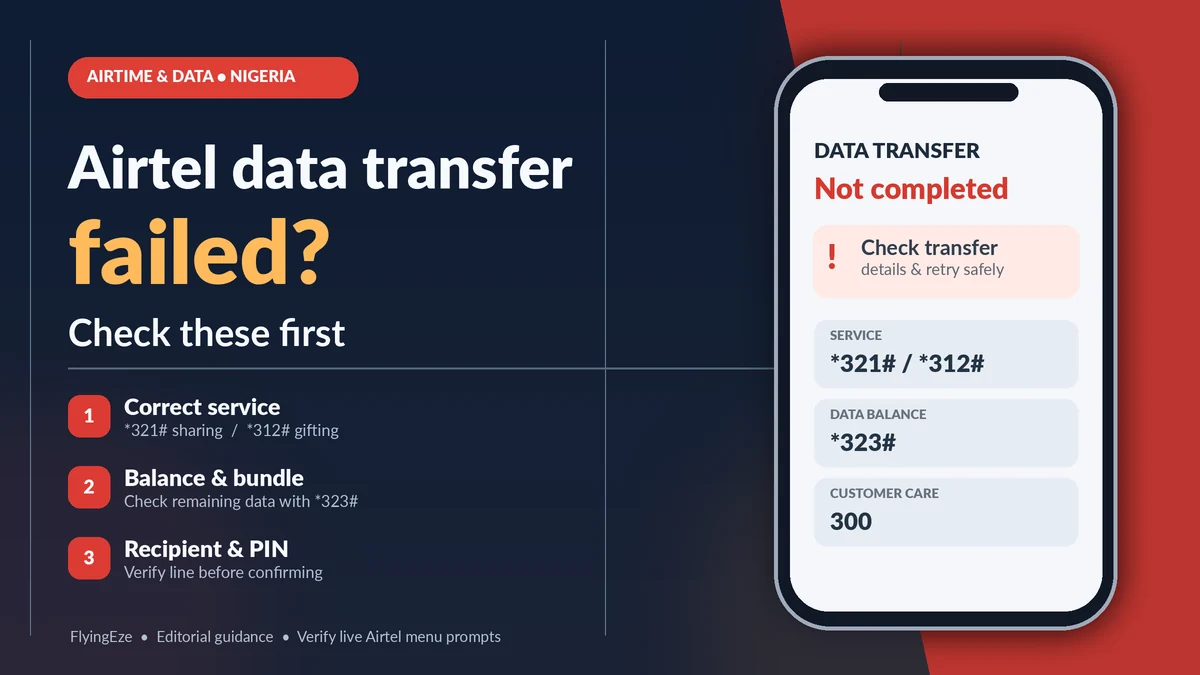
If an Airtel data transfer fails in Nigeria, check the service you selected, the recipient's number, your available bundle or airtime, and any confirmation or PIN prompt before trying again. Airtel's official FAQ directs customers to *321# for data-gifting and sharing options, while its Data Share & Gifting page confirms that *312# → Buy for Others purchases a new plan for someone else. The two operations are not interchangeable.
For anyone asking “how can I share Airtel data?”, a failed attempt can have several explanations: the wrong menu, a non-eligible balance, an incorrect number, an expired plan, an authentication error, a delayed debit or a temporary network problem. The safest fix begins by identifying what actually failed. A purchase deducted from your bank account but not credited to the recipient requires a different response from a rejected balance-sharing request.
This guide uses Airtel Nigeria's published instructions and the Nigerian Communications Commission's consumer guidance, including its 2026 advice on failed airtime and data transactions. Verified 13 November 2026. Airtel can change USSD prompts, bundle eligibility, available transfer quantities and fees; the live authorised menu and customer-support response should take precedence over an old screenshot or third-party code list.
Quick diagnosis: why your Airtel data transfer failed
| Problem | What it may mean | First check |
|---|---|---|
| You cannot find the data-transfer option | You opened a purchase menu, airtime-transfer menu or outdated menu path | Use *321# for sharing/gifting or *312# for buying a new bundle |
| “Insufficient balance” | Not enough eligible shareable data, or not enough funds to purchase a gift | Data: *323#; airtime: *310# |
| PIN rejected | The current Me2U PIN differs from the one entered | Use *321# → PIN Management if the applicable option is available |
| Recipient rejected | Number entered incorrectly, or destination not supported by the selected service | Confirm every digit and the recipient's network |
| Balance is visible but transaction fails | The bundle may be expired, restricted, promotional or otherwise ineligible | Inspect plan type, validity and the allowance the menu permits |
| USSD session ends without confirmation | Temporary connection or service-session problem | Check SMS and balances before resubmitting |
| Money debited; no data received | Payment or provisioning may still be pending | Check receipt, recipient balance and transaction reference; contact provider |
| Recipient has data but cannot browse | Data settings, network coverage, plan restrictions or expired data | Check *323#, mobile-data SIM and APN settings |
Do not interpret every error as an Airtel-wide outage. Even when mobile browsing works, a specific gifting menu, payment channel or recipient account can behave differently.
First understand the difference: sharing an existing balance versus gifting a new bundle
The phrase “share data” covers two related but different actions. Data transfer or Me2U is commonly used for moving an eligible portion of an existing allowance to another line, where the applicable feature is provided. Buy for Others means purchasing a new data plan for the recipient.
Airtel's public instructions are clearest for the second action: its SmartSHARE/Data Gifting page says to dial *312#, select a plan and choose Buy for Others. The sender pays for the plan; the beneficiary receives its stated volume and validity without a separate beneficiary charge. Airtel's FAQ separately instructs users seeking to transfer data to dial *321# and select Gift Data Bundle.
Those public descriptions do not establish that every data bundle on your line can be moved as an existing-balance transfer. If your live *321# menu offers a balance-sharing/Me2U action, check its eligibility conditions and limits on-screen. If it offers only a gift purchase for your line, do not assume that selecting a new bundle will deduct from your existing gigabytes rather than charge for a purchase.
| Question | Transfer from existing data, when eligible | Buy for Others |
|---|---|---|
| Source of data | Your qualifying current allowance | A newly purchased plan |
| What balance matters? | Eligible, still-valid data | The funding method shown in the purchase process |
| Main menu to inspect | *321#, as guided by Airtel's FAQ | *312# → Buy for Others |
| Validity | Depends on service and bundle rules | Airtel says the gifted plan retains its own stated validity |
| What can go wrong? | Unsupported bundle, amount, PIN or recipient | Wrong plan, insufficient funds, failed debit or non-delivery |
Step 1: make sure you are using the correct Airtel code and menu
Nigeria's telecom regulator harmonised major USSD services across operators. Under the NCC harmonised short codes , 312 is for data plans, 321 is for airtime/data sharing services, and 323 is for data balances. As a result, older online guides that depend on legacy Airtel codes or fixed menu option numbers can be misleading.
For the authorised gift-bundle purchase route, Airtel documents these steps:
- Dial
*312#from your Airtel line. - Open the category of data plan you want to purchase.
- Choose the specific plan and select Buy for Others.
- Enter the intended recipient's Airtel number and check it carefully.
- Review the price, validity and payment information on the confirmation screen.
- Authorise the purchase only after confirming the details.
For the sharing/gifting service, Airtel's FAQ points to *321# and a Gift Data Bundle option. Follow the actual words shown on your device, because menu ordering can change. Do not enter a code constructed by combining random snippets from MTN, Glo or outdated Airtel tutorials.
Step 2: check your data balance, eligibility and expiration
Before attempting an existing-balance transfer, dial *323# or review your data subscriptions in Airtel's official self-care app. That is Airtel's documented balance service. It helps to check not only the gigabytes shown but also the type of allowance and expiration date.
Airtel sells ordinary daily, weekly and monthly plans alongside specialist bundles, such as social or time-restricted offers. Its Data Plans terms explain that a data plan's validity determines when it can be used. They also explain a grace period during which certain unused allowances may be eligible for rollover after renewal, but cannot be used during the grace period itself.
That means a customer may see an old balance and assume it is available for immediate use or gifting when the plan is no longer active. Similarly, the bonus portion of a purchase may have restrictions separate from the ordinary data allowance. Airtel's SmartTALK guidance expressly states that its promotional airtime or data bonuses cannot be shared. Do not generalise every restriction to every bundle: check the rules of the specific plan.
Some online guides publish universal minimums or a fixed daily Me2U limit. Airtel's current public gifting and FAQ pages reviewed for this article do not provide one consistent, universally applicable limit for every existing-balance transaction. If your menu says an amount is not allowed, reduce it only to an option displayed by Airtel or ask support about the plan-specific rule. Avoid invented limits or repeated speculative attempts.
Step 3: confirm the recipient's number and network
One incorrect digit can cause an outright rejection—or, more seriously, a successful gift to the wrong person. Read the full number on the final screen rather than relying on a contact's nickname. If the recipient changed networks while keeping their number, do not guess network membership solely from the original number prefix.
Airtel's published Buy for Others FAQ refers to buying a plan for another Airtel line. Its described Airtel-to-Airtel gifting mechanism should not be assumed to transfer an existing Airtel balance directly to an MTN or Glo subscriber. A cross-network purchase through an independent bank or payment platform, where supported, is a separate service and may have different errors and refund rules.
If you suspect a wrong-number gift has already completed, record the number entered and contact Airtel promptly. Do not promise yourself that an incorrectly delivered or already-used bundle is automatically reversible.
Step 4: handle a rejected Me2U PIN without compromising the account
Airtel's official FAQ includes a Me2U PIN Management procedure. It states that the initial Me2U PIN is 1234 if the customer has never changed it, and instructs customers to dial *321#, choose PIN MANAGEMENT and then CHANGE PIN, enter the current PIN, and enter and confirm a new PIN.
That guidance applies when the specific Me2U function you are using asks for the relevant PIN. Do not assume every *312# gift purchase requires a Me2U PIN, or that the original 1234 default remains valid after you have set a personal code. If you have forgotten the current PIN and the normal authorised change process does not work, contact Airtel for account verification rather than trying a stranger's reset code.
Change an unchanged default as soon as possible. Keep the PIN private and never disclose it to somebody promising to “fix” a transfer. Protect your SIM and phone screen lock too: an unlocked phone can expose more than data allowances. FlyingEze's guide to SIM-swap fraud and mobile account security explains why protecting a mobile number matters across digital services.
Step 5: check funding and final confirmation for Buy for Others
If you are buying a bundle rather than transferring existing data, the relevant question is not how much data you have left on your own line. It is whether the chosen payment method has sufficient funds and the purchase was successfully authorised.
For example, Airtel's official gifting page says the purchaser pays the exact price of the selected bundle, while the beneficiary is not charged for receiving that new plan. Review the chosen plan's amount and validity before confirming. Where payment happens through a bank app or another payment channel, check the correct mobile network, phone number and displayed transaction status in that channel as well.
A USSD session that closes unexpectedly is not proof that payment failed. Before trying again, inspect your transaction notifications and available balance. Otherwise, a first purchase that actually succeeded could be followed by an unintended duplicate purchase.
Step 6: what if airtime or bank funds were deducted but no data arrived?
This is one of the most important cases to handle carefully. The Nigerian Communications Commission's July 2026 consumer guidance describes a failed airtime or data purchase as a payment where the account is debited but the product is not delivered. It identifies possible causes including temporary network problems, bank-to-operator system errors, service interruptions, wrong numbers and wrong network selection.
Follow a controlled sequence:
- Confirm the debit. Check the bank, wallet or airtime balance and retain the exact amount, date and time.
- Check whether delivery completed late. Ask the recipient to dial
*323#and review the plan or available balance; inspect the notification history and receipt. - Do not pay again immediately. A processing delay and an outright failed purchase are different outcomes.
- Contact the funding provider if a bank or payment app was charged, supplying the transaction reference and beneficiary number.
- Contact Airtel if the network purchase or recipient provisioning remains unresolved. Keep a ticket/reference number.
- Escalate if necessary through the NCC after using the provider's complaint procedure and the communicated resolution period.
The NCC describes work on a draft national framework for improved failed airtime and data transaction handling. That description should not be misrepresented as a guaranteed completed refund within a fixed number of minutes. Resolution depends on the verified transaction and the institutions involved.
If you paid a supposed vendor outside Airtel and suspect deliberate deception rather than a normal processing delay, preserve the payment evidence and contact your bank promptly. FlyingEze's guide to suspected fraudulent bank transfers in Nigeria explains safe first steps, although recovery is not assured.
Step 7: what if the recipient has data but cannot browse?
A successful gift can still be followed by a separate connectivity issue. Ask the recipient to confirm the bundle on *323#, its validity and whether the phone has selected the correct SIM for mobile data. Ensure mobile data is enabled and that network coverage is available.
Airtel's official FAQ provides automatic configuration by texting Internet to 232. For applicable manual settings, the listed APN is Internet.ng.airtel.com with username and password left blank. Only modify your device's APN if appropriate; on many devices the settings are installed automatically.
Also check whether the recipient received a social-only, night-only or other restricted bundle. Airtel says social bundles are limited to the covered applications, while certain bonus allocations are available only at stated times. A website failing to load over a social bundle is not necessarily proof that the gift was never delivered.
If the bundle is present and valid yet data still does not work, record the error and contact Airtel. A complete factory reset should not be the first troubleshooting step for a single data-plan activation problem.
Step 8: USSD timeout, unavailable service or app problems
USSD requires a working mobile-network connection. If *321# or *312# times out or displays a generic error, check signal reception, dual-SIM selection and whether other simple network services work. A phone restart may clear a stuck session, but it will not fix an ineligible plan or an unresolved payment on the operator's side.
For balance review or plan purchases, Airtel also documents its My Airtel self-care app. Install it from the official Android or iOS app store through Airtel's own instructions, sign in with the correct line, and check the currently available features. Do not assume that every balance-transfer function in a third-party guide will appear in every app version.
When a transaction status is uncertain, verify the result before using another channel. An app retry after a USSD timeout can produce an additional purchase if the first request was already processed.
Step 9: what to do if the data went to the wrong number
Record the beneficiary number, intended number, selected bundle, amount, timestamp and any transaction ID. If the mistake involved a purchased data bundle, contact Airtel and the payment provider, where relevant, as soon as you notice. Explain that the transaction may have been completed to an unintended recipient.
There is no basis to promise automatic reversal. Airtel may need to determine whether the gift was credited, whether the number exists and whether any allowance has been used. Avoid exposing the recipient's full number in a public social-media complaint; share it only through authenticated support channels.
How to contact Airtel Nigeria and escalate an unresolved complaint
Airtel's official contact page lists 300 from an Airtel line, +234 802 150 0300 from outside the network, and customercare@ng.airtel.com. Airtel's service guide also identifies 131 as a postpaid customer-care option. Always use the current contacts published on Airtel's website.
When reporting a failed data transfer, explain which service was used, the destination number, the data quantity or bundle, the exact error, whether funds were deducted and the date/time. Ask for a complaint reference number. Do not provide an agent with your secret Me2U PIN, OTP or banking password.
The NCC's June 2026 complaint guide says consumers should first contact the operator, keep a case reference and allow the communicated resolution period. If the matter remains unresolved or the response is unsatisfactory, contact the NCC on its toll-free 622 line or through its official consumer complaint channels , supplying the earlier case reference and supporting documents.
How to prevent the next Airtel transfer failure
- Choose the right transaction: balance sharing through an eligible option or a newly purchased plan through Buy for Others.
- Use current official menus:
*321#for sharing/gifting functions and*312#for bundle purchases, as shown on your line. - Check balances and validity: use
*323#and look at the bundle type, not just the total shown. - Confirm the recipient: check the entire Airtel number and your selected network before paying.
- Keep the PIN secret: change an unchanged Me2U default and use it only in the authorised interface when requested.
- Review the last screen: read the price, amount, validity and any conditions before confirming.
- Avoid duplicate attempts: when a result is unclear, check the recipient and transaction history before retrying.
- Keep evidence: save receipts and reference numbers until the service is confirmed or a complaint is resolved.
Frequently asked questions about failed Airtel data transfers
How can I share Airtel data with another number?
Airtel's FAQ directs customers to *321# and Gift Data Bundle for its sharing/gifting service. To buy a new data plan for another Airtel user, dial *312#, select the plan and choose Buy for Others. Follow the current menu labels and verify any plan-specific eligibility.
What code checks my Airtel data balance?
Dial *323# from the Airtel line, or inspect your subscriptions in the official My Airtel app. The main balance may include allowances with different validity or usage rules.
Why does Airtel say I have insufficient data when I can see gigabytes?
The visible allowance may not be eligible for the transfer action, may be a specialist or bonus bundle, or may be in a grace period after expiration. Check the precise plan and the shareable amount that Airtel displays.
Why is my Airtel Me2U PIN not working?
The PIN may have been changed, entered incorrectly or may apply to a different service than the one you selected. Airtel documents *321# → PIN Management → Change PIN and says the original default is 1234 only when never changed. If you cannot verify the current PIN, seek authorised support.
Can I share Airtel data to MTN or Glo directly?
Airtel's documented gifting service is for Airtel recipients. Do not assume a transfer of your existing Airtel allowance can be sent directly to a different network. Buying data for another network through a separate payment platform is a different transaction.
My bank was debited but the Airtel recipient received nothing. What should I do?
Verify the transaction reference and recipient's balance, avoid immediately repeating the purchase, report the debit to the bank/payment provider, and contact Airtel where network provisioning is unresolved. Keep the complaint reference for any NCC escalation.
Is every Airtel data bundle shareable?
No universal eligibility guarantee is published for every Airtel plan. Special-purpose and bonus allowances can have restrictions; use the official live menu or customer care for the actual plan's sharing rules.
Is there a fixed daily limit for all Airtel data transfers?
Airtel's official gifting and FAQ pages reviewed for this guide do not state a single clearly applicable universal existing-balance transfer cap. Refer to the currently displayed limit for your service and plan instead of relying on inconsistent numbers from older guides.
What if I have data after gifting but browsing still fails?
Check whether the bundle is valid, whether mobile data uses the correct SIM, whether the plan covers the activity, and whether Airtel's automatic or manual APN settings are correct. Contact support if the problem persists.
Conclusion: identify the failed step before paying or retrying
If your Airtel data transfer failed, begin with four checks: service type, eligible balance or funding, recipient details, and the transaction result. Then investigate the PIN, network or app only when those basics do not explain the problem. This order helps prevent duplicate purchases and unnecessary charges.
For Nigerians searching how can I share Airtel data, the official routes are more useful than recycled short-code lists: use *321# to inspect sharing/gifting options, use *312# → Buy for Others when purchasing a new bundle, and use *323# to verify the balance. If funds have been deducted without delivery, preserve your evidence and seek help from Airtel and the payment provider, escalating to the NCC when appropriate.