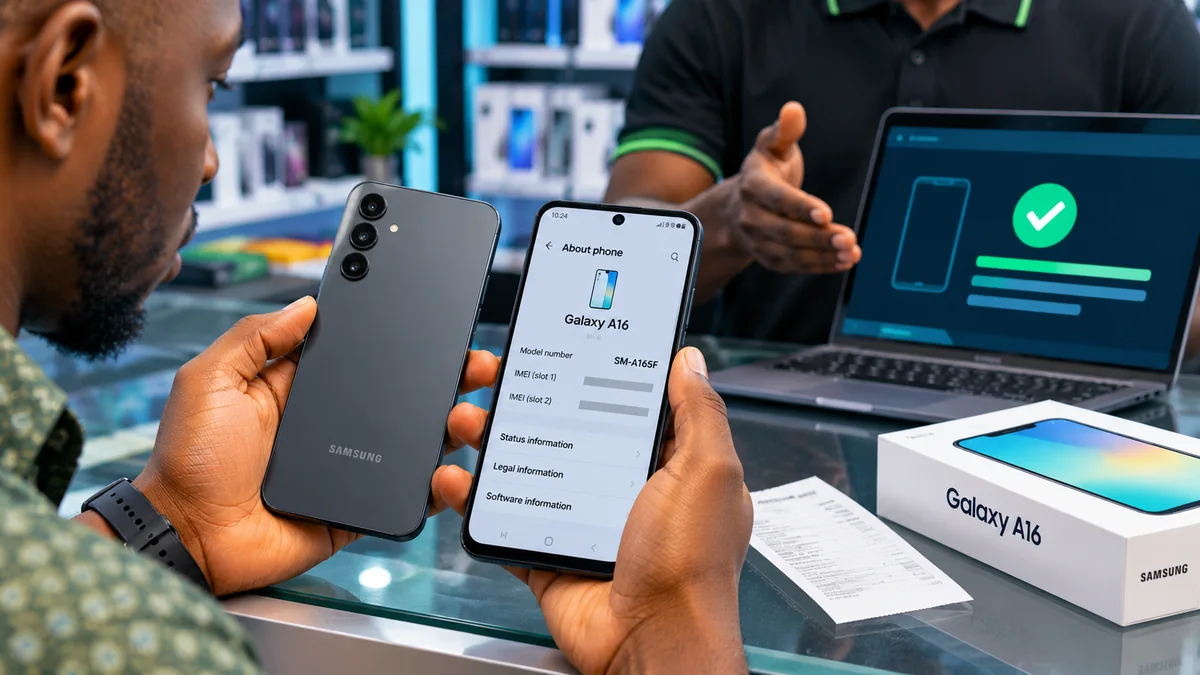
How to Verify a Genuine Samsung A16 in Nigeria
Two phones can carry the same “Samsung Galaxy A16” name, similar packaging and an almost identical camera design, yet have different network capabilities—or, in the worst case, one may be counterfeit. For Nigerian buyers, the safest way to check a Samsung A16 is not to trust a sticker, a cheap price or one IMEI lookup.
Before paying, compare the phone's model code and IMEI with its packaging, check its status through the Nigerian Communications Commission (NCC) Device Checker, examine Samsung software and hardware, and confirm warranty details with Samsung or an authorised service centre. Each step answers a different question; no single test guarantees every part of a device is original.
This guide covers both the Samsung Galaxy A16 4G/LTE and the Galaxy A16 5G, including refurbished and imported units. It draws on official Samsung Africa product information and the NCC's device-verification guidance, including requirements strengthened in October 2026. Research verified: 11 November 2026.
Quick checklist: how to check whether a Samsung A16 is genuine
| Check | What to do | What the result actually means |
|---|---|---|
| Model | Open Settings > About phone; compare with the box and official model listing | Checks the claimed model, but a counterfeit interface can imitate text |
| IMEI | Dial *#06# and compare with About phone and the package | Identifies inconsistencies; a matching number is not final proof |
| NCC | Dial *315# or use NCC Device Checker | Checks type-approval and device-verification status for Nigerian networks |
| Samsung software | Check One UI, software updates and Samsung Members | Helps detect unsupported or suspicious software, not a standalone certificate |
| Hardware | Test display, cameras, fingerprint sensor, SIM, mobile network and charging | Reveals faults or mismatches; it cannot prove a component's origin |
| Warranty and seller | Request a receipt and seek Samsung confirmation for the specific serial/model | Helps establish support eligibility and seller accountability |
1. Know which Samsung Galaxy A16 you are actually buying
“Samsung A16” is not precise enough. The Galaxy A16 family includes a 4G/LTE version and a 5G version. A genuine A16 4G will not acquire 5G capability because a seller calls it “5G enabled”. Conversely, a 5G model may use 4G service where 5G coverage, a suitable SIM or the necessary network configuration is unavailable.
In the NCC's approved-handsets listing , the model identifiers include Samsung Galaxy A16 LTE — SM-A165F and Samsung Galaxy A16 5G — SM-A166P. Samsung Africa separately publishes Galaxy A16 4G product information and Galaxy A16 5G product information .
Model codes can contain additional characters for storage, colour, country and sales configuration. The examples above are model-family identifiers, not a claim that every genuine A16 in the world has the identical complete sales code. Some legitimate imports may have regional variants; those require extra support and network-compatibility checks.
| Specification | Galaxy A16 LTE/4G | Galaxy A16 5G |
|---|---|---|
| Example NCC-listed model family | SM-A165F | SM-A166P |
| Mobile network | Up to 4G LTE | 5G capable, subject to network availability |
| Display on Samsung Africa listings | 6.7-inch FHD+ Super AMOLED | 6.7-inch FHD+ Super AMOLED |
| Rear camera listing | 50MP + 5MP + 2MP | 50MP + 5MP + 2MP |
| Front camera | 13MP | 13MP |
| Typical battery capacity | 5,000mAh | 5,000mAh |
| Memory and storage | Depends on exact configuration | Depends on exact configuration |
These are reference specifications, not an exhaustive specification sheet. Product features and connectivity can vary by region and variant; confirm the precise code you are offered on Samsung's website before rejecting a phone solely because it has a different RAM or colour option.
2. Check the model, serial number and IMEI directly on the device
Ask the seller to turn on the exact unit you intend to purchase—not a demonstration handset while a different sealed box is delivered later. Go to Settings > About phone. Samsung says that page shows the model number, serial number and device IMEI details, depending on the software version.
Next, open the phone dialler and enter *#06#. The phone should display its IMEI number or numbers. According to Samsung's official identification guide , IMEI information can also appear on the original packaging.
Compare the identifiers carefully. A dual-SIM model can have more than one IMEI, so two different numbers on the same handset do not automatically mean it is fake. Compare the labelled IMEI for each SIM identity where available, rather than assuming every number must be identical.
A mismatch between the handset and the claimed original box is a reason to stop and investigate. It may reflect a repackaged, repaired or switched product, or another issue. Yet a matching IMEI is only a consistency check: the NCC warns that criminals can clone an IMEI from a real device. Never publish your full IMEI in a product review or send it to an unverified “verification agent”.
3. Use the NCC Device Checker before paying
This is particularly important for a phone being sold in Nigeria in 2026. The Nigerian Communications Commission's official Device Checker FAQ explains that strengthened device-verification requirements took effect from 7 October 2026.
NCC says consumers can check a SIM-enabled device by dialling *315#, visiting www.ncc.gov.ng/DeviceChecker , or contacting its official help channels. For another phone, the checker may request the 15-digit IMEI.
Before completing the sale:
- Get the IMEI from the actual A16 using
*#06#. - Open the official NCC checker yourself or follow its published USSD instructions.
- Check that the result identifies the relevant model and indicates the required Type Approval and verification for Nigerian networks.
- If the result says the device is unverified or requests additional action, ask the seller to clarify the problem before paying.
- If a device transfer or additional confirmation is required, use only the official procedure; never disclose an OTP to a shop attendant or caller.
Important limitation: NCC explicitly says its service does not guarantee every component, repair history or seller statement. A device that is not yet verified is also not automatically confirmed counterfeit. Type Approval concerns a device model's compliance, while device verification concerns the particular equipment identity and network eligibility. Neither replaces manufacturer authentication or an inspection for damage and tampering.
4. Why an IMEI check alone cannot prove authenticity
An IMEI is an equipment identifier, not a tamper-proof certificate of genuine Samsung manufacture. The NCC defines a cloned device as one that replicates another legitimate device's IMEI, which means an apparently valid number can be misleading. The presence of 15 digits, a barcode or an “IMEI verified” message from an unknown website is insufficient.
Some internet tutorials advise entering an IMEI into random third-party databases and accepting any result labelled “Samsung A16” as conclusive proof. Be cautious: the database may be incomplete, may only resolve an associated model range or may harvest identifying information. Prefer official NCC and Samsung channels.
Nor do online claims about “secret Samsung codes” replace current model- and region-specific verification. Diagnostic menus may differ by firmware and carrier, and a phone failing to open a particular undocumented service code is not automatic proof of counterfeiting.
5. Check whether the phone runs expected Samsung software
After confirming the identifiers, inspect the interface. A genuine Galaxy A16 should operate with Samsung's supported Android and One UI software experience, subject to the phone's update history and region. Open Settings > About phone > Software information and review the software version. Try Settings > Software update > Download and install using a trusted connection.
Look for inconsistent menus, suspicious preinstalled applications, persistent errors or an interface that does not resemble current Samsung software for the claimed device. None is definitive alone: a real used handset may have a software fault or customised settings, and an imitation can mimic visual elements.
The manufacturer's own support service is the better escalation route. Samsung's Africa support website provides help, service information and a warranty checker. If the software and model details seem contradictory, request assessment through an authorised service centre instead of installing “Samsung authenticity” APKs from an unknown link.
6. Run Samsung Members and basic hardware tests
Samsung's Samsung Members Diagnostics guide explains how supported Galaxy users can open Samsung Members > Support > View tests > Test all to evaluate phone functions. Some devices also provide Settings > Device care > Diagnostics, as documented by Samsung's 2026 device-care instructions .
Before paying, with the seller's permission, test:
- Touchscreen responsiveness across the display and basic image quality.
- Front and rear cameras and their ability to record photos and video.
- Fingerprint sensor, buttons, microphone, speaker and earpiece.
- Wi-Fi, Bluetooth, charging port and safe charging behaviour.
- Mobile network registration using a properly working SIM, where possible.
- Battery condition, unexpected overheating and obvious charging issues.
A passed diagnostic test is evidence of functionality—not proof that every part is original or that the phone has never been repaired. A genuine refurbished device may use replacement components. Ask whether any display, battery or camera has been replaced and whether an authorised repair record exists.
7. Inspect the box, seller's receipt and physical condition
Examine the box for coherent model information, a clear label, sensible printing and matching product details. Look at the phone's fit and finish: gaps, damaged screws or trays, irregular buttons, loose parts and evidence of poor repairs deserve explanation. Compare its form and camera arrangement with official Samsung images of the same exact variant.
Do not rely on packaging alone. A genuine box can be reused to sell another phone, and a professional-looking counterfeit box can mislead buyers. A broken seal may mean the handset was inspected, activated, returned or repackaged; it does not prove counterfeit manufacture. Conversely, a new-looking seal does not establish that the device inside is factory-new.
Ask the seller to show the same phone being tested and then write a receipt specifying the model, agreed condition, transaction date, seller details and any warranty promises. Keep the receipt and original packaging. Avoid paying a large deposit to an unverified social-media account merely to “reserve” a supposedly limited A16 stock.
8. Verify Samsung warranty support—especially for imported phones
Samsung Africa's warranty information currently states a 24-month warranty period for mobile phones within the applicable warranty framework and requires relevant product information and proof of purchase when arranging service. That headline does not establish that every imported, used or privately resold phone automatically qualifies for 24 months of local coverage.
Ask the seller whether the device is supplied through authorised Nigerian channels, what warranty applies to the specific unit, when coverage began and how to make a claim. Samsung's support site links to a warranty checker; its authorised service-centre locator can help identify assistance for the model and region.
For a definitive answer on a particular device, contact Samsung using the official Africa contact page and provide the details it legitimately requests through the verified support process. Warranty eligibility and authenticity are related but different questions: a genuine foreign-market or used phone may have limited local warranty coverage.
9. How to check a fairly used or refurbished Samsung A16
Second-hand phones need an additional layer of checks. A genuine Samsung handset can still be stolen, blacklisted, damaged, locked to a previous account or misrepresented as “brand new”. Those issues may cause more practical trouble than an imperfect box.
Run the NCC verification check and ask about the device's ownership history. Confirm the seller can remove their own Samsung and Google accounts through the ordinary authorised process and that the phone can be lawfully reset and activated without requesting credentials from a former owner. Do not buy a device that requires you to bypass Factory Reset Protection (FRP) or use an unofficial unlocking service to defeat account ownership checks.
Inspect for display burn-in, abnormal touch areas, weak charging, poor battery endurance, camera damage and SIM registration problems. Ask whether the screen, battery or housing was replaced. A refurbished phone is not automatically counterfeit, but it should be advertised honestly and priced according to its actual condition.
If a seller will not let you test the device, confirm the IMEI or examine the return policy, consider purchasing elsewhere.
10. Beware of fake device-verification messages and websites
The 2026 NCC verification initiative has created another opportunity for phishing. An NCC cybersecurity advisory warns about fraudulent pages impersonating legitimate device-verification services and seeking personal information or codes.
Use the NCC's published *315# service or navigate to its official Device Checker link. The NCC also identifies its official verifymydevice.gov.ng service in its security guidance; follow only links provided on official NCC channels rather than domains that merely contain the words “verify my device”.
Never send a verification OTP to a vendor, online seller or supposed NCC agent. The NCC says any required code should be entered only in the official process. Do not pay a stranger to “clear” an IMEI or change a device's identity. Unauthorised IMEI alteration can undermine verification and is a warning sign.
11. Where should Nigerian buyers purchase the Samsung A16?
Buying from an established retailer or a Samsung-authorised channel provides stronger purchase documentation and a clearer path to support. Samsung maintains an authorised service-centre finder and has published Nigerian dealer lists. Because store partnerships change, verify a retailer's current status rather than assuming an old promotional list remains accurate.
If buying from an ordinary phone shop or online marketplace, make the sale conditional on the model and NCC checks, a functional demonstration, a proper receipt and an agreed return procedure. Compare prices from several trustworthy sellers, but avoid treating any single “market price” as definitive; storage options, 4G versus 5G, imports, condition and promotions can alter the price.
Affordability matters. FlyingEze has reported on the NCC's efforts to expand access to more affordable smartphones in Nigeria . Yet a low price is not proof that a phone is counterfeit; it is simply a reason to verify the product description, condition and seller carefully.
12. A 10-minute Samsung A16 verification routine
- Before entering the shop: decide whether you want the 4G or 5G model and open the correct Samsung Africa product page.
- Minutes 1–2: ask the seller to turn on the exact handset being sold; open Settings > About phone.
- Minute 3: dial
*#06#and compare the IMEI(s), serial and model information with the original box. - Minutes 4–5: check the device with NCC using
*315#or its official website; resolve any verification problem before payment. - Minutes 6–7: review Software information and inspect Samsung Members or Device care diagnostics if supported.
- Minutes 8–9: test cameras, screen, fingerprint, sound, charging and network functions.
- Minute 10: inspect the receipt, return arrangement, claimed condition and specific Samsung warranty status.
Ten minutes is an illustrative target, not a guarantee that each check can be completed in that period. A failed NCC verification or unclear serial, warranty or ownership history may require more time or professional assistance. If the seller pressures you to pay before checking, stop.
What if the Samsung A16 fails one of these checks?
| Issue | What it could mean | Next action |
|---|---|---|
| Model on phone differs from the advertised version | Wrong variant, switched device or misrepresentation | Clarify exact variant and do not pay the advertised price for a different model |
| IMEI differs from the box | Box and device may not belong together, or another issue | Request Samsung-authorised clarification |
| NCC checker says unverified | Incomplete verification; not automatic proof of a fake | Ask seller to resolve it and consult NCC if necessary |
| Samsung Members cannot complete a test | Software, account, hardware or compatibility problem | Try official support; don't label counterfeit on one symptom |
| No receipt or unclear warranty promise | Weak consumer protection or uncertain service entitlement | Seek documented terms or a different seller |
| Phone asks for someone else's account after reset | Ownership/FRP issue | Do not bypass; have original owner resolve it legitimately |
If you have already paid and suspect a counterfeit or misrepresented handset, preserve the receipt, product listing, seller messages, box and photographs of the device details, but protect your full IMEI and other identifiers from public posting. Contact the seller promptly in writing, request an inspection or refund under the applicable sale terms, and escalate to Samsung support or the NCC where appropriate. A failed check is evidence to investigate, not automatically a conclusion of criminal fraud.
Frequently asked questions
How do I check whether my Samsung A16 is original in Nigeria?
Check the model number under Settings > About phone, compare the IMEI obtained using *#06# with the box, run the NCC Device Checker using *315#, inspect Samsung software and hardware, and verify warranty and service support through Samsung. No single step is conclusive.
What is the difference between Samsung A16 4G and A16 5G?
The main distinction is 5G network support. The NCC lists A16 LTE model SM-A165F and A16 5G model SM-A166P. Actual sales codes and memory configurations vary; check the full model offered.
Does a valid IMEI mean my Samsung A16 is genuine?
No. The NCC warns that IMEIs can be cloned. A number that looks valid or matches a label is one useful check, but it cannot establish genuine manufacture, component history or warranty entitlement by itself.
What is the NCC code for checking a phone in Nigeria?
The official Device Checker can be accessed through *315# or the NCC's verified website . Its stated strengthened device-verification process took effect on 7 October 2026.
Will Samsung Members prove the phone is original?
Not by itself. Samsung Members Diagnostics helps assess supported phone components and software functions. It does not guarantee an untouched original device or replace Samsung service-centre examination.
Is an imported Samsung A16 automatically fake?
No. A genuine imported or refurbished handset may have different regional software, network or warranty conditions. Ask about the exact model, NCC compliance and whether Samsung will service it locally.
Does Samsung give a two-year warranty for the A16?
Samsung Africa lists a 24-month mobile-phone warranty within its published warranty terms. Eligibility for any specific A16 depends on its region, purchase history, proof of purchase and applicable conditions. Verify with Samsung rather than assuming all used or imported phones qualify.
Conclusion
Verifying a genuine Samsung A16 in Nigeria requires several independent checks. Start with the exact 4G or 5G model, compare the phone's identifiers and use the official NCC Device Checker. Then evaluate Samsung software, hardware, purchase documentation and warranty support.
The crucial lesson is that a matching IMEI does not prove authenticity, NCC approval does not confirm every component, and a missing local warranty does not automatically mean a phone is counterfeit. Buyers who insist on documented, consistent results before payment are better positioned to avoid cloned, faulty, misrepresented or unsupported devices.