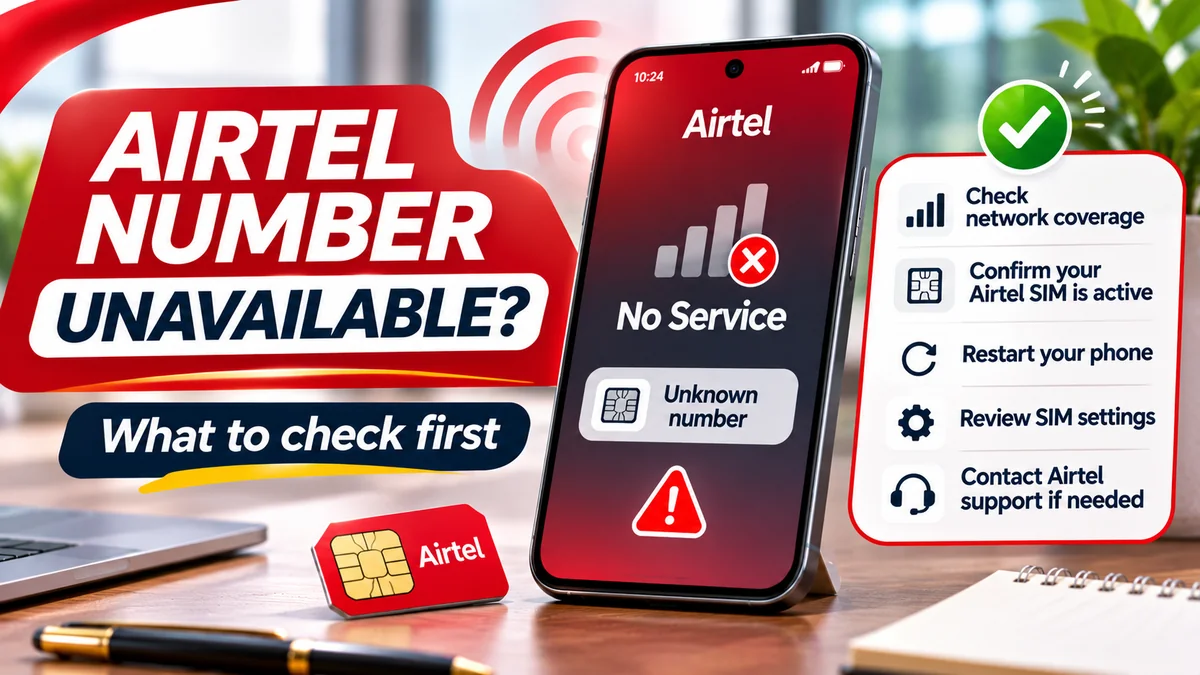
Your Airtel number may be temporarily unavailable because the phone has lost network service, the SIM or eSIM is disabled, the line is barred for a registration or inactivity issue, or the device cannot read the SIM correctly. Sometimes the number itself is working normally but appears as “Unknown” in Android or iPhone settings. These situations are different, so the correct fix depends on the actual symptom—not simply on the fact that a number is missing from the screen.
If you are searching “how can I know Airtel number”, start with the official Airtel Nigeria number-check method when the line has network service: dial *121#, select Manage my Account, then My number. Airtel publishes this procedure in its official FAQ . But if your SIM says No Service, cannot make calls or has been barred, you may need to restore the underlying service before the menu can respond.
This guide explains the most important reasons for temporary unavailability, the difference between a missing display and an unavailable subscription, what Nigerian rules say about inactivity, and when to contact Airtel urgently. It does not claim that an Airtel network outage is occurring at your location. Fact-check date: 16 November 2026.
First, identify what “Airtel number unavailable” actually means
The words unavailable, inactive and Unknown are often used interchangeably, but they can point to very different problems.
| What you see or experience | What it may mean | What to check first |
|---|---|---|
| “Unknown” in About phone or My Number | No valid number stored or displayed locally | Carrier registration, then Airtel *121# |
| “No SIM” or “SIM not detected” | Device cannot read the physical card or find an active SIM profile | SIM installation, device settings and card condition |
| “No Service” or “Searching” | Not connected to the mobile network | Coverage, Airplane Mode, enabled line and account status |
| Caller hears “not reachable” | Line may lack service, be restricted or be temporarily inaccessible | Try outgoing service and compare another Airtel phone nearby |
| Calls or USSD restricted but signal is present | Possible account bar, service restriction or SIM security lock | NIN registration, activity history, SIM PIN/PUK and Airtel support |
| Old number stopped working after months unused | Possible partial barring or eventual number churning | Contact Airtel promptly about the number's current status |
Not all these conditions are temporary. For example, a number that has already been withdrawn and reassigned to a new subscriber is fundamentally different from a handset that briefly loses signal. The network operator must confirm whether a specific number is recoverable.
1. The number is only missing from the phone's settings
Many people discover this problem while checking Settings → About phone on Android or My Number on iPhone. They expect to see the assigned telephone number but find a blank field or the word Unknown. A missing display is not proof that Airtel has deactivated the line.
Some phones obtain the displayed number from information stored on the SIM or in the device. That information may be absent or out of date even when the line successfully registers and receives calls. A number shown in settings can also be stale, particularly after a SIM or eSIM change. The stronger check is a response from the active carrier or a controlled call to a phone you own.
If the Airtel line is connected, dial *121# using that specific SIM and follow Airtel's published route. For more device-specific instructions, FlyingEze's published guide to checking an Airtel number on Android or iPhone explains the alternatives. The present article focuses on why a number may be inaccessible and what to do about it.
2. Temporary network loss, weak coverage or a local service fault
If your phone displays No Service, your device is not connected to the expected cellular network. Apple's No Service and Searching support guide explains this distinction and advises checking Airplane Mode, restarting and contacting the operator about outages or account restrictions.
A temporary interruption can occur because of local coverage conditions, network maintenance or a service fault. Moving indoors, into an underground area or away from strong signal may also affect reception. However, you should not automatically attribute every problem to a general Airtel outage.
Try an ordinary, reversible sequence:
- Check the signal bars and the network name; note whether the phone actually shows Airtel.
- Move to an area where you usually obtain coverage.
- Turn Airplane Mode on briefly, then off. Apple recommends keeping it on for at least 15 seconds as a reconnection step on iPhone.
- Restart the handset once.
- Ask another Airtel user nearby whether their service is also affected, without assuming a neighbour's experience proves a network-wide outage.
- If the problem persists, contact Airtel to ask whether there is a confirmed service issue or a restriction on your subscription.
An intermittent network fault does not ordinarily change the number assigned to your account. Once service is restored, you can try the official own-number menu again.
3. Airtel is switched off in a dual-SIM phone
A phone can contain two installed SIMs while only one is enabled. You might be using another operator for internet data and mistakenly conclude that your Airtel number has disappeared. On a dual-SIM handset, SIM 1 and SIM 2 are positions or device labels, not proofs of which operator or number is active.
For Samsung Galaxy, check Settings → Connections → SIM manager and find the Airtel line. For Google Pixel, Google's mobile connectivity guidance points to Settings → Network & internet → SIMs and the Use SIM switch. On iPhone, Apple advises opening Settings → Cellular, selecting the intended plan and checking Turn On This Line.
If Airtel is disabled, enable it and give the device an opportunity to register. Then check its carrier status before trying USSD. The SIM selected for mobile data may be different from the line selected for voice calls, so inspect those preferences separately instead of using the internet connection as proof that Airtel is connected.
Do not delete an eSIM or reset every network setting just because a line is turned off. A simple enable switch may resolve the issue.
4. Your SIM–NIN verification or registration has a problem
In Nigeria, a mobile subscription can be restricted because of SIM registration or National Identification Number (NIN) verification problems. The NCC's SIM–NIN linkage FAQ states that a line can be barred where the required linkage has not been completed or where registration KYC information does not match the NIN details.
The same NCC guidance identifies *996# as a harmonised SIM–NIN service route and says an affected subscriber whose verification fails should visit the service provider's outlet to correct the problem. Airtel's own FAQ also notes that confirmation of successful validation may arrive by SMS.
A restriction is not necessarily a permanent loss of the number. But its resolution depends on the exact issue and the operator's identity-verification process, not on restarting the phone repeatedly.
What to do: If the Airtel SIM still supports the required network service, review any legitimate operator messages and available NIN-status options. If the line is barred, use Airtel's official customer care or an authorised outlet and ask what records or identity steps are required. Do not enter your NIN, passwords or banking OTPs into an unsolicited “reactivation” link from social media or a stranger.
5. Long inactivity may lead to partial barring or number churning
This is one of the most important explanations for a number that worked months ago but no longer behaves normally. The NCC's 30 July 2026 guide to churned lines describes a two-stage inactivity risk under its Quality of Service business rules:
- After six months without a qualifying revenue-generating event, a consumer line may be partially barred; the NCC describes a period in which incoming calls may remain available.
- After a further six months of inactivity—twelve months in total—the operator may withdraw or churn the number, potentially making it available for reassignment to a new subscriber.
The word may matters. These are regulatory milestones and possibilities, not a real-time diagnosis of your specific Airtel account. Airtel's prepaid user guide also advises periodic qualifying use, including calls, SMS or airtime recharge. The NCC's newer guidance should be consulted for the wider rules governing partial barring and churning.
If your number has been unused for many months, contact Airtel promptly to establish whether it is still assigned to you, temporarily restricted or already withdrawn. Do not assume a recharge will automatically restore a churned number. If the number has already been allocated to someone else, recovery may not be possible.
How to protect a number during a long absence
Airtel's FAQ lists its Keep My Number service with the *494# entry point. The NCC also explains line parking as a means of preserving an assigned number during extended non-use.
Check Airtel's current eligibility, price, duration and activation terms before relying on a retention service, especially if you are already barred or abroad. Number parking is a preventive measure; it is not a promise that an already-reassigned number can be reclaimed.
6. A SIM PIN or PUK lock stops the card from working
A SIM PIN is a security mechanism on the card, separate from your phone's screen-lock passcode and from an Airtel account restriction. Airtel's prepaid guide warns that repeated incorrect SIM PIN attempts can trigger a PUK requirement.
If the phone says SIM locked, Enter PUK or a similar message, deal with that specific lock rather than repeatedly dialling the number-check code. The PUK may be available on the original SIM packaging or through the operator after ownership verification.
Never guess a PUK repeatedly. Incorrect PUK attempts can render a SIM unusable, potentially requiring a replacement. Likewise, do not send PIN or PUK information to someone promising instant activation on WhatsApp. Ask Airtel's official team for the appropriate procedure.
This situation differs from a carrier-level NIN bar. Unlocking a physical SIM does not itself resolve a registration restriction, and clearing a registration problem does not automatically unlock a card that is asking for its PUK.
7. The physical SIM is damaged or the eSIM profile has a problem
If the phone says No SIM rather than No Service, the device might not be detecting the card at all. Samsung's September 2026 SIM troubleshooting update identifies possible causes including temporary software errors, an incorrectly inserted SIM, card damage and network settings.
After switching off the handset, a physical SIM can be inspected and reinserted according to the device manufacturer's instructions. Do not bend the contacts, cut the card or insert it into an incompatible tray. If the card is visibly damaged or fails in a known-working compatible device, the operator may need to replace it.
With an eSIM, the profile can be disabled or missing without any plastic card being damaged. Airtel's official eSIM guide explains that changing devices may involve a new authorised SIM swap or eSIM provisioning process.
Do not erase your Airtel eSIM as an initial troubleshooting step. Removing the profile can make it harder to reconnect until the carrier issues the required replacement details. Record the exact error and contact Airtel for guidance if the eSIM profile has disappeared.
8. Roaming, account-service restrictions or a wrong network selection
Travelling outside Nigeria can make a previously working Airtel line appear unavailable if the phone has not registered with a supported roaming partner or the required roaming service is not available. Airtel's service guide tells customers to contact their provider about international roaming availability and tariffs.
If you are abroad, confirm that roaming is supported for your plan and country, and review the selected network and roaming settings. Avoid switching on data roaming without considering possible charges. An activated eSIM or a stored number in settings does not prove the account can currently roam.
In Nigeria, restricted outgoing service can also be confused with full line deactivation. For example, insufficient airtime may prevent an ordinary chargeable call without causing the telephone number to vanish or the device to lose network registration. Check the displayed status and ask the operator what service, if any, is barred rather than assuming every failed call means the whole account has been closed.
9. Unexpected service loss can occasionally be a security warning
Most connectivity problems do not imply fraud. But if an Airtel SIM suddenly stops receiving service at the same time as unexplained password-reset alerts, bank security notifications or messages about a replacement you did not request, consider the possibility of an unauthorised SIM swap.
The NCC's August 2026 TIRMS explanation notes that swapped, churned and reassigned numbers can create identity and account-security risks. The NCC advises subscribers to contact telecom operators and financial providers about suspicious activity and to protect OTPs, passwords and other credentials.
In that situation, use a different trusted phone or internet connection to contact Airtel through independently verified details. Ask whether the number has undergone a replacement or account change. Notify any bank or wallet linked to the number, especially if there are unusual transactions or lost access to SMS verification.
For more detail on the risks, FlyingEze's published SIM-swap fraud and mobile-banking explainer covers how number control can be abused in account recovery. Do not treat a network outage alone as proof of a fraudulent swap.
A safe, ordered troubleshooting checklist
Use this sequence to separate device issues from account problems without making destructive changes:
- Record the precise symptom. Is the number hidden in settings, the SIM missing, the network unavailable, the USSD menu failing or only incoming calls affected?
- Check the selected line. On dual-SIM phones, confirm Airtel is enabled and that you are not testing the other operator.
- Check basic connectivity. Move to an area with known coverage, turn Airplane Mode off and restart once.
- Check SIM status. Look for the Airtel network name, an active eSIM profile or a SIM PIN/PUK request. Do not erase an eSIM.
- Try official number retrieval only when connected. Dial
*121#on Airtel and select Manage my Account → My number. - Review registration and use history. If the line may have been inactive for months or NIN verification failed, contact Airtel for the actual status.
- Investigate warning signs of fraud. Treat unexplained account or bank activity as urgent; use trusted channels from another device.
- Escalate persistent problems. Obtain a support reference number and follow the operator's authorised process.
A factory reset is not an ordinary first step for an unavailable number. It can erase valuable information without correcting carrier restrictions, lost number ownership or an unregistered subscription. Network-setting resets should also be considered only after reviewing their effect on saved device connections.
How to retrieve your Airtel number after service returns
Once Airtel is registering on its network and the line can use USSD, open your dialler, make sure the outgoing selection is Airtel, then enter *121#. Follow Manage my Account → My number. Menus can change; rely on the text shown rather than an old numbered option.
If the result is confusing, you can place a short call to a second phone under your control or review the number on an already authenticated account. Standard call or SMS charges can apply. Remember that the number shown under Android About phone or iPhone My Number may be a locally stored value and therefore worth confirming independently.
Once confirmed, save the number in a secure contact entry, with the correct network label. For a dual-SIM phone, separately check default voice, SMS and mobile-data choices. If you must update banking, employer or scholarship records, first verify that the number remains registered to you.
How to contact Airtel Nigeria about a restricted or unreachable line
Airtel's official contact page lists:
- 300 from an Airtel line.
- +234 802 150 0300 and +234 802 152 0800 for customers using another network or calling from abroad.
- customercare@ng.airtel.com for customer enquiries.
- Airtel's official shops and service centres for identity checks or SIM replacement.
Tell the agent exactly when the number last worked, what appears on the screen, whether other Airtel customers have service in the same location, whether the SIM is physical or embedded, and whether NIN verification or months of inactivity may be relevant. Ask whether your number is active, partially barred, fully barred, churned or reassigned; only the operator can confirm your account's actual status.
Keep a complaint reference if supplied. The NCC's consumer portal says unresolved telecommunications complaints can be escalated after contacting the provider; it also lists 622 as its toll-free consumer complaint channel. That regulator route is not a substitute for urgent reporting to Airtel and your bank when you suspect fraud.
How to reduce the risk of losing an Airtel number again
Keep the account's registration information correct, secure the SIM, and make occasional qualifying use if it is a line you intend to retain. For a line that will be unused during extended travel, investigate Airtel's Keep My Number service or another authorised retention arrangement before the inactivity period becomes a problem.
Do not leave a number linked to banking, email or messaging accounts indefinitely if you no longer control it. The NCC warns that a churned number can be assigned to someone else, exposing the previous subscriber to lost account-recovery messages and potential privacy risks. Use official account settings to replace an obsolete recovery number and stronger authentication methods where supported.
Protect OTPs, PUK details and identity documents. If a stranger sends an urgent “Airtel reactivation” link, verify the request directly with Airtel instead of submitting personal or banking credentials.
Frequently asked questions
Why is my Airtel number temporarily unavailable?
Possible reasons include poor cellular coverage, a phone or SIM setting, a card-detection problem, SIM PIN/PUK locking, account restrictions, failed NIN verification or prolonged inactivity. The exact reason depends on the symptom; a number missing from settings does not necessarily mean the account is disconnected.
How can I know my Airtel number if it shows Unknown?
If the SIM is active and connected, dial *121#, select Manage my Account and then My number. This is Airtel Nigeria's officially documented method. If it does not work because there is no cellular service, address the service problem first or contact Airtel.
Does No Service mean my Airtel SIM has been blocked?
No. A loss of network coverage, disabled line, device issue or account restriction can all contribute. Apple and Samsung recommend checking basic connectivity and SIM status before asking the carrier about a bar or outage.
Can Airtel suspend a SIM because my NIN details do not match?
Yes, registration and verification mismatches can lead to barring under the NCC's SIM–NIN guidance. Affected subscribers should use the operator's authorised correction process. Avoid sending personal documents to unknown agents.
How long can a Nigerian SIM stay inactive before I risk losing the number?
The NCC's July 2026 explanation says a number may be partially barred after six months without qualifying activity and may be churned after twelve months of inactivity. Individual account status and any valid retention service must be confirmed with the operator.
Will recharging airtime restore a churned Airtel number?
Do not assume so. A temporarily restricted subscription and a number already withdrawn or reassigned are different states. Ask Airtel whether you still own the number and which recovery options, if any, apply.
Can I recover an Airtel number if the SIM card is damaged?
Airtel may offer an authorised replacement subject to account ownership and current registration requirements. The old physical SIM being damaged does not by itself prove the subscriber number has been lost. Use an official service centre.
Should I delete an Airtel eSIM when the number becomes unavailable?
No. First check that the Airtel plan is enabled and connected, then contact Airtel if the profile is missing or restricted. Removing the profile may require new activation credentials or a carrier-assisted swap.
How do I report an Airtel line that still does not work?
Contact Airtel on 300 or the alternative official contact numbers, describe the problem and retain any complaint reference. If the operator does not resolve the matter, the NCC lists 622 and its consumer portal for escalation.
Conclusion: identify the status before trying to recover the number
An Airtel phone number that is temporarily unavailable may simply be hidden in device settings, affected by short-term connectivity trouble, or disconnected because of an account problem. More serious cases include registration-related barring, extended inactivity and eventual reassignment. Those conditions should not be treated as interchangeable.
Start with safe checks: confirm the correct Airtel SIM, inspect network status, restart only when appropriate and use *121# if the line is connected. If the number has been inactive for months, is barred or may have been replaced without your permission, contact Airtel promptly and protect any accounts linked to that number. The sooner you identify the true status, the better informed your next step will be.