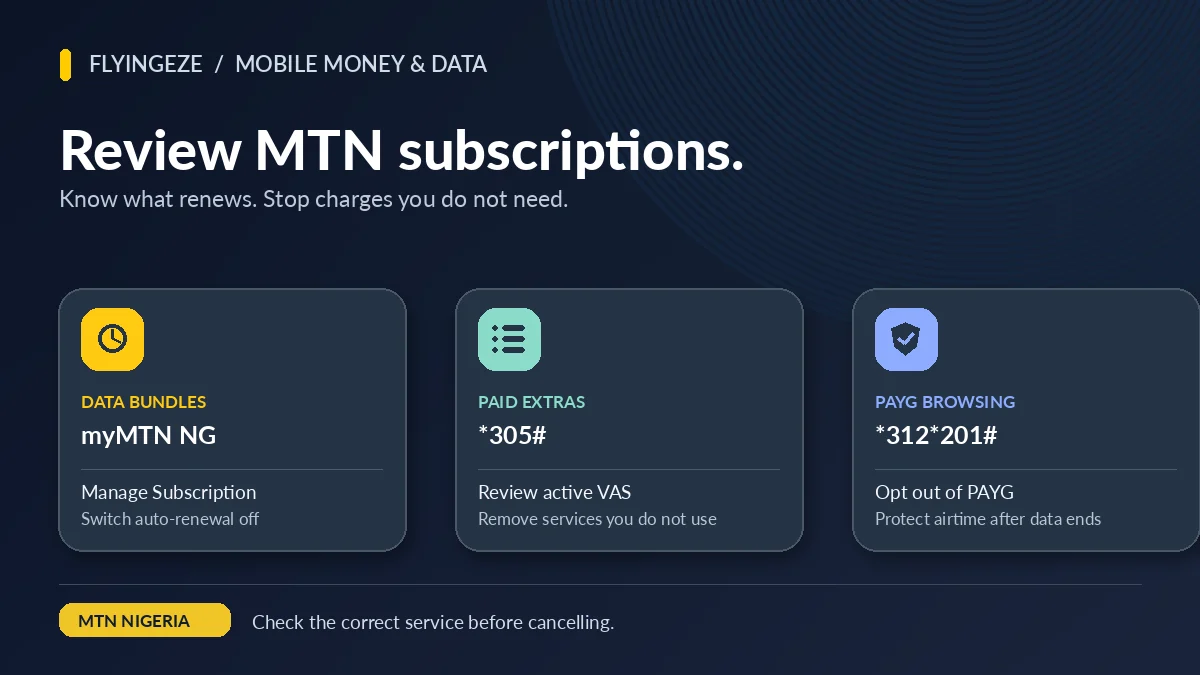
To review active MTN subscriptions and reduce recurring airtime deductions in Nigeria, check three different things: data-bundle renewals in myMTN NG, paid value-added services (VAS) through *305#, and pay-as-you-go (PAYG) browsing settings through MTN's data controls. These are separate services. Cancelling a data bundle will not automatically remove a paid news alert, and unsubscribing from a music service will not disable a recurring monthly data purchase.
If you searched how to cancel auto renewal on MTN, you may have noticed airtime disappearing after recharge, a new bundle starting without a manual purchase, or SMS confirmations about a service you no longer use. The best response is not to try every cancellation code found online: it is to identify the actual charge, use the relevant official menu and verify that the change took effect.
This guide provides an MTN subscription audit you can complete from your phone, explains the official service codes and shows how to document a disputed charge. Information verified on 13 November 2026 against MTN Nigeria and the Nigerian Communications Commission (NCC). Menus, bundle codes and individual offers may change, so check your own plan and the current confirmation screen before acting.
Quick reference: which MTN subscription do you want to manage?
| What you notice | Where to check | What the option actually manages |
|---|---|---|
| A daily, weekly or monthly data bundle renews | myMTN NG → Manage Subscription; or NO + exact bundle code to 312 | Future purchases of that particular data bundle |
| Music, football, gaming, news or similar paid extras | Dial *305# → Active Services | Chargeable value-added services, not standard data plans |
| Airtime reduces while browsing after data expires | Dial *312*201# or send SUSPEND to 312 | Opting out of MTN PAYG browsing |
| Recurring social-media data bundle | Specific social-bundle opt-out code, often to 312 | Social plan only; not all subscriptions |
| Recurring mPulse education bundle | mPulse plan-specific opt-out keyword to 344 | Education bundle only |
| Automatic data transfers to beneficiaries | MTN Data Gifting → Manage Beneficiary → Stop auto transfer | Scheduled transfers, not the sender's ordinary data renewal |
| Too many promotional texts | STOP to 2442 for full DND | Marketing messages; it does not cancel existing paid subscriptions |
MTN documents *305# for value-added services in its official VAS help page . Its Data Bundles FAQ separately lists data cancellation and PAYG controls. The NCC explicitly distinguishes *305# from the 2442 Do-Not-Disturb service in its March 2026 consumer guide .
Step 1: establish whether the money went to data, calls or a subscription
Start with evidence. Open myMTN NG and examine any transaction history or usage information available for the correct number. MTN's Manage Data FAQ recommends reviewing transaction history or usage in the app when customers report unexpected deductions; it also recommends customer care or the Zigi assistant when the cause remains unclear.
Next, check the SMS inbox for purchase confirmations, renewal notices and cancellation acknowledgements. Compare the date, time and amount of a deduction with any data bundle, value-added service or other transaction. For example, if airtime decreases at the exact time a monthly bundle expires and a fresh bundle appears, a renewal may explain it. If a small amount disappears at a separate interval and you receive a daily news alert, a VAS subscription may be involved.
Use *310# to inspect the available airtime balance and *323*4#, or SMS 2 to 323, to inspect data bundles and validity. Record balances before and after a suspected event. A balance difference by itself does not prove an unauthorised charge: phone calls, ordinary SMS, browsing, eligible plan access fees and other services can also affect the available amount.
For a clearer audit, keep a simple record: charge date, amount, suspected service, next renewal date, action taken and confirmation. This prevents a cancellation of one service from being confused with a later deduction caused by another.
Step 2: view and cancel active MTN value-added services with *305#
MTN's *305# menu is specifically for value-added services (VAS), such as gaming, music, news and information, football and other paid extras. According to MTN's VAS menu overview , customers can view their active services and deactivate those they no longer want.
- Dial
*305#on the MTN SIM you want to review. - Choose Active Services. Read the service names that appear.
- Identify which ones you recognise and still want to keep.
- Follow the menu's cancellation instructions for an unwanted entry; MTN says you can remove an individual service or select Cancel All.
- Wait for an acknowledgement and repeat the Active Services check to see whether the unwanted entry remains.
If there are no active VAS entries, MTN says the menu can return a message stating that the customer has no active service. That is useful information, but it is not evidence that all data bundles, airtime charges or other subscription arrangements are disabled. The VAS list is only one part of the overall audit.
Be careful with Cancel All. It is appropriate if you truly want to remove every listed value-added service, but not if you still use a paid feature. Review names before confirming rather than assuming every service is accidental.
Step 3: inspect data auto-renewal in the myMTN NG app
MTN's Data Autorenewal page describes a dedicated control for recurring data-bundle purchases in the myMTN NG app. Open the app using the correct MTN number, tap Manage Subscription, select the relevant active data bundle, and switch the auto-renewal option off.
After the switch is changed, reopen the bundle details to verify the setting. If the app asks for confirmation, complete it and save the success notification. An app screen that has merely displayed a button is not proof that the setting was saved. If you manage more than one MTN line, check that the app is signed into the SIM from which the airtime was deducted.
A recurring bundle is different from a One-off Purchase. MTN says an auto-renewing plan repurchases itself when validity expires and funding requirements are met, whereas a one-off plan does not automatically repurchase, even when prepaid airtime remains. You can continue using the current bundle under its normal validity after disabling renewal; the cancellation concerns the next purchase.
If your line has several bundles, do not stop after checking only one. MTN says separate daily, weekly and monthly categories can renew according to their own schedules, while the latest purchase in the same category normally determines which plan renews in that category. A cancellation that succeeds for one bundle does not guarantee that another recurring plan has been disabled.
Step 4: use the correct SMS code if you cannot access the app
For ordinary MTN data bundles, the official cancellation instruction is to send NO followed immediately by the correct bundle code to 312. The code varies by product: do not guess the bundle code from its price and do not type a literal plus sign when MTN writes NO+bundle code as a format.
For instance, if a fictional plan had activation code XYZ, the illustrative cancellation text would be NOXYZ to 312. This is a format example, not a real MTN cancellation code. Obtain the actual code from the purchase SMS, official product table, myMTN subscription details or customer care.
Check the reply for the specific service and number. A failed or unacknowledged SMS should not be treated as successful cancellation. If you cannot locate the correct plan or the message is rejected, seek assistance from MTN rather than sending many random commands.
When buying future data, select One-off Purchase through the official *312*1# data-menu flow if you do not want another recurring bundle. That selection governs the new purchase; it should not be mistaken for an all-account cancellation tool.
Step 5: check social and education plans that use special cancellation instructions
Some MTN subscriptions have different rules from ordinary data access plans. MTN's Social Bundles FAQ lists plan-specific cancellation keywords. Its table includes examples such as STOPWAD to 312 for a daily WhatsApp bundle and NOASD to 312 for All Social Daily. The current plan name and validity need to match the selected code.
MTN mPulse education bundles can use 344 instead of 312. MTN's published education-bundle example is NO353 to 344 for the specified monthly education bundle. That example should not be applied to a different education or social plan merely because the plan price looks familiar.
For accounts connected to children, mPulse's parent–child gifting arrangements are another distinct source of recurring spending. The appropriate management controls are in the parent–child or related mPulse menu, not necessarily in ordinary data auto-renewal. An unrecognised school-related deduction deserves a careful plan check before you disable useful services on another line.
Step 6: stop pay-as-you-go browsing from using airtime after data ends
PAYG browsing is not a recurring data purchase. MTN's Data Bundles FAQ explains that an opted-in customer may continue browsing from airtime after bundled data is exhausted. That can produce a charge even when all recurring bundle renewals have already been disabled.
MTN lists two official ways to opt out of ordinary PAYG browsing: dial *312*201#, or send SUSPEND to 312. Its opt-in commands are different: *312*200# or RESET to 312. Do not confuse opt-in with opt-out.
If you cancel PAYG, monitor the airtime balance and confirm the network response. Stopping PAYG does not necessarily cancel a data bundle's auto-renewal, a paid news subscription or a separate family-gifting arrangement. Likewise, switching a plan to one-off does not always change a previously chosen PAYG preference.
When a customer is still connected to Wi-Fi but sees what appears to be mobile-data usage, check whether the phone has automatically switched to cellular data. Device background updates, cloud backups, autoplay video and hotspots can use data quickly. MTN's usage guidance recommends inspecting app activity instead of assuming every depletion is a recurring payment.
Step 7: review automatic data gifting and transfers
Some customers have set up recurring data transfers to friends or family. MTN's Data Gifting FAQ describes an Automate Transfer function with weekly or monthly frequency and a beneficiary list. This may reduce an eligible data balance at intervals even though you did not buy an ordinary subscription for yourself each time.
MTN says you can inspect the gifting menu through *321*2# or its documented gifting options, open beneficiary management and choose Stop auto transfer to halt the automatic transfers. According to the FAQ, this stop instruction cancels automatic transfers for all beneficiaries rather than just one. Review your intended recipients and the actual wording before proceeding.
Gifting a new data bundle, transferring part of an existing balance and arranging an automated transfer are separate transactions. A recipient's data allowance is not a straightforward statement about which service charged the sender. FlyingEze's published MTN data-sharing troubleshooting guide explores the transfer side in more detail.
Do not confuse legitimate recurring gifts with a fraudulent transaction without first checking whether you created the arrangement. If you see an unfamiliar beneficiary, secure the relevant account and report the event to MTN.
Step 8: recognise other recurring services, such as CallerTunez
Not all chargeable subscriptions are data plans. Some are entertainment or content products, voice-related services or special offers. MTN's Mytunez help page , for instance, documents recurring caller-tune charges and gives service-specific unsubscribe options: text CANCEL or NO to 4100, or use the relevant caller-tune menu. These instructions apply to that service; they are not a universal cancellation code for MTN data.
Similarly, MTN's Keep My Number service has its own renewal management under *365#. Other voice products or account plans may have access charges or service conditions rather than ordinary recurring content subscriptions. Identifying the exact product is therefore the most reliable way to determine what to cancel.
If an unfamiliar deduction does not appear in *305# or the myMTN data subscription list, ask MTN to provide the service name, amount and billing basis. Avoid assuming that one menu covers every possible network charge.
Do Not Disturb does not cancel subscriptions: *305# vs 2442
The NCC's Do-Not-Disturb guide , published in March 2026, distinguishes two consumer controls that are often confused. The *305# service manages active VAS subscriptions. The 2442 short code manages unwanted promotional messages.
To activate full DND, the NCC says to text STOP to 2442. You can text STATUS to 2442 to check the current messaging preference. This can be useful if promotional messages are distracting or encourage unnecessary purchases.
However, DND should not be presented as a way to reverse a paid subscription or stop a recurring data bundle. It controls classes of marketing communications, not the original contract or activation of every service. If you receive fewer messages after enabling DND but airtime deductions continue, return to the appropriate billing and subscription tools.
Why airtime may still reduce after you cancel subscriptions
| What happens | Possible explanation | What to do |
|---|---|---|
| Data renewal is off but another data charge appears | A different bundle is still recurring, or the charge preceded cancellation | Review all data subscriptions and transaction times |
| VAS list is empty but airtime reduces | PAYG, calls, SMS, other bundles or product-specific charges | Check usage history and the correct service menu |
| PAYG disabled but data balance decreases rapidly | Data-intensive apps, streaming, hotspot use or backups | Inspect device and MTN usage records |
| Unexpected charge after recharge | A scheduled renewal or another billed service has become due | Compare the charge with the original subscription and confirmation |
| Unwanted SMS continues after cancellation | Promotional messages are separate from subscription charges | Consider DND via 2442 and report persistent problems |
| Recurring family data reduction | Automated gifting or parent–child arrangement | Inspect the applicable gifting menu and beneficiaries |
| App says off but a fee appears next month | Sync issue, different account, other plan or disputed billing | Save evidence and ask MTN for a traceable investigation |
The table lists possibilities, not definitive causes. A provider must examine its actual billing and subscription records to establish the reason for a disputed deduction.
How to tell if your cancellation really worked
Do not stop at pressing a button or sending a message. MTN's official VAS menu says it sends notifications after successful deactivation, while its data-management service provides a renewal toggle and relevant confirmations. The exact acknowledgement depends on the product.
- Check the correct MTN line. Dual-SIM phones and linked app accounts can cause confusion.
- Verify the service name. Make sure the cancellation refers to the precise VAS entry or data bundle.
- Save the confirmation. Keep the SMS or screenshot with date and time.
- Inspect the updated state. Reopen
*305#Active Services or the myMTN subscription setting as appropriate. - Monitor the next relevant billing date. Confirm whether a repeat charge occurs, allowing for the time at which the change became effective.
If a service remains listed as active or the app state does not change, treat the outcome as uncertain until MTN confirms it. Avoid cancelling unrelated features just to see whether the deduction disappears.
Build a simple monthly MTN subscription audit
For practical spending control, audit the line after a major recharge and at least once a month. You can record the details in a phone note or spreadsheet; no paid management app is required.
| Service | Recurring? | Amount and date | Decision and proof |
|---|---|---|---|
| Monthly data | Yes, if auto-renewal enabled | Exact live bundle price and due date | Keep or switch to one-off; save confirmation |
| Social or education bundle | Plan-specific | Product and expiry | Review its official opt-out keyword |
| Music, news, gaming or other VAS | Service-specific | Listed fee and interval | Review in *305# |
| Automated data transfers | Weekly or monthly, if configured | Volume and beneficiaries | Keep or stop through gifting controls |
| PAYG browsing | Usage-based, not a bundle renewal | Depends on use | Review opt-in and disable if unwanted |
Use the account's actual charges, not assumed prices from third-party pages. A simple arithmetic example shows why the audit matters: a hypothetical ₦200 weekly service could cost ₦800 across four paid weeks. That is an illustration, not an MTN tariff quote. Small recurring charges can add up over time, even if each charge seems modest.
When choosing which services to retain, prioritise your real usage. Removing a helpful work bundle may create more inconvenience than it saves, while cancelling unused entertainment services can reduce spending without affecting essential communication.
What if you believe MTN renewed a service without consent?
The NCC's consumer directions on automatic renewal say data and VAS renewal should not occur without prior consumer consent and set expectations for renewal choices and confirmations. An unwanted charge is not, by itself, conclusive proof that the operator broke the rules: you need to establish what was originally selected and what happened after any opt-out request.
Gather the subscription name, exact charge, transaction date and your cancellation acknowledgement. Contact MTN through its official support channels , including 300, and ask for the service name, activation history, renewal status and a complaint reference. Do not give a purported support agent your OTP, bank PIN or unrelated password.
If MTN's response does not resolve the problem, the NCC's June 2026 complaint guide says to retain the operator's case reference, allow the communicated resolution period, then escalate through the NCC on 622 or its official consumer channels. Supply evidence and explain the action you want reviewed, such as a continuing renewal after an acknowledged opt-out.
Refunds, if any, depend on the verified circumstances. Do not trust a stranger promising an instant reversal in exchange for a payment or remote access to your phone. FlyingEze's SIM-swap fraud and account-security guide explains why protecting the SIM and linked accounts is important.
A seven-step checklist to reduce future MTN charges
- Use
*310#, your transaction messages and myMTN NG history to identify the charge. - Dial
*305#to review and remove unused paid VAS entries. - Check data bundles in myMTN NG and disable unwanted renewal settings.
- Use
NOplus the exact code to312only for the appropriate ordinary bundle; check specialist-plan rules separately. - Opt out of PAYG with
*312*201#orSUSPENDto 312 if you do not want airtime-funded browsing. - Review recurring gifting, family arrangements and any special entertainment products.
- Save confirmations, monitor the next charge date and report unresolved discrepancies through MTN and, if necessary, the NCC.
Avoid a false sense of security from a single result. An empty VAS list does not prove there are no data renewals; DND does not cancel paid services; and a remaining data balance does not reveal whether the next bundle purchase is authorised. Each control answers a different question.
Frequently asked questions about reviewing MTN subscriptions
How do I see active subscriptions on my MTN SIM?
For value-added services, dial *305# and choose Active Services. For data-bundle renewals, review the active plans and renewal settings in myMTN NG under Manage Subscription. No single one of these views covers every possible type of charge.
How do I cancel all MTN paid services?
There is no verified universal command that disables every MTN charge. *305# includes a Cancel All option for listed VAS entries, but data bundles, PAYG browsing and specialist plans require their own controls. Review what you need to retain before cancelling.
How do I cancel auto renewal on MTN data?
Open myMTN NG → Manage Subscription, select the relevant data bundle and toggle auto-renewal off. For ordinary bundles, MTN also documents texting NO followed by the exact plan code to 312. Verify the resulting confirmation.
What is the difference between *305# and *312#?
*305# is for chargeable value-added services such as news or entertainment subscriptions. MTN's *312# family is used for data plans and other data options, including separate PAYG controls.
Will STOP to 2442 cancel my MTN subscriptions?
No. According to the NCC, STOP to 2442 enables full Do-Not-Disturb for promotional communications. It does not automatically deactivate your existing data plans or paid VAS. To stop unwanted charges, use the appropriate subscription-management tool.
Why am I still losing airtime after using *305#?
The deduction may come from data renewal, PAYG browsing, calls, SMS, an account-specific service fee or something else outside that VAS menu. Check transaction history and ask MTN to identify the exact service if the cause remains unclear.
How do I stop MTN from charging airtime after my data is exhausted?
MTN lists *312*201# and SUSPEND to 312 for opting out of PAYG browsing. This is not the same as stopping data-bundle auto-renewal.
Does turning off renewal delete the data I already have?
Turning off the recurring purchase instruction does not mean that the existing bundle is automatically erased. Its remaining allowance is still governed by the original plan's validity and product conditions. Verify balance through *323*4# or text 2 to 323.
How can I prove that I cancelled a service?
Save the acknowledgement SMS, app screenshot, time of change and relevant service name. Reopen the official menu and check whether the setting or active listing reflects the cancellation. If disputed, share the evidence with MTN and retain the complaint reference.
Where can I complain about a recurring MTN charge?
Contact MTN on 300 or through its published support channels, obtain a ticket number and allow the resolution period. If unresolved or unsatisfactory, escalate with the NCC through 622 or its official consumer complaints channels.
Conclusion: check the type of MTN charge before cancelling it
The most effective way to review active MTN subscriptions and reduce charges is to audit the actual services linked to your number, not rely on one shortcut. Use *305# for paid VAS, myMTN NG or the correct NO + bundle code to 312 for data renewal, and *312*201# or SUSPEND to 312 for PAYG browsing when you wish to opt out.
If your question is how to cancel auto renewal on MTN, start by identifying the named plan and confirming its recurrence setting. Then check for paid extras, recurring gifting and other services separately. Keep the subscriptions you genuinely use, disable those you do not, and verify each change with the network. That is a more dependable way to control airtime spending than cancelling blindly or trusting unverified online codes.