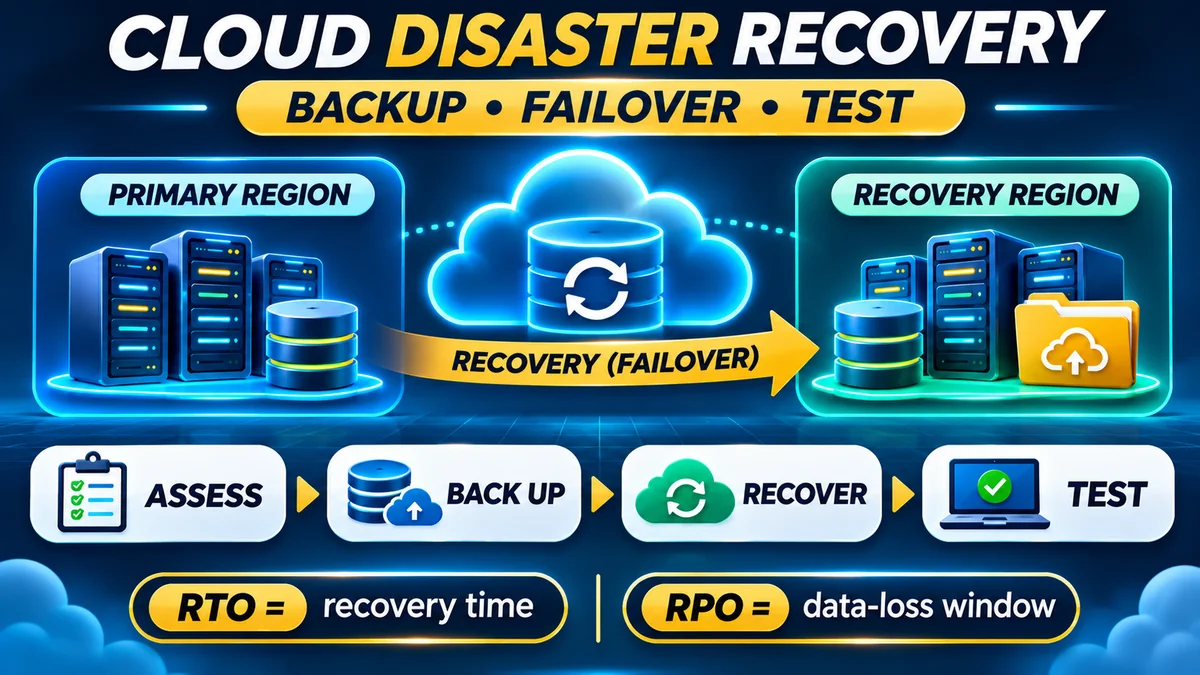
Quick answer: A basic cloud disaster recovery plan explains how your organisation will restore a cloud application and its data after a serious outage, security incident, deletion or infrastructure failure. Start by identifying critical services and setting two measurable targets: recovery time objective (RTO), how long the business can tolerate an interruption, and recovery point objective (RPO), how much recent data it can afford to lose. Then protect restorable backups, choose a realistic recovery location, document the recovery steps, assign responsibilities and test the entire process.
Cloud computing gives businesses powerful tools for resilience, but it does not make outages or data loss impossible. A faulty deployment can break an application, a compromised account can delete data, and a cloud region can experience an incident. A working recovery plan turns “we have backups” into a much stronger statement: we know who can restore the application, what data they will use, how long it should take and how we will check that it works.
This guide covers a practical disaster recovery (DR) plan for a small company website, booking system or cloud-hosted business application. It follows NIST's contingency-planning framework and the current recovery guidance from AWS , Microsoft Azure and Google Cloud .
Research verified: 14 November 2026. Example recovery targets, workloads, budgets and schedules are illustrative, not provider guarantees or mandatory compliance requirements.
What is cloud disaster recovery—and why do businesses need it?
Cloud disaster recovery is the set of people, processes, backup copies and technical procedures used to restore an application or information system after a disruptive event. Depending on the incident, recovery could mean restoring a deleted database, rebuilding servers in the same region, switching to another region or temporarily using a manual business process.
NIST describes contingency planning as a coordinated approach to restoring disrupted systems, operations and data. Its long-standing SP 800-34 Rev. 1 framework includes business impact analysis, preventive controls, recovery strategies, documented plans, exercises and ongoing maintenance. Although written for federal information systems, the planning principles are useful to smaller organisations.
A disaster recovery plan is not exactly the same as business continuity planning. Business continuity addresses how the organisation keeps serving customers through disruption—including staff, alternate communications and manual processes. Disaster recovery concentrates on restoring the technology and data on which those activities depend. Both must work together.
It also helps to distinguish DR from high availability (HA). HA mechanisms such as redundant servers can keep a system running through routine component failures. Disaster recovery addresses major failures that require deliberate restoration or failover. A system can be highly available and still need protection against destructive deletion, credential compromise or an entire region becoming unavailable. Microsoft's reliability guidance explains why redundancy, replication and backup protect against different risks.
Step 1: Identify critical business processes and cloud dependencies
Start with a simple business impact analysis (BIA): identify the activities that would cause the greatest customer, financial or operational harm if unavailable. Examples might include accepting orders, recording payments, managing customer bookings and accessing essential documents. Estimate the consequences of interruption after 30 minutes, four hours and one day rather than declaring every system equally critical.
Then list the infrastructure and data needed to restore each business process. Include the application, database, user-uploaded files, authentication, configuration, DNS, networking, queues, email or messaging services, access keys, secret stores, deployment pipelines and third-party services. Identify which dependencies are shared across several applications.
| Workload component | Recovery dependency | Question to answer |
|---|---|---|
| Website or API | Application code, compute, runtime and configuration | Can we redeploy the last known-good version? |
| Database | Recent consistent backups, transaction logs or replica | How much confirmed data can we recover? |
| Customer files | Object storage and retained backup copies | Are uploads included in the recovery point? |
| Identity and secrets | Protected administrator access, encryption keys and secrets | Can we recover without the compromised production credentials? |
| Network and domain | DNS, certificates, routing, firewall rules and load balancer | How will users reach the recovered environment? |
| External integrations | Payment, email, SMS and other service providers | What happens when an external dependency is down? |
Assign an owner for each dependency. If the database can be recovered but the encryption key or domain administrator access is unavailable, the application may still be unusable. For larger systems, draw a dependency diagram and identify the minimum viable service that must be restored before optional features.
Step 2: Define RTO and RPO before selecting technology
The two most useful recovery measurements are RTO and RPO:
- Recovery Time Objective (RTO): the target maximum time between a disruption and restoring an acceptable level of service. A four-hour RTO means the business aims to resume that service within four hours.
- Recovery Point Objective (RPO): the maximum acceptable time span of data loss. A one-hour RPO means recovering to a point as much as one hour before the incident might be acceptable; the business should plan to keep any loss within that window.
These are business requirements, not guaranteed outcomes. The targets must be tested against the proposed architecture. A faster RTO and smaller RPO generally cost more and may require continuous replication, pre-provisioned resources or additional automation. The Google Cloud DR planning guide connects these targets to recovery design and ongoing cost.
For a fictional small business, the initial targets might look like this:
| Service | Illustrative RTO | Illustrative RPO | Business rationale |
|---|---|---|---|
| Customer booking and payments | 4 hours | 15 minutes | Lost transactions are costly and customer-facing disruption is urgent |
| Internal reporting dashboard | 24 hours | 12 hours | Reporting can pause while frontline operations resume |
| Marketing website | 8 hours | 24 hours | Content changes less frequently than transaction records |
A 15-minute RPO does not simply mean running a backup every 15 minutes. Scheduling, completion delays, consistency and storage availability can widen the actual gap between a usable recovery point and the disruption. Design and test enough margin to meet the target. Similarly, a four-hour RTO must cover investigation, decisions, provisioning, restoration, validation and bringing traffic back—not just the time it takes to copy a backup.
Step 3: Choose a cloud disaster recovery strategy
Once the objectives are clear, choose the least complex approach capable of meeting them. AWS's disaster recovery architecture guidance groups common strategies into backup and restore, pilot light, warm standby, and multi-site active/active. Azure similarly distinguishes cold and warm standby.
| Strategy | How it works | General cost and recovery trade-off |
|---|---|---|
| Backup and restore | Rebuild resources and restore saved data after an incident | Often lowest standby cost; typically longest restore |
| Pilot light | Maintain essential replicated data and configurations, then deploy or start other components | Moderate preparedness and cost; requires activation work |
| Warm standby | Keep a smaller but operational copy of the system running elsewhere | Faster potential failover; ongoing standby expense |
| Multi-site active/active | Multiple locations actively serve users with designed data coordination | Complex and costly; can reduce interruption but does not guarantee zero data loss |
For a small application that can tolerate hours of downtime, backup and restore may be a reasonable beginning. For a business with stringent recovery targets, maintaining a standby system could be appropriate. Choose based on the whole application's requirements, not a marketing diagram showing an ideal recovery time. Network routing, identity services, database consistency and cloud service quotas can affect real recovery.
Keep the recovery environment sufficiently independent to survive the failure you are planning for. A second server in the same region may address one machine's failure but not a region-wide outage. Cross-region arrangements can help with regional incidents, while some security scenarios may justify a separate account or administrative boundary. Confirm the provider's actual service availability, replication support and residency requirements.
Step 4: Build backups that remain usable during a real disaster
A backup policy should name what is protected, how often copies are created, where they are stored, how long they are retained and who can restore them. Protect the database, object files, critical configurations and any other state needed to rebuild the application.
For data protection, start with the 3-2-1 principle: retain multiple copies, use appropriately distinct storage and keep at least one separate from the main environment. For ransomware resilience, consider offline, immutable or otherwise protected copies with separately controlled credentials where the service supports them. FlyingEze's published 3-2-1 backup strategy guide explains the basic method.
Replication is not a replacement for backup. Replication can copy legitimate changes quickly, but it can also propagate deletions, corruption or malicious alterations. Microsoft's backup-versus-replication guidance treats the two as complementary controls.
Investigate service-specific protections. AWS Backup Vault Lock supports modes for protecting retained recovery points from modification or deletion. Azure Backup's security guidance discusses soft delete, immutable vaults and multi-user authorisation. These features have product-specific limitations and retention consequences; an irreversible retention setting can also create long-lived costs, so configure it deliberately.
Encrypt backups appropriately, safeguard keys separately and restrict destructive backup actions. Monitor unsuccessful backups, storage limits and expiring retention periods. A successful “backup job” notification is not proof that a complete application can be restored: restoration must be tested.
Step 5: Write a practical recovery runbook
A runbook is a checklist containing the exact steps authorised staff will perform. It should be understandable to a trained colleague who did not design the system. Store a protected, accessible copy outside the production environment, because the cloud account or documentation service used by the primary application might be unavailable during the incident.
For a typical application, document the following sequence:
- Detect and assess. Confirm symptoms, affected customers, scope and probable cause through monitoring and independent checks.
- Declare the incident. Identify the incident commander, approval authority and conditions for invoking disaster recovery. Record the decision time.
- Contain active threats. For suspected compromise, restrict attacker access and preserve evidence before copying data or switching services.
- Find a trusted recovery point. Select a backup or clean replica consistent with the RPO and the incident's start time.
- Prepare the recovery environment. Provision compute, network, firewalls, DNS, certificates, identity, secrets and quotas using tested configuration.
- Restore dependencies in order. Recover the database and storage before application services that depend on them.
- Deploy a trusted application version. Restore software, configuration and background workers; prevent accidental duplicate processing.
- Validate functionality. Verify login, essential reads and writes, customer access, payments or booking flows, scheduled jobs and data integrity.
- Resume customer traffic. Update routing and DNS as appropriate, monitor error rates and confirm service availability.
- Document and review. Record downtime, actual data-loss window, decisions, failed steps and follow-up actions.
This is a generic example, not a command sequence to execute blindly. Your system may need different sequencing or application-specific safeguards. For example, if payments are processed externally, reconcile transaction status before retrying queued payments after recovery to avoid duplicate charges.
The Azure recovery-plan guidance recommends documented responsibilities, invocation conditions, communications and separate failover and failback plans. It also explains the importance of validating connections, network settings and application health after a switch.
Step 6: Make recovery possible without the failed production environment
Consider what happens if the production cloud account, administrator credentials or primary region are unavailable. The recovery plan should identify emergency administrative access, MFA methods, stored credentials, encryption keys, infrastructure templates and an independent communication channel.
Use least-privilege access and secure, tested emergency-access procedures. Protect backups from the same administrative credentials that operate production where practical, especially against deletion and ransomware. Maintain version-controlled infrastructure as code to reproduce networking and compute configuration, but do not store raw passwords or private keys in source control.
Check quotas and permissions in the target region before an emergency. A recovery runbook that depends on provisioning ten instances will fail if the account can create only two. The AWS DR testing guidance flags configuration drift and insufficient secondary-region quotas as practical recovery risks.
Plan domain, certificate and DNS changes as part of restoration. DNS adjustments may not take effect instantly for every user because resolvers can cache records. External identity or payment vendors may also need configuration changes before a recovered application can function normally.
Step 7: Test restores, failover and the actual business workflow
The essential test is not “did the backup process run?” but can the team restore a working service within the agreed RTO and RPO? AWS's backup recovery testing guidance warns against restoring a database without querying it to confirm the data is usable and complete.
Start safely with a tabletop exercise where staff walk through the incident and name each action. Next, perform a non-production restore into an isolated environment. Test both database recovery and the application workflows. As the process matures, conduct controlled failover drills appropriate to the business risk, using change approvals and safeguards before production disruption.
Measure at least:
- Elapsed time from incident recognition to decision, restoration and verified service recovery.
- Timestamp of the newest usable recovered data, compared with the disruption time.
- Successful recovery of critical dependencies, user authentication and external integrations.
- Accuracy of the runbook, permissions, credentials and recovery contact list.
- Errors, missing data, duplicated messages and customer-facing performance after restoration.
Record the result as a pass, failure or qualified result against each objective. If the target was four hours and the test takes six, the plan did not meet its RTO—revise the architecture, process or business requirement. Repeat drills after major system changes, not only on a calendar. AWS's DR testing best practice emphasises practising real recovery paths rather than relying on unexercised assumptions.
Step 8: Plan for ransomware and corrupted data
A regional infrastructure outage and a destructive cyberattack require different responses. In a regional outage, a healthy replica in another region may be sufficient. In a ransomware incident, a continuously synchronised replica may contain the same malicious changes, so rapidly failing over could reproduce the problem.
For suspected compromise, isolate affected systems, rotate exposed credentials when safe, preserve forensic evidence and identify a known-clean recovery point. Do not reconnect a restored environment to a still-compromised identity system. Investigate how the incident occurred and validate the recovered environment before resuming normal operations.
Backups with protected retention, independent administration and restore testing can reduce the risk of permanent loss. Azure's secure backup guidance recommends strong access controls and safeguards against premature deletion. These controls reduce risk but do not guarantee that every snapshot is clean or that an attack cannot interrupt service.
A cyber incident response plan should cover containment, investigation and reporting, while the DR runbook covers rebuilding and restoring the business workload. Coordinate the two rather than letting restoration destroy evidence or reintroduce compromised configurations.
Step 9: Account for disaster recovery costs
DR is not free simply because the primary application already runs in the cloud. Depending on the strategy, the recurring budget may include backup storage, immutable retention, cross-region copies, database replication, standby compute, networking, monitoring, testing and staff time. Recovery events may trigger additional data transfer, restoration, incident response and temporary infrastructure charges.
For a fictional small application, assume a monthly DR budget containing:
| Illustrative cost item | Monthly allowance |
|---|---|
| Separated backup storage and retention | $35 |
| Cross-region copies or recovery storage | $20 |
| Monitoring and recovery alerts | $15 |
| Testing environment and recovery drills | $25 |
| Illustrative recurring DR total | $95/month |
This is not a quoted price from AWS, Azure, Google or another provider. A basic $95 monthly planning assumption would equal $1,140 over twelve months, before the cost of a recovery event, taxes or extra staffing. A warm-standby or multi-site system could cost substantially more because computing and data services remain active. Use official product pricing and real consumption to replace the assumptions.
To evaluate affordability, compare the consequences of downtime and lost transactions with the cost of each recovery strategy. For more on modelling full cloud expenses, FlyingEze's separately scheduled guide How to Estimate Cloud Costs Before Moving an Application addresses compute, databases, backups and network charges in greater detail. The DR budget should fit within that broader total cost of ownership.
Step 10: Special considerations for SaaS and multi-tenant platforms
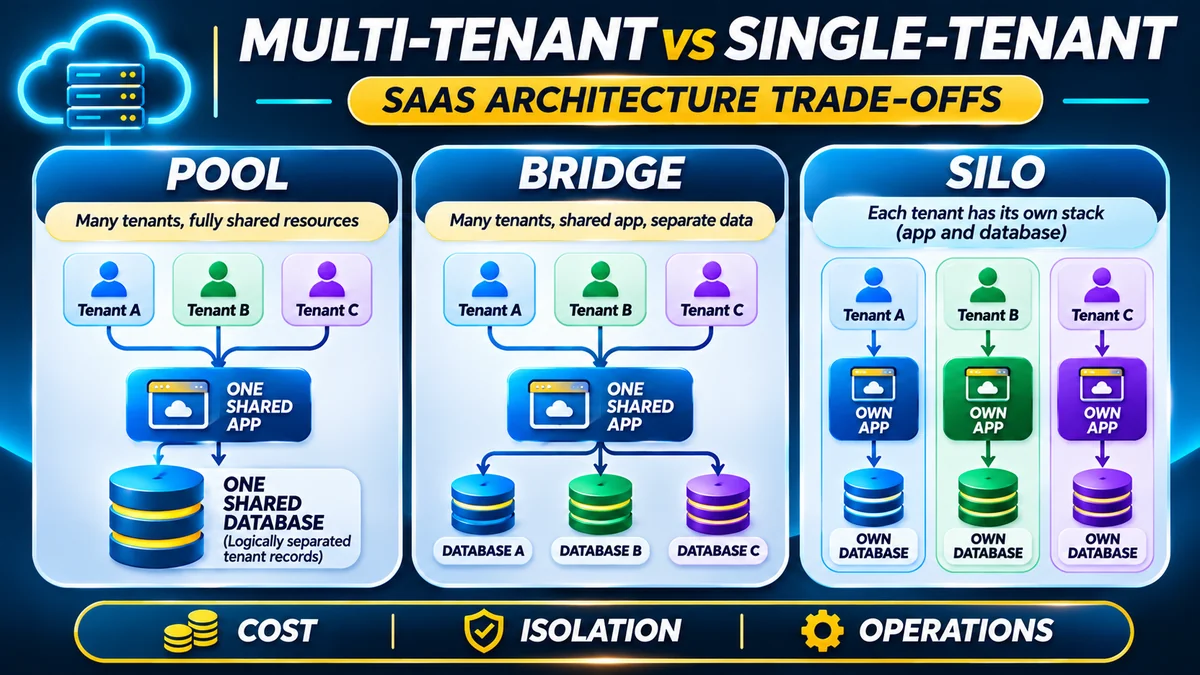
A SaaS platform serving many organisations faces two related questions: how to restore the shared service, and how to restore one customer's data without harming another. If tenants share tables in one database, an individual tenant restore may require recovering a separate database copy and selectively importing validated records. If each organisation has its own database, tenant-specific recovery may be more straightforward, but the platform must still protect the shared application, authentication and routing services.
Include tenant identifiers, region placement, database location, encryption keys and backup policy in the recovery inventory. Test recovery using tenant-specific permissions and check that restoring a customer does not leak information to others. If queued jobs or subscriptions are resumed, guard against replaying events or duplicated financial operations.
For systems with thousands of customer databases, DR automation must scale with the fleet. Know which tenants were affected, which recovery points apply and whether the control plane can function while the primary environment is unavailable. Tenant-level backups alone cannot restore a failed common identity or application service.
FlyingEze's earlier enterprise internet infrastructure article is also useful background: after failover, users still need a functional network route to reach the recovered SaaS service.
A simple cloud disaster recovery plan template
A small business can start with one maintained document and a short runbook, then expand it as the system grows. The following fields should be filled with real approved values, not assumptions:
| Plan field | What to record |
|---|---|
| Application and owner | Name, business purpose, technical owner and incident commander |
| Business impact | Critical functions, customers affected and maximum tolerable disruption |
| Approved RTO / RPO | Targets for each critical service, with business approval |
| Primary and recovery locations | Accounts, regions, resources, dependencies and residency restrictions |
| Backup policy | Coverage, schedule, last usable recovery point, encryption and retention |
| Activation criteria | Who declares DR, what evidence is needed and how it is recorded |
| Runbook | Ordered restoration steps, scripts, prerequisites and rollback procedures |
| Communications | Staff escalation, backup communication channel and customer status updates |
| Validation checks | Business transactions, data integrity, authentication and monitoring |
| Failback plan | Conditions and safe procedure for returning to the normal environment |
| Testing and review | Drill dates, actual RTO/RPO results, corrective actions and next review |
Keep the plan versioned, secure and accessible to authorised responders without relying solely on the service that could fail. NIST's contingency-planning resource includes business impact and contingency templates for organisations seeking more formal documentation.
Common mistakes in cloud disaster recovery planning
- Assuming the cloud provider handles everything: provider infrastructure resilience does not automatically cover your application logic, credentials and retention choices.
- Confusing a replica with a backup: malicious changes and data corruption can propagate to a replica.
- Protecting only the database: missing files, keys, DNS or deployment configurations can prevent full restoration.
- Promising targets without testing: an RTO or RPO has little operational value until measured during realistic exercises.
- Keeping every backup under one compromised identity: attackers may delete both primary data and accessible backup copies.
- Ignoring the return journey: failback may require data reconciliation and a controlled traffic switch.
- Forgetting service quotas: the target region may not have enough approved resource capacity to recreate production.
- Not budgeting for recovery: backup retention, cross-region traffic, standby capacity and testing can generate separate charges.
- Publishing secret recovery credentials inside the runbook: document secure retrieval methods, not raw passwords.
- Never reviewing the plan: architecture changes, employees leaving and new dependencies can make old procedures unsafe.
Frequently asked questions about cloud disaster recovery
What is a disaster recovery plan in cloud computing?
It is a documented set of people, procedures, technical resources and tests for restoring cloud-hosted services and data after a significant disruption.
What is the difference between RTO and RPO?
RTO concerns acceptable service-restoration time. RPO concerns the maximum acceptable age of recovered data, usually expressed as a time window of potential data loss.
Is backing up my cloud database enough?
Usually not for complete application recovery. You may also need customer files, configuration, deployment artefacts, secrets, network settings and a tested procedure to rebuild working services.
Does cloud replication replace backup?
No. Replication can help with availability, but it may also reproduce deletion or corrupted data. Retained backups and tested restore points protect against different failures.
What are the four main cloud DR strategies?
AWS commonly describes backup and restore, pilot light, warm standby and multi-site active/active. Their costs, implementation complexity and achievable recovery targets differ.
Can a small business start with backup and restore?
Yes, if its recovery objectives and business risk permit that approach. A critical payment or healthcare system may require more demanding protection than a low-change marketing site.
How often should I test a recovery plan?
Choose a risk-based cadence and repeat tests after significant changes. At minimum, validate backups regularly and conduct periodic runbook exercises; higher-criticality systems require more rigorous testing. No single frequency fits every application.
Is a second cloud region always required?
No. A second region is useful for some regional failure scenarios, but requirements depend on the disaster scope, business impact, residency, cost and available recovery time.
What is failback?
Failback is the controlled process of returning from a recovery environment to the normal production environment after the original problem has been resolved, including data synchronisation and validation.
How can I protect cloud backups from ransomware?
Use properly restricted backup permissions, separately protected copies and supported immutable or offline retention where appropriate. Regularly restore and inspect data to confirm recovery points are usable and clean.
Will a high-availability cloud setup survive every disaster?
No. HA can reduce routine interruptions but may not protect against data corruption, credential compromise, an entire region outage or shared-service dependencies.
Can a SaaS recover one tenant without restoring every other tenant?
Sometimes. Separate databases can simplify tenant-specific restoration. Shared-table designs often need selective, validated data recovery. The capability must be engineered and tested rather than assumed.
Conclusion: a basic recovery plan must be executable, not just written
Cloud disaster recovery is a practical business capability. Define which services matter most, agree on RTO and RPO, identify every dependency, protect independent backup copies and choose a recovery approach that fits the business's risk and budget. Then write clear responsibilities and procedures and test whether they restore an actual working application.
The strongest basic plan is one a trained colleague can execute even when the normal production environment is unavailable. Keep it current, measure each exercise and improve the weakest steps before an emergency makes them urgent.
Editorial verification: 14 November 2026. Key sources are NIST SP 800-34 Rev. 1, AWS disaster recovery and backup testing guidance, Azure Well-Architected disaster recovery recommendations, Google Cloud DR planning documents and official cloud-backup security documentation. Illustrative targets and budgets are not promises of recovery times or cloud-provider pricing.