A small business is not disaster-ready merely because its files appear in the cloud. An accidental deletion, ransomware attack, failed server, stolen laptop, fire or extended connectivity outage can interrupt operations even when automatic backups are switched on. The decisive test is whether the business can restore trustworthy information and resume its most important services within an acceptable time.
This cloud backup and disaster recovery checklist helps small and medium-sized enterprises (SMEs) turn that question into a practical plan. It covers what to protect, how to set recovery targets, where to keep isolated copies, how to test restoration, who makes decisions during an incident and what to budget. It draws on guidance from NIST, CISA, established cloud providers and Nigeria's data-protection framework.
The first action: identify the three systems your business cannot operate without, name an owner for each, and test whether a usable copy of its data can be restored. Buying another backup subscription before doing this may not address the biggest recovery risk.
Backup, synchronisation and disaster recovery are not the same thing
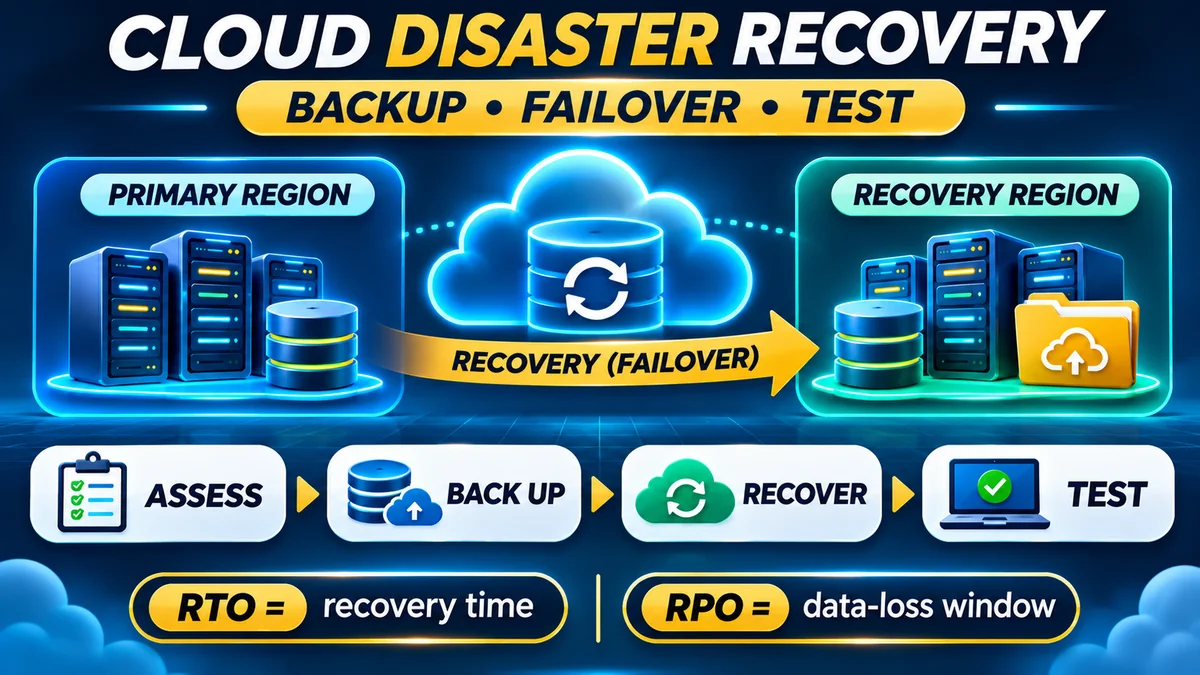
Backup means retaining recoverable copies or versions of data so they can be restored after loss, corruption or compromise. Synchronisation keeps files consistent across devices or services; depending on configuration, an unwanted deletion or encrypted file may also be synchronised. Replication maintains another copy of a system or dataset, often to improve availability; it may also replicate corrupted or deleted data. Disaster recovery (DR) is the broader process of restoring applications, records, access and business operations after disruption.
This distinction matters during ransomware incidents. The CISA #StopRansomware Guide warns that automated cloud synchronisation may copy encrypted files over unaffected ones. It recommends offline, encrypted backups and regular tests of their integrity and availability. A recovery plan therefore needs protected historical recovery points, not just a second location containing whatever the production system currently holds.
Businesses should also distinguish high availability from recoverability. Redundant infrastructure can reduce some outages, but two servers using the same compromised credentials or database can fail together. A reliable design considers both continuity during disruption and recovery from bad data or security incidents.
Set two recovery targets before choosing backup software
The two most useful planning measures are Recovery Time Objective (RTO) and Recovery Point Objective (RPO). NIST's Contingency Planning Guide, SP 800-34 Rev. 1 describes RTO as a target for how long a system can be unavailable, while RPO concerns the point in time to which data can be recovered. Neither target is a promise that technology will meet it without testing.
| Example SME workload | Illustrative RTO | Illustrative RPO | Reason for priority |
|---|---|---|---|
| Shop sales and payment records | 4 hours | 15 minutes | Missing recent transactions requires reconciliation |
| Customer bookings and appointments | 8 hours | 1 hour | Staff need to serve booked customers |
| Shared business documents | 24 hours | 24 hours | Some work can continue temporarily using alternatives |
| Old marketing archives | 72 hours | 7 days | Usually less urgent than live operations |
All targets in this table are hypothetical planning examples, not recommended minimum standards. Actual targets depend on transaction frequency, available recovery technology, contractual obligations and what loss the business can tolerate. For instance, an RPO of one hour suggests that losing up to an hour of changes could be acceptable—not that an hourly backup has been configured successfully. Recovery targets should be formally approved by the business owner or responsible manager.
SME readiness checklist: 12 controls to verify
Use these checks to assess not only whether a setting exists, but also whether someone owns it and evidence proves it works.
1. Inventory the systems and information that matter
List websites, databases, point-of-sale records, accounting tools, payroll, customer files, email, cloud drives, devices, configuration files and third-party platforms. Record where each lives, how much data it contains and what other systems it depends on. A website backup without its database, encryption keys or DNS configuration may not produce a working website after restoration.
Evidence to keep: an inventory with system owner, storage location, data sensitivity, dependencies and last-review date.
2. Rank workloads by business impact
Ask what happens if each system is unavailable for one hour, one day or one week. Consider customers unable to pay, missed bookings, interrupted deliveries, lost salaries and regulatory exposure. Document a manual workaround where one is realistic. Use this business-impact assessment to set priorities rather than giving every file the same expensive recovery target.
Evidence: approved restoration order, RTO and RPO for each critical service, plus a contact responsible for decisions.
3. Follow a multi-copy backup strategy
A useful starting pattern is the 3-2-1 principle: keep three copies of important information (the working original and two backups), on two types of storage or independently protected systems, with at least one copy offsite. The exact technologies can differ. A small business might use encrypted cloud backup plus an offline external drive, while a larger one uses separately administered cloud storage and a dedicated recovery vault.
FlyingEze has a more detailed explanation of the 3-2-1 backup strategy for business files and databases . The key is separation: three copies under one compromised administrator account may not provide the protection the business expects.
Evidence: data-copy map showing location, protection, account owner, retention period and isolation controls.
4. Protect at least one copy against ransomware and accidental deletion
Use an offline, isolated or appropriately immutable backup copy where feasible. Offline copies are disconnected when not in use; immutable storage is intended to prevent deletion or modification for a specified retention period. Neither is magical: storage policies can be misconfigured, privileged credentials can be stolen, and an immutable copy may faithfully preserve already corrupted data.
Services such as Azure Backup's protected vault features support controls including soft delete, multi-user authorisation and immutability, subject to workload and configuration. Check the actual protection status, not merely whether a feature appears in a product brochure.
Evidence: a demonstrated recovery point that ordinary production administrators cannot silently erase.
5. Secure backup accounts, encryption keys and access
Require multifactor authentication for administrators, use least-privilege permissions and restrict who can disable jobs, shorten retention or delete recovery points. Separate backup administration from routine staff access where practicable. Protect encryption keys, recovery credentials and emergency access procedures; a perfectly intact encrypted backup is useless if the only decryption key is lost.
Evidence: current access review, emergency credential procedure and a tested way to retrieve required keys securely.
6. Set schedules and retention by data type
Back up frequently enough to support the RPO. A busy database may need transaction-log protection or frequent incremental backups, while static records can tolerate less frequent copies. Keep enough historical versions to recover from an error discovered days or weeks later. Retention should also respect legitimate deletion duties; keeping personal information forever simply because storage is cheap may create privacy and security problems.
Evidence: documented schedules, retention policies, backup success history and alerts for missed jobs.
7. Verify application-consistent backups
Copying a live database file is not always equivalent to a consistent database backup. Use the database engine's supported backup and recovery methods, and confirm that associated application files, secrets, configuration and software versions can be restored together. For cloud applications, understand which parts are protected by the provider and which remain the customer's responsibility.
Evidence: documented recovery procedure and a restored application that starts, authenticates and produces correct records—not just a downloaded archive.
8. Monitor failures rather than trusting green dashboards
Check jobs for failed runs, unexpected drops in backup size, missing critical assets and exhausted storage. Assign someone to act on alerts within a defined period. A message that a job has finished does not prove the data is complete, uninfected or usable.
Evidence: alert routing, ownership and a record of when the last failure was resolved.
9. Run restore tests in an isolated environment
At regular intervals, restore representative files and at least one critical service to a clean environment. Validate database integrity, user access, application functionality and the time required. Include a test of the most difficult recovery path—such as accessing an offsite copy after the production cloud account is unavailable.
AWS's guidance on securing backup data explains that isolation and immutability must be complemented by restore testing to establish actual recoverability. Record the result and correct failures. Testing should avoid overwriting live data or exposing real personal information in a test environment.
Evidence: dated restore report with the recovery point, steps, elapsed time, data checks, defects and sign-off.
10. Write a recovery runbook and name a deputy
Specify who declares an incident, who contacts the hosting provider, who can approve restoration, which systems are rebuilt first and how customers receive updates. Include the sequence for obtaining clean infrastructure, validating backups, restoring identity services and reconnecting applications. Keep a protected offline copy and at least one reachable deputy in case the primary technician is unavailable.
Evidence: a version-controlled runbook, current phone numbers, supplier escalation paths and approved alternative operations.
11. Plan for ransomware, power failure and loss of connectivity
A cyberattack and a prolonged outage require different responses. For suspected ransomware, isolate affected systems with qualified assistance, preserve appropriate evidence and do not reintroduce compromised devices into the restored environment. For power or internet failure, determine which local operations can continue and how records will be reconciled afterward. Test dependencies such as DNS, payment gateways, SMS authentication and access to cloud consoles.
Evidence: a tabletop exercise documenting how staff respond when their usual laptop, connection or administrator account cannot be used.
12. Review the plan after every significant change
New SaaS products, branches, payment integrations, cloud migrations and staffing changes can render a backup plan incomplete. Make resilience checks part of change management and review targets, access, costs and recovery tests periodically. The NIST Cybersecurity Framework 2.0 places recovery alongside governance, identification, protection, detection and response as an essential security outcome.
Evidence: updated asset inventory, recovery test results, change records and management review.
One-page SME readiness scorecard
Mark each requirement as Verified, Partly verified or Not verified. A written policy without a successful test should not receive full credit.
| Control to verify | Practical proof | Suggested owner |
|---|---|---|
| Critical systems listed | Current application and data inventory | Operations lead |
| RTO and RPO agreed | Signed business-impact priorities | Business owner |
| Backup coverage complete | Job list mapped to critical assets | IT lead |
| Isolated recovery copy | Verified immutable/offline recovery point | IT/security lead |
| Secure administrative access | MFA, key recovery and access review | IT/security lead |
| Restore tested | Successful dated recovery report | IT lead and service owner |
| Recovery roles and contacts | Approved runbook and deputies | Operations lead |
| Budget and review date | Cost estimate and next exercise scheduled | Finance/business owner |
Interpret the score: a single “Not verified” for a critical data restore or an unprotected backup administrator is a priority risk, even if every other line is green. Avoid turning the checklist into a reassuring percentage that hides a serious recovery gap.
A simple 30-day cloud disaster recovery action plan
Days 1–7: discover and prioritise
List critical workflows, locate records, identify vendors and determine RTO/RPO targets. Check when the last backup ran and whether the account performing it is still active. Choose one high-priority system for an initial restoration test.
Days 8–14: harden the backup design
Fix unprotected workloads, add an isolated copy, enable suitable access controls, review encryption keys and retention, and establish failure alerts. Resolve the most severe gaps before purchasing unnecessary extra features.
Days 15–21: perform and document a restoration
Restore a representative application and its data into an isolated environment. Measure recovery time and the age of the restored information. Correct missing dependencies, permissions or configuration issues and repeat the test where needed.
Days 22–30: exercise the incident response
Run a short tabletop scenario: the main office cannot connect to its systems and a backup administrator is unavailable. Confirm the deputies, supplier contacts, decision authority, communication templates and recovery priorities. Approve the revised runbook and set the next review date.
These time windows are an illustrative starting plan, not a formal compliance deadline. High-impact gaps should be addressed immediately rather than waiting for their assigned week.
How much should an SME budget for cloud backup and disaster recovery?
There is no universal cost per employee or per gigabyte because workload size, change rate, retention, backup frequency, geographic copies and restore requirements vary. A meaningful budget includes more than storage subscription fees.
Consider monthly backup cost = protected data storage + version/retention growth + replication or transfer fees + backup software/service fees + monitoring and administration. Separately budget for restore testing, recovery infrastructure and possible incident-response assistance. The published AWS Backup pricing model illustrates how backup storage, cross-region transfers, restored data and other operations can be separately billable. Azure's backup cost estimator also accounts for retention, data-change rate and redundancy choices.
For a purely illustrative exercise, a business might reserve $35 monthly for protected storage, $15 for monitoring or software and $40 worth of staff time, giving a notional $90 monthly operating allowance or $1,080 over twelve months. Those figures are invented budgeting assumptions, not live product prices or adequate coverage guarantees. Actual services can be substantially cheaper or more expensive; a business should seek quotes using its measured data volume and recovery targets.
Where bills are charged in foreign currency, Nigerian SMEs should also plan for payment fees and exchange-rate movements. Incorporating backup spend into a 13-week cash-flow forecast can help prevent essential protection from being cancelled during a tight month.
Nigerian SMEs: data protection belongs in the recovery plan
For organisations processing personal data in Nigeria, section 39 of the Nigeria Data Protection Act 2023 requires appropriate technical and organisational security measures. It expressly contemplates timely restoration of access to personal data following physical or technical incidents, and regular testing and assessment of security measures. The Act uses a risk-based approach that considers the data, processing and the size and resources of the controller or processor; it does not impose a single universal backup schedule for every SME.
Businesses should consider the security of personal information held inside backups, retention and deletion requirements, access privileges, supplier contracts and applicable cross-border transfer rules. FlyingEze also explains how Nigerian businesses can assess potential NDPC registration obligations . This article is educational guidance, not an individual legal-compliance determination.
What should an SME do in the first hour after a major incident?
- Protect people and contain immediate harm. Follow physical safety procedures first. For suspected cyber compromise, obtain appropriate technical assistance and isolate affected systems where safe.
- Activate the incident lead. Record who discovered the issue and when, and choose the approved communication channel if email is unavailable.
- Preserve necessary evidence. Avoid indiscriminate wiping or resetting systems before the incident is understood; involve qualified responders where required.
- Identify affected business services. Separate critical operations from optional systems and determine whether a manual workaround can continue safely.
- Confirm usable recovery points. Review isolated backups and look for signs of corruption or compromise before bringing data back into production.
- Start an approved recovery sequence. Restore clean infrastructure and verify the application and data before reconnecting users.
- Assess notification obligations. Determine whether privacy, contractual, insurer or regulatory notices are required and meet applicable time limits.
CISA's ransomware response checklist provides further guidance on isolation, rebuilding and recovery from protected backups. The order above is a practical initial framework, not a substitute for incident-specific technical or legal advice.
Frequently asked questions
Is cloud storage the same as cloud backup?
No. Ordinary cloud storage or synchronisation may lack independent version history, isolation, recovery testing or an appropriate retention policy. A reliable backup service must support restoration of trustworthy historical data after mistakes or attacks.
How often should a small business back up its data?
As often as necessary to meet its approved RPO. A busy transaction database may require far more frequent protection than a static folder of archived documents. Monitor completion and verify recovery, rather than choosing an arbitrary universal interval.
Does a cloud provider automatically back up everything?
No. Responsibilities differ by product and contract. Some services offer recovery features, while others expect the customer to configure backups and maintain independent copies. Review the service's shared-responsibility and retention documentation.
Are immutable backups enough to stop ransomware?
No. Immutability can reduce the risk of recovery points being deleted or altered during their protected period, but it does not prevent stolen data, compromised applications or backup copies of already-damaged information. Identity security, isolation, monitoring and restore tests remain essential.
What is the difference between RTO and RPO?
RTO concerns how quickly service should be recovered. RPO concerns how far back in time the recovered data may be. For example, a four-hour RTO and one-hour RPO mean a target of restoring service within four hours while accepting no more than one hour of lost changes, assuming the technical design can achieve those goals.
Can a small Nigerian business use cloud backups?
Yes, but it should evaluate security, connectivity, availability, provider terms and any applicable data-protection requirements. An offline or separately protected copy may be valuable where internet access is unreliable. The correct design depends on business needs, not only provider location.
Final verdict: preparedness means proving that recovery works
Cloud computing makes remote backup options accessible to SMEs, but a subscription alone is not a disaster recovery strategy. A credible plan identifies essential systems, defines acceptable downtime and data loss, retains protected copies, secures access, tests complete restoration and assigns clear responsibilities.
If an SME completes just one task this week, it should restore a critical service in a safe test environment and document what actually worked. That exercise can reveal whether the business has a dependable recovery capability—or merely a set of backup files it hopes will be enough.