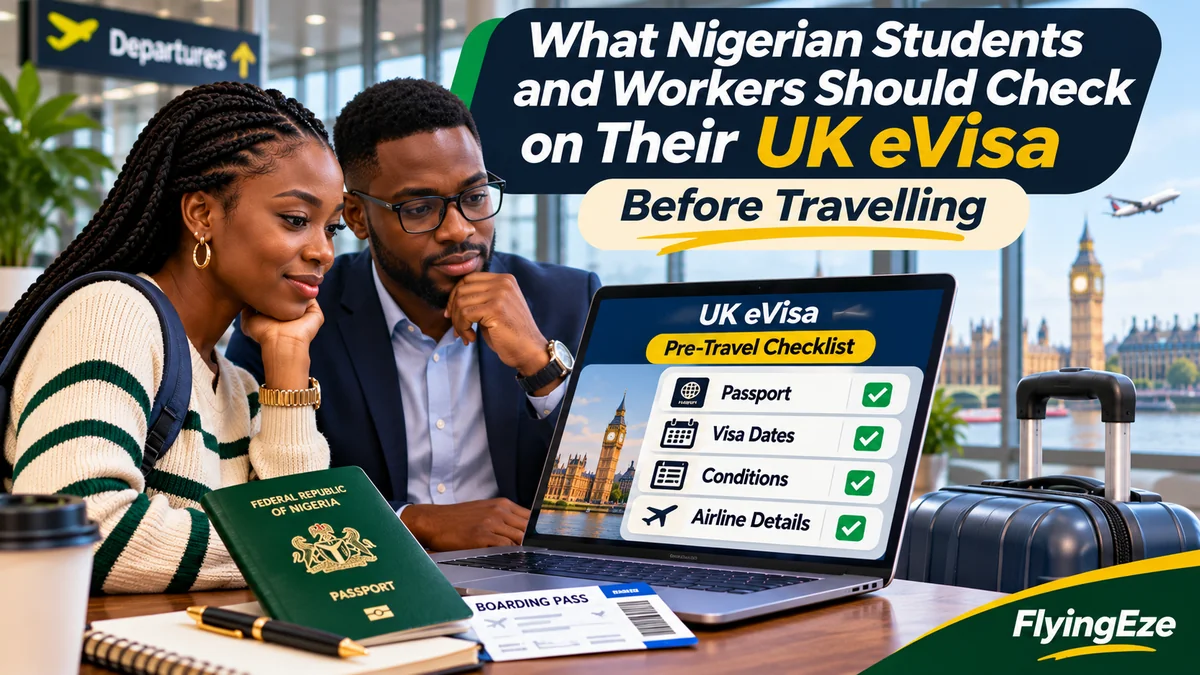
Before travelling from Nigeria to the United Kingdom on a Student or Skilled Worker visa, sign in to your UKVI account and check your name, nationality, current passport, immigration route, permission start and end dates, and work or study conditions. Compare those details with your Home Office grant decision, university or employer records, and airline booking. A valid visa decision is not enough if the carrier cannot match your travel document to your digital immigration permission.
Since 1 July 2026, UKVI has stopped issuing new visa stickers to successful new applicants and uses digital immigration records known as eVisas. Existing valid stickers can still be used until expiry, and some people are issued a form for accompanying an eVisa (FAV). The Home Office transition guidance explains those exceptions. Nigeria remains a visa-required nationality, so an eVisa records granted permission; it is not a separate visa-free travel authorisation.
For a student preparing to leave Lagos for a UK university or a skilled worker travelling to join an approved employer, this is a practical final-check guide—not a substitute for the visa application process. Verified on 3 November 2026 against GOV.UK immigration and travel guidance.
What does a UK eVisa show?
An eVisa is an online record of identity, immigration status and the conditions attached to that status. It can show whether the holder may study or work, the route under which permission was granted and the applicable dates. You access it through a UK Visas and Immigration (UKVI) account using View your eVisa and get a share code . Creating or accessing a UKVI account is free.
Do not confuse four different things: your university's Confirmation of Acceptance for Studies (CAS), an employer's Certificate of Sponsorship (CoS), the Home Office grant decision and your eVisa. The first two support the respective visa applications, the decision communicates the outcome, and the eVisa is the digital evidence of the permission you actually hold. Not every CAS or CoS detail will necessarily be displayed on the eVisa screen, so compare the separate documents rather than assuming they must be identical in layout.
1. Confirm your full name, date of birth and nationality
Open your eVisa and examine the personal details character by character against your current Nigerian passport: surname, given names, birth date and nationality. Also check the photograph if displayed, particularly if you have changed your appearance significantly. Be alert to misspelled names, transposed dates and inconsistencies between old and new passports.
Minor differences in formatting should still be investigated when they might affect verification. GOV.UK specifically advises that UKVI personal details must match the information supplied to the airline. If the eVisa record contains incorrect data, use Report an error with your eVisa . If your legal details genuinely changed after permission was granted, follow the account-update service and its identity-evidence instructions instead.
2. Ensure your current passport is linked to the UKVI account
Your passport is the document the carrier will inspect when you check in and the UK border will use to verify your identity. The Home Office says travellers must use a valid passport or travel document already added to their UKVI account. Check the passport number, expiry date and associated nationality; a new passport does not automatically become linked simply because the old passport was used in the original visa application.
If you renewed your Nigerian passport, sign into Update your UKVI account details , choose the relevant passport or travel-document option, provide the new details and complete any verification the service requires. Afterwards, return to the record and confirm the change. A traveller with more than one passport must ensure the specific document used on the trip has been added.
Pending applications require caution: GOV.UK says you cannot use the ordinary account update service to change your name or passport/travel-document details while waiting for a visa decision. Consult UKVI's instructions for the pending application rather than trying to create a second account. Rules for changes made while outside the UK can also depend on whether the passport is biometric.
3. Check the correct visa category—not just whether it says “valid”
A Student visa and a Skilled Worker visa do not provide the same entitlements. A Nigerian postgraduate student should verify that the record reflects the permission actually granted for study; an employed applicant should verify the Skilled Worker or other work route appropriate to the grant. Some people travel as dependants, not as main applicants, and their rights may differ.
Read the status and any conditions rather than relying on an agent's verbal assurance or a saved screenshot. Compare the eVisa with your decision notification. If the status is wrong—for example the decision grants one route but the digital record lists another—use the official eVisa error form . Updating your phone or passport in the account does not amend an immigration decision.
4. Review the permission start and end dates before booking a flight
Do not confuse a university's orientation date, a CAS course start date, an employment start date or the date of visa approval with the actual validity period of immigration permission. Check when the granted permission begins and expires, and confirm that your intended arrival falls within the authorised period.
The official Student visa guidance says students may generally arrive up to one week before a course lasting six months or less, or up to one month before a longer course, but never before the visa's start date. Therefore an inexpensive ticket for a much earlier date could still be unusable. Skilled Worker applicants should compare their granted start date with their planned arrival and employer arrangements rather than assuming the CoS start date alone permits entry.
Also examine the end date. If your university course runs close to the permission expiry or an employment contract extends beyond it, raise the question with your sponsor or a qualified immigration adviser before relying on extra time that has not been granted.
5. Students: compare the visa with your CAS and university information
Before departing, keep the official university admission information and CAS reference accessible. The CAS normally identifies the sponsor, course and its dates. These records may not all appear on your eVisa, so compare them separately with the visa route and Home Office decision. A mismatch requiring a new sponsor or immigration permission is not solved by editing a UKVI profile.
Confirm your university's enrolment deadline, course start date and any instructions for late arrival, accommodation or academic registration. If the course has been deferred or the sponsor has changed, contact the university's international student office before flying. The Home Office Student visa document guidance identifies the passport and CAS as central application documents, with additional evidence required in some circumstances.
Keep copies of the grant decision, CAS and university contact information in a secure, accessible location in case you need to explain your travel purpose. A border officer or university may request supporting information depending on the circumstances; those documents are helpful context, not a substitute for the actual immigration permission.
6. Students: verify the exact employment conditions
Do not assume every Student visa permits 20 hours of paid work each week. Appendix Student specifies different limits depending on the course level and sponsor. Illustratively, full-time degree-level or higher study at a qualifying higher-education sponsor commonly permits 20 hours per week during term-time, while eligible full-time courses below degree level commonly permit 10 hours; other study arrangements can prohibit employment entirely.
Where permitted, full-time work may be possible outside term-time, subject to the specific conditions and restrictions. A student should obtain accurate term and vacation dates from the institution rather than assuming every holiday on a general calendar is an authorised vacation. Student route rules also restrict self-employment, business activity and certain occupations, with narrowly defined exceptions.
If your eVisa states an unexpected work restriction, compare it with the grant decision and ask the university's immigration advice team to help interpret it. If the digital record is materially wrong, report the error. Do not begin a side business or take work outside the permitted conditions on the assumption that study permission is unrestricted employment permission.
7. Skilled workers: check your sponsored employment arrangements
A Skilled Worker visa permits employment in an eligible job with an approved sponsor. Before travelling, verify the correct visa route and dates, then compare your grant decision and sponsor-issued documents with your actual employer, role, work location and intended start arrangements.
A sponsor may provide a CoS reference, job title, occupation code and employment information in the application process, but do not expect every one of these fields to be visible on the eVisa itself. Instead, check the separate sponsorship documents and get the employer's HR or immigration team to confirm your expected reporting date, induction and any right-to-work checks.
The Skilled Worker change-of-employment guidance says changing employers or moving into certain different occupation codes can require a visa update. It is not safe to assume a valid Skilled Worker eVisa automatically authorises employment with any company. If a change-of-employment application is pending inside the UK, travel outside the relevant Common Travel Area before a decision can cause that application to be withdrawn, according to the applicable guidance.
If a sponsor withdraws an offer before travel or the job differs materially from the approved sponsorship, seek reliable advice before departing. Correct-looking eVisa details do not eliminate a separate immigration issue affecting the underlying employment.
8. Check other conditions, including dependants and public funds
Read the complete conditions of your permission, including whether access to public funds is restricted. Both the Student and Skilled Worker route guidance describe restrictions on most public benefits and other activities. Do not rely on social-media advice that applies to an unrelated immigration category.
For family travel, each spouse, partner or child who needs permission should have the correct individual immigration record and access to their own UKVI account. Check each person's passport, date of birth and validity period separately. A dependant's conditions are not always identical to those of the principal student or worker. Families must also check that they meet the eligibility and application rules for accompanying dependants in their particular route.
9. Test UKVI account access and obtain any useful share code
Make sure you can actually sign into the account using your current email or phone. If you changed your Nigerian SIM, lost access to an email address or have trouble receiving a verification code, use the official account recovery route before departure. Do not generate a second UKVI account merely because the first login is inconvenient.
The View and Prove service lets you create a share code for an appropriate purpose. A share code generally lasts 90 days and can be reused during that period. A travel share code can be useful if a carrier needs additional proof of status, but it does not replace the requirement to use a valid linked passport.
Students expecting a part-time job and workers about to start sponsored employment should also understand the separate right-to-work checking process . An employer may request a right-to-work share code to verify what employment is permitted and for how long. Choose the correct proof purpose rather than sending a travel code as though it were an employment check.
10. Check passport, flight booking and carrier verification together
Review the exact passenger information on the reservation: the name on the ticket, passport number where entered, date of birth and nationality. Compare it to the physical passport and UKVI account. The Home Office travel guidance warns that a mismatch can prevent a carrier from verifying permission automatically and may cause a delay at the border.
New successful applicants generally receive an eVisa rather than a visa vignette. If UKVI specifically issued you a form for accompanying an eVisa (FAV), follow its collection and travel instructions; existing valid vignettes remain usable until expiry. An expired biometric residence permit (BRP) cannot be used as a travel document in place of a current passport and digital status.
If the airline cannot verify your permission, the Home Office's carrier guidance describes options including a relevant share code or other permitted immigration evidence. The carrier can contact the UK Border Force carrier support hub for help. Do not assume that showing a screenshot on your phone forces a carrier to board you.
Pre-departure checklist: student versus skilled worker
| Check | Student visa holder | Skilled Worker holder |
|---|---|---|
| Personal details | Name, nationality and birth date match passport | Same identity and passport check |
| Travel document | Current Nigerian passport linked to UKVI | Current Nigerian passport linked to UKVI |
| Immigration route | Student permission and grant notice | Skilled Worker or other correct route |
| Validity | Arrival after visa start; course dates understood | Visa start valid for intended travel; employer notified |
| Supporting record | CAS, university acceptance and enrolment information | CoS, sponsoring employer and job arrangements |
| Conditions | Course-specific work-hour and self-employment limits | Sponsored role, permitted supplementary work and restrictions |
| Evidence | Live eVisa access; suitable travel share code if needed | Live eVisa access; travel and right-to-work checks if needed |
| Family | Each eligible dependant's own records checked | Each eligible dependant's own records checked |
What if the eVisa is missing or a detail is wrong?
If the eVisa does not show, check that the UKVI account has been fully created, identity verification completed and the eVisa linked. GOV.UK says access is usually immediate after successful linking but can take up to 24 hours. After that, use Report an error with your eVisa for continuing invisibility, technical errors or wrong immigration details.
Use Update your UKVI account when the issue is a changed passport, phone number, email or other account detail, where the service permits the change. It cannot amend the substance of a visa grant. UKVI aims to resolve most reported eVisa errors within five working days, with more complex cases potentially taking up to 15 working days. Those are service targets, not flight-date guarantees.
If travel is imminent, contact UKVI through its official support options and speak with your carrier. Students should also contact their university's immigration team, and workers should notify the sponsoring employer. Do not book an urgent replacement visa application solely because the digital record is temporarily unavailable without first understanding the actual problem.
A practical timeline for checking your UK eVisa
Before paying for a flight: confirm the visa decision, permission dates, passport validity and immigration route. Check that the university or employer expects you when you plan to arrive. At least a few days before departure: sign in again, confirm the current passport is linked, review conditions and resolve mismatches. This is a practical planning recommendation—not a statutory deadline.
Before airport check-in: keep your valid passport, airline booking, university or employer details, and appropriate supplementary permission evidence accessible. A live UKVI account is more reliable than relying solely on a stored screenshot. Make sure your phone can receive verification messages or that you know how to recover access.
Frequently asked questions
Can a Nigerian student travel before their UK visa start date?
No. Even if university orientation begins earlier, GOV.UK says Student visa holders must not enter before their permission start date. Arrival windows depend on course duration and the granted dates.
Can every Student visa holder work 20 hours a week?
No. Work rights vary with course level, sponsor and permission. Some students have a 10-hour term-time limit or no work permission. Always check the specific restrictions.
Does a Skilled Worker eVisa let me work for another employer?
Not automatically. Some changes in employer, job or occupation code require an immigration application or approved update. Check the current Skilled Worker rules before switching.
Is a UK eVisa the same as an ETA?
No. An eVisa records granted immigration permission. An electronic travel authorisation is a different process for certain visa-exempt travellers; ordinary Nigerian passport holders normally need the appropriate UK visa.
Is a share code enough if I forget my passport?
No. You need the valid passport or accepted travel document linked to the UKVI account. A share code can provide additional evidence but does not replace the travel document.
Do I need to pay to access my eVisa?
No. Creating a UKVI account and accessing an eVisa are free. That does not remove the separate fees associated with a visa application, where applicable.
Conclusion
Nigerian students and workers should treat their UK eVisa as an essential pre-travel record, not merely a digital visa approval message. Verify identity, current passport, immigration category, dates and route-specific conditions; compare the separate CAS or CoS documents; test UKVI account access; and confirm airline details before departure. Early checks leave time to report errors and reduce avoidable boarding or arrival problems without confusing an account correction with a change in immigration permission.