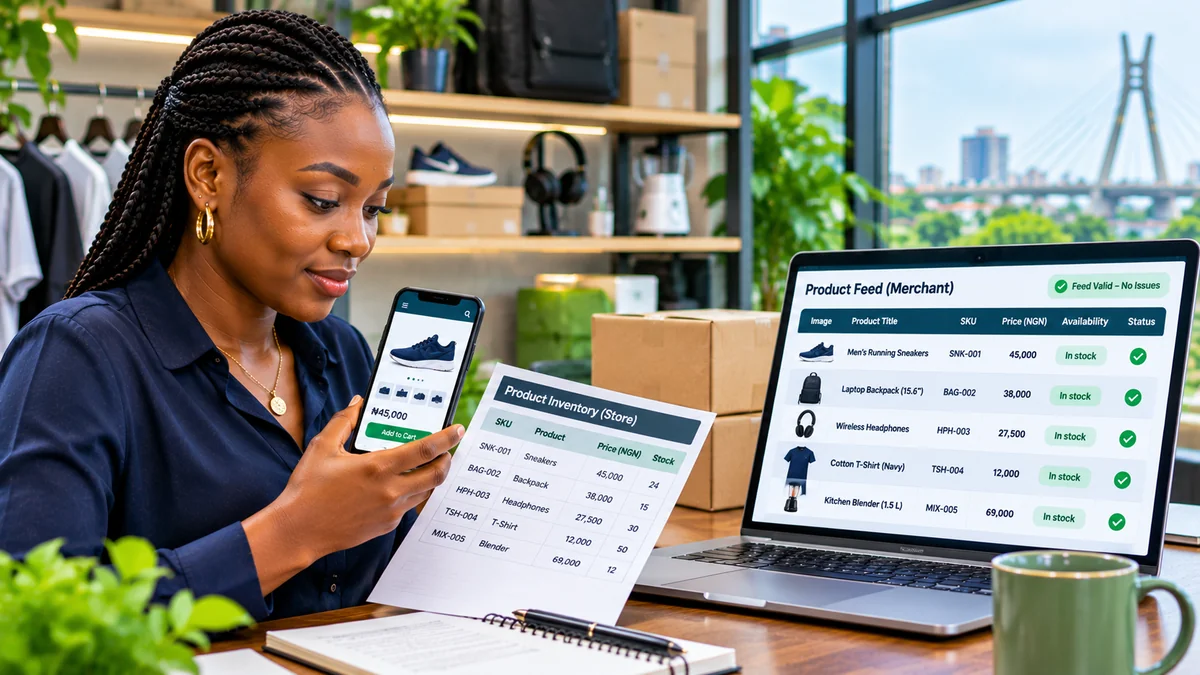
An accurate Google Shopping product feed is a structured catalogue that tells Google exactly what an e-commerce website sells, how much each item costs, whether it is available, and where a buyer can purchase it. A useful feed does more than pass a technical upload check: its identifiers, names, images, stock status and prices must stay consistent with the actual product pages and checkout.
For Nigerian retailers, Google Merchant Center supports Nigeria as a beta target country for Shopping ads and free listings, and Nigerian naira (NGN) is a supported currency. Google's country list does not currently mark Nigeria as a country with the dedicated Shopping tab. Beta availability and product visibility can vary; a valid feed is not a guarantee of impressions, sales or placement on every Google surface. See Google's beta-country guidance and target-country requirements .
This guide shows store owners and developers how to prepare product records, generate a feed, submit it through Merchant Center, prevent common errors and keep large catalogues synchronised. Research verified 3 November 2026.
What is a Google Merchant Center product feed?
A product feed, or product data source, is a structured list of individual product offers. Each row or record contains fields such as id, title, link, image_link, price and availability. Merchant Center uses that information—alongside your website and account settings—to determine whether products are eligible for particular free or paid experiences.
You can provide data through an uploaded file, a regularly fetched URL, a supported commerce-platform connection, website crawling in qualifying configurations, or an API. The correct approach depends on catalogue size, how often inventory changes and how the online store is built.
Important: Google Shopping product data is not the same as an XML sitemap. A sitemap helps search engines discover URLs; a Merchant Center product data source supplies detailed offer attributes and is subject to product-specific policies.
Step 1: Check whether your store is eligible and ready
Before exporting a catalogue, create or access your Google Merchant Center account, provide genuine business information, and complete the website verification or claiming requirements shown for your account. Use the correct store domain and select countries where you can actually fulfil orders.
For a Nigerian store selling to customers in Nigeria, check whether the beta features are available to that account and configure the relevant target country as Nigeria. Google's supported currencies list includes NGN. A store targeting another country must meet that country's language, pricing, delivery, policy and checkout requirements; do not select a foreign country merely to bypass a limitation.
Inspect the website from a new visitor's perspective. Are product pages publicly accessible? Are products genuinely purchasable? Can customers find company contact details, delivery charges and a clear refund or return policy? Does checkout work on mobile? Google's editorial and professional requirements treat missing policies, broken pages, unclear business details and an unusable purchase flow as serious quality problems.
Step 2: Build your catalogue from one reliable source of truth
Accurate feeds begin with consistent store data, not with manually rewriting listings for Google. Ideally the catalogue uses the e-commerce or inventory system's canonical product identifiers, current selling prices, available quantities, product variants and published images.
For each sellable item or variant, retain a stable SKU, human-readable name, detailed description, product URL, main image, live price, inventory state and any relevant manufacturer's identifiers. Keep a clear distinction between a parent product, an actual purchasable variant, and an optional add-on.
For example, a T-shirt offered in three sizes is not necessarily one offer with one price or stock value. If each size is separately purchasable and has distinct inventory, each should be represented with its own ID and appropriate variant fields. Never recycle an old SKU for a different product just because the original item was discontinued.
Step 3: Include the product attributes Google expects
Google's Product Data Specification is the authority for current field formats and conditional requirements. This condensed table is a practical starting point; exact requirements depend on the product, country and marketing method.
| Feed attribute | What it describes | Quality check |
|---|---|---|
id | Stable unique product or variant identifier | Do not change or reuse it unnecessarily |
title | Actual product name | Specific, readable and consistent with the page |
description | Accurate features, materials and purpose | No invented claims or unrelated promotions |
link | Public product landing-page URL | Resolves to the correct item on your verified domain |
image_link | Main product image URL | Accessible, accurate, without distracting overlays |
availability | Stock state | Use accepted values and match the page |
price | Product price with currency | Match landing page and checkout, e.g. 45000.00 NGN |
condition | New, used or refurbished state | Provide when required and never misrepresent condition |
brand, gtin, mpn | Manufacturer/product identifiers | Use genuine values where applicable; do not invent GTINs |
item_group_id, color, size | Related variants and distinguishing traits | Use consistently for relevant variant groups |
shipping | Offer-specific delivery charges where used | Match real delivery settings and customer charges |
Google supports values such as in_stock, out_of_stock, preorder and backorder for availability. Your store must represent those states honestly. For handmade or custom products without normal manufacturer's identifiers, check the specification for the appropriate use of identifier_exists; do not assign a fabricated barcode to satisfy a warning.
Step 4: Write product titles and descriptions for real buyers
An effective title identifies the actual item. Depending on the category, it may include brand, model, material, capacity, colour or size. “Men's Running Shoes — Navy, Size 43” is more informative than “Amazing Shoes Cheap Buy Now”. Do not add keywords or popular brands that are not true of the product.
Descriptions should explain relevant features and what is included in the purchase. Avoid fake compatibility claims, irrelevant competitors' names and promotional slogans. If you use generative AI to produce product titles or descriptions, Google's current specification includes structured_title and structured_description fields with AI-source indicators; review the exact submission requirements rather than silently treating all generated copy as ordinary human-written data.
Reconcile names and specifications across the feed, product page, checkout and actual inventory. A feed that describes a 128 GB model must not land on a 64 GB variant or charge for a different item.
Step 5: Use original, accurate images—not decorative feed thumbnails
The main image_link should lead to the image of the product on offer, not a generic category banner, small thumbnail or fake brand photograph. Google accepts formats including JPEG, PNG and WebP, and disallows promotional overlays and misleading or unsuitable imagery.
Important 2027 change: Google's updated product-data specification says a minimum product-image size of 500 × 500 pixels will be enforced from 31 January 2027. Nigerian stores should prepare images that meet the newer size before enforcement. This requirement applies to submitted product imagery and is separate from the 1200 × 675 WebP editorial hero image used for this FlyingEze article.
For product imagery generated or edited using AI, the current specification also calls for metadata identifying AI-generated content, such as the relevant IPTC digital-source marker. Do not remove required provenance metadata. An illustration that looks attractive in an editorial story should not be substituted for truthful product photography if it misrepresents the sold item.
FlyingEze has separately examined furniture rendering and AI visualisation for e-commerce . Visualisation can support merchandising, but a feed must still accurately depict the goods customers will receive.
Step 6: Make price and stock status match the live website
One of the fastest ways to create Merchant Center issues is to submit an old price while checkout shows a new price. If a store changes a product from ₦45,000 to ₦49,500, its feed, visible product page, structured data and checkout must reflect the correct applicable price. The currency should be NGN for the relevant Nigerian offer.
Likewise, if the last item sells, the feed should stop describing it as in_stock. Use actual inventory states from the order-management system and refresh feed data promptly after price or stock updates. Do not list “in stock” for items you cannot fulfil under the stated arrangements.
Google's price guidance and availability guidance require consistency between submitted records and customer-facing pages. Sudden price increases, discounts and temporary outages should be handled with clear, accurate updates rather than attempting to conceal changes from Google's crawler.
Step 7: Add variants, GTINs and shipping information correctly
Products with separate colour or size options need consistent variant handling. Use a stable item_group_id to identify related variants where applicable, and individual id values to distinguish each item. The title, page URL, image, stock level and price should represent the actual selected variant. Review category-specific requirements for clothing, electronics and other product groups.
For branded manufactured goods, provide the genuine brand, gtin and mpn where relevant. Copying another seller's GTIN or inventing one can associate your offer with the wrong product. Some original or one-of-a-kind products legitimately have no global identifiers; follow Google's rules rather than supplying fabricated data.
Shipping and return details also matter. Set a delivery policy that matches real charges and timeframes, including whether the store serves all of Nigeria or only particular states or cities. Use Merchant Center's shipping settings, or offer-level shipping attributes where appropriate, and ensure checkout does not unexpectedly contradict the submitted information. The shipping and return configuration guide recommends publishing a clear dedicated returns policy.
Step 8: Create the feed file—an illustrative two-product example
A small catalogue can use a tab-separated file or a compatible spreadsheet. The following shows the header and two fictional example rows. The product names, prices, SKUs and URLs are illustrative only; shop.example.com is a reserved example hostname, not a live retailer.
id	title	description	link	image_link	availability	price	condition
SHOE-001	Men's Running Shoes Navy Size 43	Breathable training shoes with rubber sole size 43	https://shop.example.com/products/shoe-001	https://shop.example.com/images/shoe-001.jpg	in_stock	45000.00 NGN	new
BAG-002	Laptop Backpack Black 15 Inch	Padded backpack with laptop sleeve and water-resistant fabric	https://shop.example.com/products/bag-002	https://shop.example.com/images/bag-002.jpg	in_stock	38000.00 NGN	new
Use literal tab characters between columns when saving as a TSV file, or a correctly formatted CSV or XML source supported by Merchant Center. Do not use commas as thousands separators inside the price field. A real product data source should also include the identifiers and category-specific attributes required for its actual inventory.
Google publishes instructions for creating tab-delimited product data sources . Validate several records manually before submitting thousands of rows.
Step 9: Submit and automate updates through Merchant Center
In Merchant Center, open the data-source settings, create an appropriate product source, choose a supported method and follow the account's current setup screens. Typical options include connecting an e-commerce platform, adding a file, scheduling file retrieval or using an approved API integration. Interface labels may change, so follow the live account controls.
For a scheduled fetch, host the product file at a stable, accessible URL and configure Google's retrieval schedule. Google's scheduled-update instructions permit http://, https://, ftp:// and sftp:// URLs and describe optional authentication where supported. In practice, use secure transport and do not expose administrator credentials in the file.
High-volume stores may use the Merchant API. Google says its older Content API for Shopping reached sunset on 18 August 2026, with service degradation for unextended integrations beginning in September 2026 and full decommissioning planned for early 2027. Developers building new integrations should use the Merchant API guidance , not legacy Content API examples found in old tutorials.
Whatever method you choose, feed generation must be idempotent and repeatable: the same item should retain its stable ID, and updates should replace the existing offer rather than create duplicates.
Step 10: Match product pages with structured data and crawlable assets
Google may compare Merchant Center records against the actual website. Product pages should expose accurate customer-facing titles, descriptions, images, prices and availability. Add appropriate Product and nested Offer structured data where relevant, including price, priceCurrency, availability and itemCondition values matching the visible page and feed.
Test those pages with Google's Rich Results Test and relevant Search Console reports. Its structured-data guidance explains how automatic item updates can help detect price and stock changes, but cautions that they are not a substitute for refreshing the primary feed.
Confirm that the product URLs and image URLs return successful responses to authorised Google crawlers; check robots.txt, noindex directives where relevant, image hotlink restrictions, login walls and broken redirects. Do not mistake a successfully downloaded feed for proof that every linked page and image is crawlable.
For more on the user experience of shop landing pages, FlyingEze has covered landing-page tools for e-commerce and lead generation . Merchant Center eligibility additionally depends on actual checkout functionality and commercial transparency, not simply visual design.
Step 11: Check diagnostics before and after products are approved
After import, inspect the product status and Needs attention areas in Merchant Center. Distinguish file-processing failures from item disapprovals, limited performance and policy/account-level issues. Fix the underlying product or website data, then allow Google's system time to reprocess it; do not repeatedly upload unchanged files hoping an error disappears.
| Problem | Likely cause | First check |
|---|---|---|
| Price mismatch | Feed differs from product page or checkout | Compare currency, sale price and final purchasable price |
| Availability mismatch | Stock data is stale | Check inventory events and update frequency |
| Image cannot be retrieved | Blocked URL, broken link or unsupported asset | Test public image URL and crawler access |
| Missing identifier | Required brand, GTIN or MPN absent | Verify manufacturer records and conditional requirements |
| Invalid landing page | Wrong variant, redirect, inaccessible product | Open the exact feed URL in a clean browser |
| Country not supported | Wrong target-country settings or beta limitations | Review current supported-country and account settings |
| Policy warning | Missing contact/returns information or restricted content | Review the cited policy and store transparency |
Track the number of products submitted, processed, approved, disapproved and eligible for each relevant marketing method. These status figures are more useful than treating a successful upload as the final result.
A simple automated quality-control routine for growing stores
For a catalogue managed by Laravel, WooCommerce, Shopify or another platform, the useful automation pattern is:
- Read only published, genuinely purchasable products and their sellable variants.
- Produce stable IDs and normalise supported attribute values.
- Reject or flag missing images, malformed prices, impossible stock values and invalid URLs before export.
- Generate a fresh data source atomically, rather than letting Google download a half-written file.
- Update when prices or inventory change and run a scheduled full reconciliation.
- Compare feed totals and attributes against the source catalogue and structured data.
- Review Merchant Center diagnostics and alert staff to new disapprovals.
- Maintain logs of export time, source-data version, item counts and failures.
The biggest operational improvement often comes from resolving which system is authoritative for price and stock. If an online shop, physical store and warehouse each keep conflicting quantities, Google will expose those inconsistencies; a feed generator alone cannot fix them.
Frequently asked questions
Is Google Merchant Center available in Nigeria?
Google lists Nigeria among beta target countries for Shopping ads and free listings and supports NGN. Beta features may be limited for some merchants; the official country list does not currently mark Nigeria as having the dedicated Shopping tab. Check current eligibility in your own account.
Does a product feed guarantee free Google Shopping traffic?
No. Google reviews product eligibility and decides where and whether listings appear. Accurate data is essential but does not guarantee impressions, positions or conversions.
Do I need a separate product feed for every colour and size?
When variants are distinct purchasable items with different stock or attributes, submit appropriate separate offer records with stable IDs and consistent grouping information. Follow the current category-specific specification.
Can I use WebP product images?
Yes, Google's product-data specification accepts WebP among other formats. The images must genuinely represent the sold item and comply with applicable size, accessibility and content requirements.
How often should the feed be updated?
As often as needed to keep price and availability accurate. A store with frequent sales and stock changes should update promptly and reconcile regularly. Automatic item updates are a safety net, not a replacement for current source data.
Should developers still use the Content API for Shopping?
No new integration should depend on that sunset API. Google's Merchant API is the successor; consult the current migration and developer guidance for existing integrations.
Conclusion: A good product feed is an accurate reflection of your store
A reliable Google Shopping product feed starts with real product information: stable identifiers, clear titles, truthful descriptions, reachable images, correct naira prices, genuine stock availability and a functioning checkout. Merchant Center, structured data and automation should agree about the same product offer.
For Nigerian e-commerce businesses, start by confirming the country's current beta eligibility, build from one source of truth, verify a small sample and automate disciplined updates. The goal is not merely to get a file accepted; it is to give potential buyers information they can trust while reducing disapprovals and operational errors.