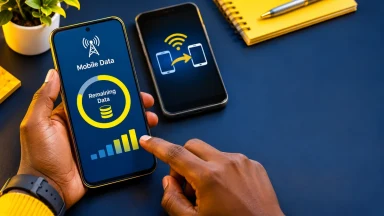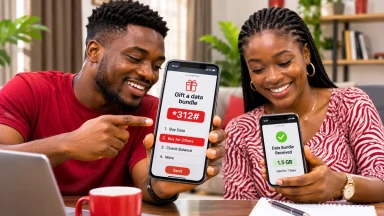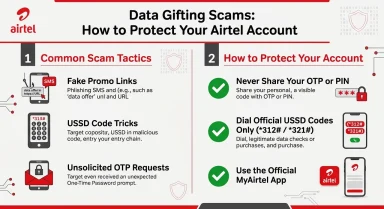
Quick answer: Airtel data gifting lets you buy a separate mobile-data bundle for another Airtel Nigeria subscriber. Airtel officially documents the sequence *312# → select a data plan → Buy for Others → enter the recipient's Airtel number. A mobile hotspot, by contrast, lets nearby phones, tablets or laptops connect to the internet through your phone's active data connection; their usage comes out of the host phone's available allowance. The key choice is simple: gift data when someone needs their own bundle, especially at a distance; use a hotspot when devices are nearby and need temporary access.
If you have been asking how can I share Airtel data?, this distinction can save you from buying an unnecessary plan or leaving a hotspot running when nobody needs it. Gifting and tethering both help another person get online, but they differ in pricing, range, who controls the connection, device compatibility, battery usage and security. Here is how to choose between them using Airtel Nigeria's official guidance and the hotspot instructions published by Android and Apple.
Research verified: 13 November 2026. USSD menus, tariff terms and hotspot availability can vary by device or plan. No live Airtel SIM purchase or hotspot session was independently tested for this article.
Airtel data gifting vs mobile hotspot at a glance
| Question | Airtel data gifting | Mobile hotspot |
|---|---|---|
| What is shared? | A newly purchased data bundle on the recipient's eligible Airtel line | A live internet connection from the host's mobile data allowance |
| Must people be close? | No; the recipient can be elsewhere within applicable Airtel service coverage | Yes for Wi-Fi hotspot; devices must stay within working wireless range |
| Does the recipient need an Airtel SIM? | Yes, for Airtel's documented Buy for Others service | No; a Wi-Fi-capable laptop or phone can connect without using its own Airtel SIM |
| Who pays or uses data? | The sender purchases the gift bundle; recipient consumes that new allocation | The host uses their existing data allowance as connected devices browse |
| Will access continue if the sender leaves or turns off their phone? | Yes, subject to the recipient's bundle validity, signal and other plan conditions | No; a hotspot session depends on the host device and active connection |
| Best for | Remote help, a child's own Airtel line, independent browsing | Short visits, connecting a laptop, temporary nearby access |
| Common risk | Wrong recipient number, unwanted purchase, choosing unsuitable plan | Excess data use, weak hotspot password, battery drain |
One detail often causes confusion: Airtel's Buy for Others option is documented as a new plan purchase, not a guaranteed transfer of gigabytes from the data already on the sender's line. A mobile hotspot does not create a second data balance at all.
What is Airtel data gifting, and how does it work?
Airtel Nigeria calls its gift service SmartSHARE. The operator's Data Share & Gifting page says a sender chooses a data bundle, enters an Airtel recipient number and pays for the selected plan. The beneficiary is credited with that plan's stated data volume and validity without paying its purchase price separately.
How to gift an Airtel bundle with the official code
- Confirm the correct Airtel Nigeria number of the intended recipient.
- Check your airtime with *310# if you will pay from airtime.
- Dial *312# from your Airtel SIM.
- Select the data bundle you wish to gift and review its price and validity.
- Choose the option labelled Buy for Others.
- Enter the beneficiary's number and review the final confirmation.
- Complete the purchase, keep any receipt or reference and ask the recipient to check their balance by dialling *323#.
Airtel's Data Plans FAQ repeats this *312# method. Exact numbered menu choices may change, so follow the option's name rather than blindly entering a sequence copied from an old screenshot. Gifted data follows the purchased plan's volume and expiry terms.
Does gifting deduct my existing bundle? Not through the documented Buy for Others method. If you already have a 4GB bundle, buying a separate eligible 1GB gift for someone else does not, by itself, transfer 1GB out of your existing 4GB. You pay the displayed purchase price, and the recipient receives a separate 1GB plan. Ordinary usage on your own line could still affect your balance during this time.
What is a mobile hotspot, and how does it use Airtel data?
A mobile hotspot—also called tethering—turns a supported smartphone into an internet connection point for other devices. The phone uses its cellular data connection, then allows a laptop, tablet or another phone to access that connection over Wi-Fi. Some devices also support USB or Bluetooth tethering.
Google's official Android instructions explain how to share a phone's mobile connection with another device. Apple's iPhone user guide similarly explains that Personal Hotspot shares the iPhone's cellular internet connection. These are phone operating-system capabilities; they are not Airtel's separate data-gifting product.
If a connected laptop downloads a large file, the mobile data used for that download is taken from the connection on the host phone, subject to the host's applicable plan rules. The laptop does not receive a new Airtel bundle with an independent expiry date, and the host remains responsible for managing total consumption.
How to share Airtel data using a hotspot on Android
Most current Android phones include a Wi-Fi hotspot setting. The menu name can vary by manufacturer and software version.
- On the phone holding the Airtel SIM, switch on mobile data and confirm that its internet connection works.
- Open Settings → Network & internet → Hotspot & tethering, or look for Mobile Hotspot or Personal Hotspot.
- Turn on Wi-Fi hotspot. You may also find a Hotspot button in Quick Settings.
- Set a clear network name and a strong, private Wi-Fi password. Keep the strongest compatible security option enabled.
- On the nearby device, open Wi-Fi, select the hotspot name and enter the password.
- Confirm internet access, watch your mobile data usage and switch the hotspot off when finished.
Google notes that some carriers may limit or separately charge for tethering. Check your Airtel plan if hotspot use is blocked or produces unexpected charges; do not assume all special-purpose bundles behave like unrestricted regular data. Google also recommends turning off tethering when not needed and charging the device during extended use.
How to share Airtel data using Personal Hotspot on an iPhone
Apple supports Personal Hotspot on compatible iPhones with cellular service and an eligible carrier plan.
- Confirm that the Airtel SIM or eSIM supplying data is selected and mobile data is enabled.
- Open Settings → Personal Hotspot, or find it under Cellular / Mobile Data, depending on the iOS version.
- Turn on Allow Others to Join if that option is offered, and review the Wi-Fi password.
- On the other device, select the iPhone's hotspot from available Wi-Fi networks and enter the password.
- When the session is over, disconnect the device and disable Personal Hotspot if it is no longer needed.
Apple's official guidance explains that iPhone Personal Hotspot shares a cellular connection, rather than simply rebroadcasting another Wi-Fi connection. If Personal Hotspot is absent or cannot be activated, check the active Airtel service and phone settings before concluding that gifting is also unavailable.
Seven practical differences that affect your choice
1. Distance: gifting works independently, while hotspots need proximity
Gift data to a relative in another city and they can use it on their own eligible Airtel line, wherever they have supported Airtel coverage. By contrast, a standard phone's Wi-Fi hotspot works only while the connected devices remain within usable wireless range. Walls, interference and device limitations can reduce the connection area; there is no universal distance that works in every building.
2. Data ownership: a separate bundle versus a shared allowance
With gifting, the recipient receives the newly purchased bundle on their Airtel account. Its validity and permitted use depend on the plan. With a hotspot, there is only the host's cellular data account; every connected device's traffic draws from that account. The host can stop the hotspot session but cannot give the connected laptop a permanent Airtel data allocation merely by enabling Wi-Fi.
3. Cost: an additional purchase versus use of an existing allowance
Airtel says the gift sender pays the advertised bundle price and the beneficiary is not charged that purchase price. A hotspot does not require a separate gifting transaction, although the host still pays for their own data plan and may incur applicable out-of-bundle charges if plan settings allow them. For a quick, nearby task, a hotspot can avoid buying a second plan; for frequent independent use, a separate bundle may be easier to manage.
4. Device needs: Airtel recipient number versus any supported Wi-Fi device
Airtel's documented data gift is for another Airtel subscriber. A laptop with no SIM slot cannot directly receive an Airtel phone-number data gift, although a supported data-equipped router or MiFi has its own account and purchase rules. A Wi-Fi hotspot can serve a nearby laptop, tablet or phone even if that device has no mobile SIM or uses a different mobile network.
5. Reliability: independent connection versus the host phone staying on
A gifted subscriber can go online without the sender remaining present or keeping their phone switched on. For a hotspot, the host phone needs enough battery, a functioning cellular connection and an active tethering session. If the host walks away, the battery dies or hotspot is disabled, connected devices lose that connection.
6. Data control and speed: one recipient plan versus several simultaneous users
A gift leaves the recipient responsible for using their own allotted bundle. With a hotspot, the host's allowance can be consumed by several connected devices, including automatic software updates, photo backups and video streaming. More users can increase total data consumption and compete for the same available connection, though actual speed depends on cellular coverage, device performance and application use. Airtel's FAQ specifically warns that streaming and background apps can consume data rapidly.
7. Security: correct recipient number versus protecting your Wi-Fi access
The main data-gifting risk is entering the wrong beneficiary number or paying through a fake purchase channel. With hotspots, the risk is allowing an unknown device onto your wireless network or forgetting to disconnect devices that continue consuming data. Use a strong hotspot password, do not disable wireless security for convenience, and change the password if it has been shared too widely.
Which method is better? Five everyday Nigerian scenarios
| Situation | Usually better | Reason |
|---|---|---|
| Your sibling needs data in another state | Gift a bundle | The recipient needs an independent connection; hotspot range is irrelevant at a distance. |
| Your laptop needs internet for a 20-minute task | Mobile hotspot | Nearby access can use your existing data without purchasing a separate phone-number bundle. |
| A visitor with another network needs to send an email | Mobile hotspot | The visiting device can join Wi-Fi without being an Airtel subscriber. |
| A child with their own Airtel line needs to study after leaving home | Gift a bundle | The plan remains on the child's line subject to validity and coverage. |
| Two people must use their laptops at the same table | Mobile hotspot | One host phone can temporarily serve nearby compatible devices. |
These are recommendations, not hard rules. An inexpensive gift may be sensible even when two people are in the same room if they need to go separate ways later. A hotspot may be unsuitable for a long work session if the host phone is low on battery or needs to leave.
Worked example: what happens to your data balance?
Imagine your Airtel line shows 4GB remaining, and a friend needs internet.
Option A — gift data: You purchase an eligible 1GB bundle for your friend's Airtel number through the *312# Buy for Others service. Your friend receives a separate 1GB plan with its advertised expiry. The gift purchase is paid separately; the original 4GB does not automatically become 3GB simply because the gift was bought.
Option B — hotspot: Your friend connects a laptop to your Airtel phone, and it uses 500MB over the session. Ignoring other usage and rounding, your remaining data falls from 4GB to about 3.5GB. Your friend gets no separate data bundle and loses the connection when the hotspot is switched off.
These are illustrative numbers, not a claim about a specific Airtel plan or real-time tariffs. Special bundle restrictions, background traffic and network billing details can alter actual usage. The point is the different accounting: gift = another purchased bundle; hotspot = consumption of the host's allowance.
Can you transfer part of an existing Airtel bundle instead of gifting?
This is a third question, distinct from both methods compared above. A transfer of existing data would deduct an eligible quantity from the sender's already-held bundle. Airtel's FAQ *321# → Gift Data Bundle under a data-transfer question, while its more detailed SmartSHARE page clearly documents purchasing a new plan using *312#.
Those published pages do not clearly establish that all current Airtel Nigeria subscribers can move arbitrary gigabytes from their existing bundle, nor do they provide a fully consistent set of current transfer limits and eligible plans. Do not assume an old Me2U guide remains valid. Check the live *321# menu for your line or ask Airtel customer care whether existing-bundle transfer is available for your particular plan.
For help purchasing a new bundle, see Airtel's official SmartSHARE instructions . FlyingEze also has a separate step-by-step Airtel gifting guide scheduled for publication; a contextual link can be added to this comparison once that guide is live and its URL has been verified.
How to check balances and manage hotspot consumption
Airtel Nigeria's official prepaid guidance identifies *323# as the data-balance code and *310# as the airtime-balance code.
| What to check | How |
|---|---|
| Recipient's gifted data and validity | Dial *323# on the receiving Airtel SIM, or use an available official self-care view. |
| Sender's remaining airtime | Dial *310# on the sender's Airtel SIM. |
| Host's data remaining after hotspot use | Dial *323# on the host's Airtel line. |
| Which device or app used data | Use device hotspot settings, Android data-usage tools, or iPhone cellular statistics where available. |
To avoid exhausting your plan during a hotspot session, limit unnecessary cloud backups and app updates, consider a metered connection on a Windows laptop and stop the hotspot when finished. The phone's data-use display and the operator's balance can use different measurement periods, so Airtel's network balance is the reference for remaining bundle allowance.
What to do if gifting or a hotspot is not working
If an Airtel gift does not arrive
Confirm that you entered the correct Airtel beneficiary number. Check the sender's purchase confirmation and the recipient's *323# balance. Do not immediately repeat a paid gift if the first transaction's status is unknown; that could create an unintended second purchase. If the sender was charged but no data appeared, retain the transaction reference and contact Airtel through official support.
Failed transactions are a broader Nigerian telecoms problem; FlyingEze previously covered calls for clearer service standards for failed airtime and data transactions .
If a phone hotspot connects but has no internet
Confirm that the Airtel SIM has mobile data enabled, sufficient eligible data and working mobile connectivity on the host phone. Then disconnect and reconnect the receiving device, check the hotspot password and look for plan-specific restrictions. If another phone or laptop connects but the connection remains unavailable, contact Airtel or the device maker as appropriate.
If hotspot data runs out unexpectedly
Check the host line's data balance with *323# and look for heavy downloads, streaming, operating-system updates and device backups. Airtel's FAQ also explains that some bundles are restricted to particular apps; a social-only allowance is not a substitute for an unrestricted browsing plan. If you need continuous shared connectivity for several devices, a dedicated MiFi or router plan may be more suitable than using one phone indefinitely.
Safety checklist for data gifting and hotspots
- Only use Airtel's documented codes and legitimate self-care channels when paying for a gift.
- Check the recipient number twice and inspect the plan's validity before confirming payment.
- Never give a stranger your SIM PIN, bank PIN or one-time password to activate a data gift.
- Use a strong WPA2/WPA3-compatible hotspot password if the phone supports it, and avoid open, password-free Wi-Fi sharing.
- Remove unknown connected devices, rotate the hotspot password after broad sharing and turn tethering off when it is no longer needed.
- Protect the mobile number itself: SIM-swap attacks can expose accounts linked to phone verification. Read FlyingEze's guide to SIM-swap fraud and mobile account security .
Frequently asked questions
Is Airtel data gifting the same as mobile hotspot?
No. Data gifting buys a separate bundle for another Airtel subscriber. A mobile hotspot shares the host phone's live connection with nearby devices and consumes the host's data allowance.
Can I gift Airtel data to someone in another city?
Yes, the recipient does not need to be next to you for an eligible Airtel Buy for Others gift. The person needs a valid receiving Airtel line, the purchased bundle and suitable network coverage.
Can I share an Airtel hotspot with an MTN or Glo phone?
Yes. A nearby device can connect through Wi-Fi even if its own SIM belongs to another operator or it has no SIM at all. That is different from Airtel's gift service, which targets Airtel numbers.
Does using hotspot cost extra airtime?
A hotspot does not itself purchase a new Airtel gift bundle. Its traffic normally uses the host's applicable cellular data plan; carrier or plan restrictions and out-of-bundle charges may apply, so verify the terms.
What happens when the hotspot owner leaves?
Connected devices usually lose that hotspot connection once they move out of effective range or the owner switches off the device or tethering feature. Gifted bundles are independent of the sender remaining nearby.
What is the Airtel data gifting code?
Airtel officially documents *312#, followed by selecting a bundle and Buy for Others. The recipient checks the resulting data balance through *323#.
Can I use my 5GB balance to gift 1GB without paying for another bundle?
Do not assume the Buy for Others option supports that. It is documented as a new purchase, and Airtel's public guidance is not conclusive about current direct transfers from existing bundles. Check the *321# menu or contact customer service for line-specific rules.
Which method is safer?
Either can be used safely. Gifting requires correct payment and recipient details; hotspots require a secured Wi-Fi connection and control over connected devices. Choose the method that fits the distance, device and duration.
Conclusion: choose the sharing method that fits the situation
For an Airtel subscriber who needs data on their own line—especially when the sender is far away—data gifting through *312# and Buy for Others is the clearer choice. The recipient receives a separate plan with its stated validity and can continue using it independently.
For a nearby friend, guest or laptop that needs a temporary connection, mobile hotspot can be simpler because it uses the phone's existing data connection without buying a second recipient bundle. Remember that the host pays through their own data allowance, keeps the device powered and should secure the Wi-Fi password.
The most useful distinction is not the word “sharing,” but who receives the allowance, whose data is consumed and whether the devices must remain together. Check Airtel's current prices, balance and plan conditions before making a paid decision.
Editorial verification: 13 November 2026. Primary research: Airtel Nigeria SmartSHARE, FAQ and prepaid guidance; Google Android Help; Apple iPhone Support. No live SIM gift, actual hotspot data measurement or user-device test was performed.