Quick answer: Protect your Airtel Nigeria account by using the operator's official channels, checking the recipient before purchasing data, and never sharing a one-time password (OTP), account PIN, password or other security code with someone offering free data or “help”. For a documented data gift, Airtel directs customers to *312# → choose a bundle → Buy for Others → enter the recipient's Airtel number. If a suspicious link, unexpected debit or possible SIM takeover occurs, contact Airtel on 300 from an Airtel line or through the contact details on its official website . For an unresolved telecom complaint, Nigeria's communications regulator provides an escalation route through the NCC consumer portal or 622.
People searching how can I share Airtel data usually want a straightforward way to help a family member or friend get online. Fraudsters can exploit that legitimate need with fake “free data” links, impersonated customer-care accounts, requests for verification codes and pressure to make unauthorised transfers. Knowing the real gifting procedure makes it easier to recognise requests that do not fit it. This guide separates verified Airtel instructions from illustrative scam scenarios, then explains practical steps to protect your phone number, money and accounts.
Research verification date: 13 November 2026. Based on Airtel Nigeria and Nigerian Communications Commission guidance. Scam scenarios are examples of common fraud methods, not claims about specific unverified incidents. Actual Airtel account activity and fraud reports were not accessed.
How legitimate Airtel data gifting works
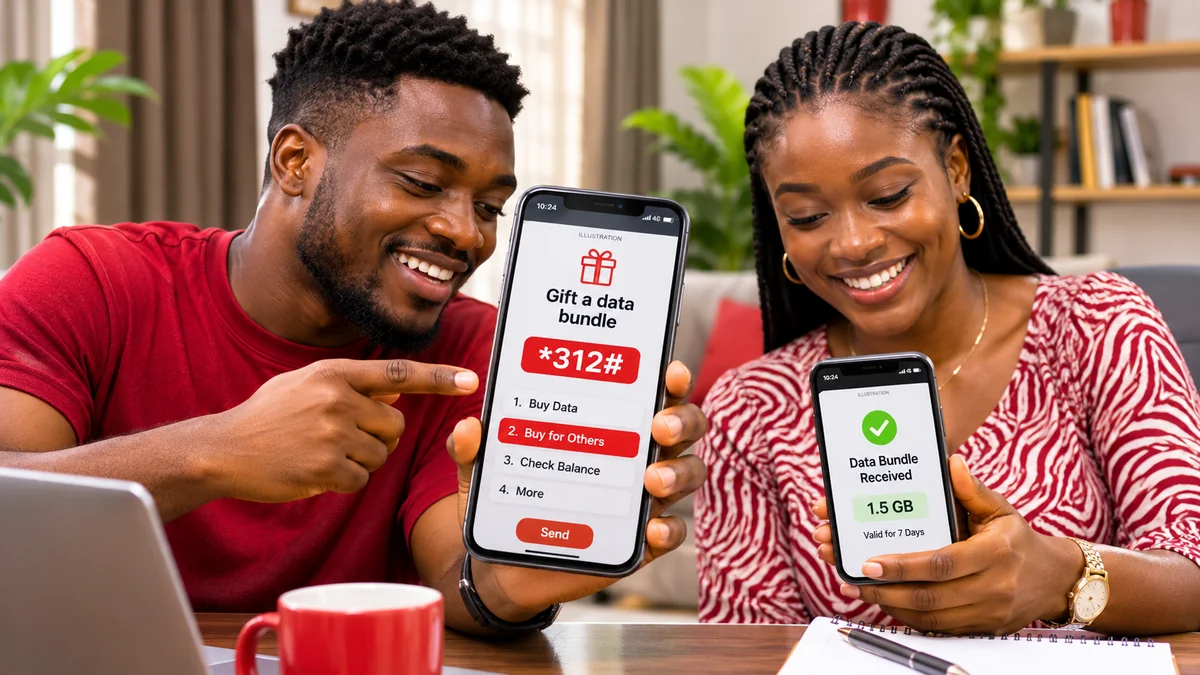
Airtel Nigeria's SmartSHARE/Data Gifting page says a customer can select a data bundle and buy it for another Airtel number. The sender pays the selected bundle price, while the recipient receives the bundle with its stated volume and validity. In other words, the documented Buy for Others service is a new purchase, not a guaranteed subtraction of megabytes from an existing bundle.
- Confirm the recipient's Airtel number directly with them.
- Dial *312# from your own Airtel line.
- Select the eligible data plan and check the displayed price and validity.
- Choose Buy for Others and enter the beneficiary number.
- Review the transaction details, then authorise it only if they are correct.
- Keep the confirmation and ask the recipient to check their balance with *323#.
Airtel also references *321# → Gift Data Bundle in its FAQ . However, the publicly available description does not clearly prove that every customer can transfer part of their existing data balance. Treat any offer promising effortless transfers of any amount, without conditions, as something to verify rather than accept automatically.
The security rule is straightforward: you initiate and review the gift inside a verified service. A stranger calling or messaging you does not need your banking OTP, email password or SIM security details to make the official purchase happen.
Six data-gifting scam patterns to recognise
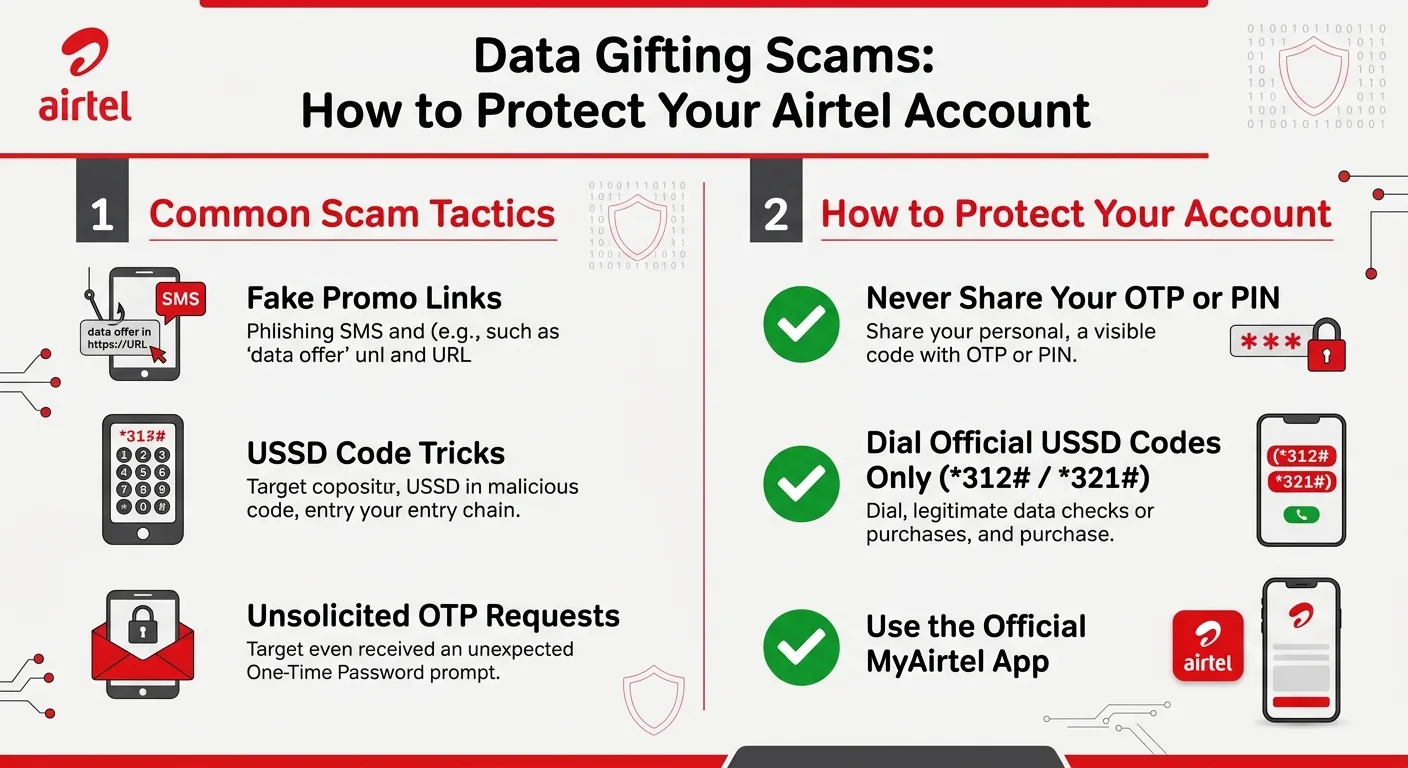
The following scenarios are examples showing how documented phishing, impersonation and mobile-account fraud tactics might be applied to data gifting. Airtel's Online Safety guidance warns against suspicious emails, links and requests for sensitive information; the NCC also identifies SMS phishing and SIM swaps as significant mobile-fraud methods.
1. A fake “free Airtel data” claim on WhatsApp or social media
You receive a message claiming that Airtel is giving every subscriber a free 10GB bundle. It asks you to open a shortened link, enter your number and share a code sent by SMS. The link might imitate Airtel's branding, but branding and a professional-looking page do not prove a promotion is real.
What to do: Do not follow the message's link. Open Airtel's website or genuine self-care app independently and look for the promotion there. Never pass along a verification code. A legitimate offer should be verifiable from an official source, not solely from a forwarded chain message.
2. A caller impersonating an Airtel representative
A caller says your data gift has been “held” and that they need an OTP, Me2U PIN or login password to release it. They may use a familiar first name, speak confidently or create a false deadline.
What to do: End the conversation and contact Airtel directly using 300 or its official website. Caller names, profile photographs and apparently local numbers are not reliable authentication. Treat an off-platform request for security credentials as a serious warning sign.
3. A fake app or website promising unlimited transfers
An advertisement directs you to install a third-party APK to unlock free or unlimited Airtel data sharing. The app asks for extensive SMS, accessibility, notification or device permissions, or for your mobile-account credentials.
What to do: Use the genuine My Airtel app obtained through official app stores or Airtel's own links. Do not sideload unfamiliar apps to complete a routine gift. On a phone where you already installed a suspicious app, remove it and review permissions, security settings and the accounts potentially exposed.
4. A false payment or refund message
Someone sends a screenshot saying they have paid for a data gift but need you to transfer airtime first, cover a “release charge” or repay a supposedly mistaken purchase. Screenshots and chat messages can be edited, and a claimed transaction may not exist in your account.
What to do: Check your actual airtime and data records and your authorised payment-provider history. Do not send money because a stranger supplied a receipt image. If a genuine mistaken transaction occurred, let the operator or payment provider investigate through its formal process.
5. Pressure to reveal or reuse a Me2U PIN
Airtel's FAQ describes *321# → PIN Management → Change PIN for Me2U-related functions. A scammer may attempt to obtain a customer's transfer PIN by offering to complete a transfer for them or by asking them to confirm an “account reset.”
What to do: If your account supports a Me2U PIN, change any unchanged preset PIN through the official menu and keep the new value private. Do not confuse a Me2U transfer PIN with your device-unlock code, SIM PIN, bank PIN or login password: these protect different things. Never provide any of them in an unsolicited chat.
6. SIM-swap or phone-number takeover
A SIM-swap attack can redirect your phone number to a SIM controlled by an attacker. This matters beyond mobile data: a number linked to banking, email or other services may receive sensitive sign-in codes. The NCC warns that unexplained loss of network service and unusual account activity can be signs requiring prompt action.
What to do: If your Airtel line suddenly loses service and you suspect an unauthorised swap, contact Airtel urgently from a different phone or visit a verified service centre. Contact your bank or other affected account providers as well. Do not treat every routine network outage as proof of fraud, but investigate unexplained loss of control promptly.
Red flags: a genuine gift versus a suspicious request
| What you see | More consistent with a legitimate action | Why it may be suspicious |
|---|---|---|
| Purchase instructions | The current *312# Buy for Others menu or genuine Airtel self-care channel | A random link or APK claiming to bypass Airtel's systems |
| Confirmation | Plan, recipient number, price and authorisation displayed in the service | Pressure to approve a charge without showing who receives it |
| Verification codes | Codes entered only into the specific official service you initiated, if required | A person on WhatsApp or a call asking you to read an OTP aloud |
| Customer support | Contact initiated through Airtel's official published channels | A stranger claiming to be staff who insists on a password or bank PIN |
| Payment record | A transaction shown by the actual operator or payment provider | Only an editable screenshot, with demands for repayment |
| Offer wording | Specific, verifiable plan details and published eligibility | Unlimited or guaranteed “free data” available only after a secret payment |
A surprising discount or unsolicited gift is not automatically fraud. Likewise, a legitimate charge dispute can happen without any scammer being involved. The right response is to verify the transaction and account records through trusted channels before making another payment or disclosing information.
Eight steps to protect your Airtel account before gifting
1. Start from Airtel's own channels
Use airtel.com.ng , the operator's published USSD codes, or its genuine app. Avoid typing login information into sites opened through unknown promotional messages. The presence of a padlock icon alone does not prove a website belongs to Airtel.
2. Confirm the recipient independently
Check the phone number with the intended beneficiary, particularly when a request comes through an unfamiliar account or a changed phone number. A person impersonating a relative might say their old line is unavailable. Call the relative using a separate trusted number if the request is unusual.
3. Review the amount, bundle and destination
Read the last confirmation screen before authorising. Airtel says the sender pays for the selected gift bundle; it does not follow that a sender must pay a private “unlocking” fee. Be particularly careful if a menu selection could trigger a repeat or unintended purchase.
4. Change preset transfer PINs where applicable
If using Airtel's Me2U PIN-enabled functions, review *321# → PIN Management and update the PIN from any unchanged preset value. Use a value that is not trivially guessed, and never reuse a banking PIN. A PIN setting in the Me2U menu should not be described as a guarantee that the account is protected against every type of takeover.
5. Secure the phone and associated email
Set a strong phone screen lock, install software updates and secure the email account linked to sensitive services. Prefer an authenticator app or security key where supported for important accounts, rather than relying only on SMS authentication. The US Federal Trade Commission's SIM-swap guidance explains why SMS-based codes can be vulnerable after a phone-number takeover.
6. Protect personal and identification records
Do not send identity documents, NIN details, banking information or registration records to a contact promising a data reward. Legitimate identity checks, where required for a separate telecom service, should be completed through verified operator procedures, not an unsolicited chat link.
7. Check balances and transaction records
Airtel's published codes identify *310# for airtime balance and *323# for data balance. After a gift purchase, check whether the sender was charged and have the recipient check their own line. Keep the transaction date, plan and reference so an unexpected deduction can be investigated.
8. Educate people who share access to your phone
Where family members use the same device, explain that a request for a “data verification code” is not a reason to reveal a private SMS. Protect children and older relatives from pressure, surprise offers and unfamiliar payment links without assuming that they cannot use mobile services safely.
How to check whether data or airtime has been taken without permission
First establish what you can verify. Dial *310# to check airtime and *323# to check data on the affected Airtel SIM. Review recent legitimate purchases, active subscriptions, automatic renewals and background app usage. A reduction in data could be ordinary consumption, an expired bundle or a paid service—not necessarily theft.
If there is an unexplained charge, write down when you first noticed it, the amount involved, any confirmation message and what your account displayed immediately before or after. Check whether another authorised person used the line. Ask Airtel to investigate the charge and any associated gift recipient or service details it is authorised to disclose.
Do not share a full account screenshot publicly when it contains personal phone numbers, payment references or one-time codes. For context on legitimate failed transactions, FlyingEze has reported on calls for clearer standards for failed airtime and data transactions . A failed or delayed purchase and fraudulent account access require different investigations.
What to do immediately if you clicked a suspicious Airtel data link
The right next step depends on what happened. Opening a link, entering a password and installing an app are not identical exposures.
- Stop interacting with the page. Do not provide additional details or authorise payment.
- If you entered a password or PIN, change it through the genuine service on a trusted device. Change reused passwords elsewhere too.
- If you gave away an OTP, act quickly. Contact the account provider associated with that code, review recent activity and secure the affected account. Do not assume that the code became harmless immediately after submission.
- If you installed an unfamiliar app, remove it and inspect permissions. Run the phone's supported security checks, update the operating system and consider qualified support if device compromise is suspected.
- If money or airtime was taken, contact the responsible provider promptly. Report the transaction reference and request investigation; a refund is not guaranteed.
- If your Airtel SIM lost service unexpectedly, investigate a possible SIM swap. Contact Airtel using another device and notify banks or other important services linked to the number if necessary.
- Preserve evidence safely. Save the scam link, conversation time and relevant messages for official reporting, without reopening malicious content or broadcasting confidential data.
When a high-value financial account may be affected, contacting the bank directly may be just as urgent as contacting the telecom operator. The NCC's 2026 consumer guidance stresses the importance of protecting the phone number because it can be linked to many sensitive services.
How to report Airtel data gifting fraud in Nigeria
First: contact Airtel Nigeria
Airtel's official Contact Us page lists 300 as its consumer helpline from an Airtel line, +234 802 150 0300 for callers using another network or calling from abroad, and customercare@ng.airtel.com. Confirm these details again on the official site before sending sensitive information.
Provide a concise description of the problem, the affected phone number, the date and time, any purchase amount, and a transaction reference where available. Ask Airtel to provide a complaint or trouble-ticket number and preserve it for follow-up. Do not send your password, OTP or banking PIN to a supposed support agent.
Second: escalate an unresolved telecom complaint to the NCC
The Nigerian Communications Commission's complaint procedure says consumers should first contact their provider and then escalate an unresolved complaint through the regulator. NCC lists the toll-free consumer line 622 and its official consumer portal. Include your provider's complaint reference and relevant evidence.
For suspected theft or impersonation, preserve evidence and consider an appropriate report to law enforcement or your financial institution as applicable. The NCC complaint process can help with telecom-service disputes; it should not be presented as an instant fraud-recovery or guaranteed refund service.
Questions to ask before accepting help from an “Airtel data agent”
Some phone shops and legitimate service providers help customers buy bundles, but a shop's convenience does not prove that it has authority to access your private account. Ask what exact service will be performed, how much it costs, where the payment goes, whether a receipt will be available, and why the provider needs any personal information.
For routine gifting through *312#, you can normally select the plan and beneficiary yourself. Do not allow an unknown agent to take control of your phone, read incoming verification messages or store account credentials. If an agent claims that your data can only be released after you disclose a code, stop and confirm the requirement with Airtel directly.
Airtel's public data-gifting instructions do not establish that every subscriber can transfer arbitrary amounts from an existing data balance through older Me2U tutorials. That uncertainty is another reason to verify a purported “special transfer service” rather than pay to activate it. The service that Airtel clearly documents is buying a new bundle for another Airtel customer.
Frequently asked questions
Is Airtel data gifting itself a scam?
No. Airtel provides a legitimate SmartSHARE/Buy for Others service. The risk comes from fake promotions, impersonation, unauthorised transactions and attempts to trick customers into disclosing security information.
What is the safest official code to buy data for someone else on Airtel?
Airtel documents *312# → choose a data plan → Buy for Others. Follow the menu labels displayed on your line and confirm the recipient before purchasing.
Does Airtel need my OTP to send free data?
Do not give an OTP to a caller, chat contact or promotional webpage claiming it needs the code to release a gift. Only use any verification code in a trusted service that you deliberately initiated, and verify the purpose of the code.
How can I tell if an Airtel data offer is fake?
Look for suspicious links, unusual urgency, demands for passwords or identity documents, unverifiable eligibility, and payments to private accounts. Confirm offers independently on Airtel's official website or through customer care.
What should I do if airtime disappeared after a supposed gift?
Check the account balance, subscriptions and transaction history. Preserve the relevant details, contact Airtel for an investigation and seek a complaint reference. Do not assume a deduction is automatically fraud without examining the transaction.
Should I change my Airtel Me2U PIN?
Yes, if you use an applicable PIN-enabled transfer function and the PIN remains a preset or easily guessed value. Airtel's FAQ describes the *321# PIN Management menu. Keep the PIN private and distinct from other security codes.
Can a SIM swap affect accounts beyond Airtel data?
Yes. An unauthorised SIM swap can affect accounts that depend on the mobile number for sign-in or recovery. Contact Airtel and relevant banks or online services urgently if you suspect number takeover.
Where do I report unresolved Airtel fraud-related telecom complaints?
Contact Airtel first on 300 or another verified support channel. If the telecom complaint remains unresolved, the NCC provides an escalation route through 622 and its consumer complaint portal .
Conclusion: safe sharing begins with account control
Sharing data should be a simple way to help another person get online. For Airtel Nigeria customers, the safest starting point is a documented service you initiate yourself—*312# and Buy for Others—with the recipient number, plan and payment details checked before confirmation.
Avoid unfamiliar “free data” links, never reveal an OTP or transfer PIN to someone offering help, keep your phone number and linked accounts secure, and investigate unexplained activity through official channels. If you think an account is compromised, act quickly to protect it rather than trying to recover a gift through another stranger. Verify the service, control the transaction and keep evidence for support.
Editorial verification: 13 November 2026. Primary sources include Airtel Nigeria's SmartSHARE, FAQ, Online Safety and Contact Us pages, plus NCC consumer-fraud and complaints guidance. This guide does not establish that a particular unsolicited message, account deduction or transaction was fraudulent without an investigation.