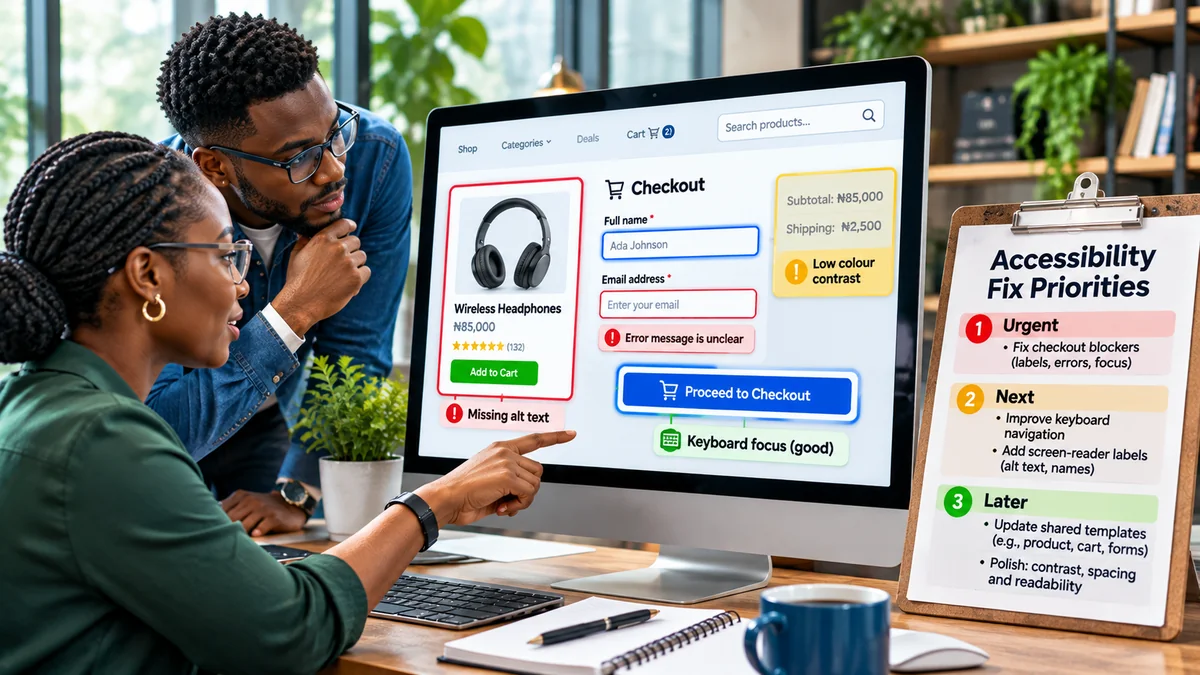
How to Prioritise Accessibility Fixes on an Existing E-Commerce Website
An online shop can look attractive and still prevent customers from buying. A keyboard user may be unable to select a product size; a screen reader may announce a checkout field only as “edit text”; or a floating promotion may hide the button needed to place an order. Faced with dozens of accessibility findings, a small business might not know where to begin.
The best starting point is to fix barriers that stop people completing important shopping tasks, then address widely reused components and other high-impact problems while working towards the full applicable accessibility standard. Under WCAG 2.2, an online store needs more than accessible product descriptions: product discovery, account access, basket management, checkout and payment all matter.
This guide offers a practical method for deciding what to repair first, assigning responsibility, and verifying that the fixes actually work. It applies to existing independent stores, marketplace storefronts and custom e-commerce sites. Research verified: 6 November 2026.
Why prioritisation matters—but does not replace WCAG conformance
The W3C Web Accessibility Initiative's interim-repairs guidance recommends considering critical tasks, popular content, reported barriers and work currently being redesigned. It also highlights failures affecting several pages or essential processes, alongside simpler repairs that can be delivered quickly.
That is an approach to sequencing work, not permission to leave other accessibility barriers indefinitely. WCAG 2.2 has conformance levels A, AA and AAA, and Level AA includes all applicable A and AA criteria. Which technical or legal target a business must meet depends on its circumstances and jurisdiction. Avoid calling a site “WCAG 2.2 AA compliant” until the required pages and complete processes have been evaluated against that level.
The W3C conformance explanation uses an online store to illustrate the complete-process requirement: pages needed to select and buy a product must all meet the claimed level. A passing product page cannot compensate for an unusable payment step.
Step 1: Map the customer journeys that generate and support sales
Before running a scanner across thousands of URLs, write down the pathways customers actually use. Follow each from beginning to end, including alternate states and mobile layouts.
| Journey | Pages or components to include | Typical accessibility risk |
|---|---|---|
| Find a product | Menu, search, filters, results, product page | Filters that cannot be used from a keyboard |
| Choose and add | Variants, quantity control, add-to-basket, basket drawer | Colour-only variant choices or missing status announcement |
| Complete an order | Cart, delivery address, shipping, payment, confirmation | Unlabelled fields, hidden focus or inaccessible payment widget |
| Access an account | Sign-in, password recovery, one-time code, order history | Authentication that blocks paste or password managers |
| Resolve a problem | Returns, tracking, help, complaints and contact forms | Unusable return request or inaccessible chat launcher |
Identify shared components, too. A broken navigation menu used on 500 product pages is effectively one reusable defect with a wide reach. A payment iframe provided by another company is still part of the customer experience and must be evaluated rather than ignored because it is externally hosted.
Step 2: Separate complete blockers from friction and polish
Use a consistent severity definition. The following four levels are an illustrative operational model, not an official W3C severity scale:
| Severity | Meaning | Example |
|---|---|---|
| 4 — Blocker | A person cannot reasonably complete an essential task | Checkout traps keyboard focus and cannot reach “Pay” |
| 3 — Major | A task is possible only with serious difficulty or an unreliable workaround | Screen reader cannot identify cart item controls |
| 2 — Moderate | Important information is difficult to perceive or operate | Product variant error is shown only by colour |
| 1 — Minor | Localised issue with limited direct impact on task completion | Repeated decorative icon has an unnecessary spoken name |
Severity must reflect the experience of affected users, not the convenience of the development team. A defect affecting fewer shoppers can still be urgent if it completely excludes them. Do not estimate disability prevalence or lost revenue from an automated checker unless you have sound evidence.
Step 3: Apply a transparent scoring method to the backlog
For a shop with limited resources, a simple score can make prioritisation explainable. Rate each confirmed issue for severity (1–4), importance of the customer journey (1–4), breadth of affected pages/users (1–3), and reuse of the faulty component (1–3). As an optional management aid, calculate:
Priority index = (3 × severity) + (2 × journey importance) + breadth + component reuse.
The formula deliberately favours severe blockers in critical journeys. It is an illustrative in-house planning formula, not part of WCAG, and should never automatically overrule an accessibility specialist's judgment, legal obligations or an urgent user report. Estimate effort separately and use it to identify quick wins among problems with comparable impact.
| Example issue | Severity | Journey | Breadth | Reuse | Index |
|---|---|---|---|---|---|
| Keyboard trap in checkout | 4 | 4 | 3 | 2 | 25 |
| Product option buttons unnamed to screen readers | 3 | 4 | 3 | 3 | 23 |
| Low-contrast informational labels on many products | 2 | 3 | 3 | 3 | 18 |
| Unneeded spoken name on decorative footer icon | 1 | 1 | 2 | 3 | 10 |
These sample scores are hypothetical. The actual scores should come from testing the specific store. Where the impact is uncertain, mark the issue for investigation rather than assuming it is harmless.
Step 4: Fix purchase-blocking keyboard and focus failures first
Start with problems that prevent selecting products, editing the cart or finishing checkout. Test Tab, Shift+Tab, Enter, Space and the appropriate arrow keys without touching the mouse. WCAG 2.1.1 Keyboard (Level A) and 2.1.2 No Keyboard Trap (Level A) address fundamental operability.
Look especially at custom product selectors, quantity steppers, dropdown menus, delivery-date pickers, voucher dialogs and third-party payment controls. Replace a clickable non-semantic element with a native button or link where appropriate; custom widgets need explicit keyboard behaviour and correctly exposed names, roles and states.
WCAG 2.2 added 2.4.11 Focus Not Obscured (Minimum), Level AA: when a component has keyboard focus, author-created content must not hide it entirely. Sticky headers, cookie prompts and floating promotional banners are common culprits. The stronger fully visible version is Level AAA, not AA. See W3C's detailed explanation .
Step 5: Repair checkout labels, errors and payment safeguards
An inaccessible address form or card-payment widget can nullify improvements elsewhere. Audit visible labels, the relationship between labels and controls, required-field instructions, error descriptions and focus after a failed submission. Under WCAG 3.3.1 (Level A), automatically detected input errors must identify the item and describe the problem in text; 3.3.3 (AA) covers known safe correction suggestions.
Preserve correct values when one field fails. Avoid forcing customers to re-enter the same information at later steps: the newer 3.3.7 Redundant Entry (Level A) generally requires reusing or offering previously supplied information within the same process, subject to exceptions.
WCAG 3.3.4 Error Prevention (Legal, Financial, Data), Level AA addresses covered financial submissions. At least one suitable protection is required, such as reversibility, checking input with an opportunity to correct it, or review and confirmation before final submission. A clear order-review screen is one practical pattern; it is not the only valid one. Read the W3C explanation for the exact scope.
If developers need form-specific implementation advice, check FlyingEze's separate scheduled article on labels, validation and focus once it is publicly available. For now, W3C's official forms tutorial provides a reliable reference.
Step 6: Address high-reuse components before one-off presentation details
A repair to a shared product card, site header, cart drawer, search filter or modal-dialog component can benefit many pages simultaneously. W3C's implementation guidance specifically recommends accessible templates and components as an efficient way to reduce repeat problems.
Build and test a reusable accessible version, then roll it out carefully. A change that improves one keyboard path could unintentionally affect focus order elsewhere, so include regression checks. Design-system fixes do not excuse content problems: editors still need meaningful product-image alternatives, understandable links and correctly structured descriptions.
FlyingEze's earlier guide to website design mistakes explains how confusing navigation can create friction. Accessibility remediation turns that broad usability concern into testable requirements for people with different input and perception needs.
Step 7: Evaluate the WCAG 2.2 additions in real shopping interfaces
After immediate purchase blockers, inspect the newer requirements on actual controls rather than treating WCAG 2.2 as an abstract checklist:
- 2.5.8 Target Size (Minimum), AA: pointer targets generally need a 24 × 24 CSS-pixel area, with defined spacing and other exceptions. Check tiny remove-item icons and densely packed filter controls; do not incorrectly claim every target must be 44 pixels.
- 2.5.7 Dragging Movements, AA: provide a single-pointer, non-drag alternative where required—for example, buttons to rearrange cart items rather than only dragging.
- 3.2.6 Consistent Help, A: repeated contact or help mechanisms should maintain the required consistent relative order across the relevant pages.
- 3.3.8 Accessible Authentication (Minimum), AA: ensure account login does not depend solely on an inaccessible cognitive-function test. Support appropriate alternatives and mechanisms such as password managers and paste.
- 2.4.11 Focus Not Obscured (Minimum), AA: test promotions, chat launchers and bottom-sheet drawers against keyboard focus.
These additions sit alongside older requirements for image alternatives, text contrast, reflow, keyboard operation, headings and form semantics. See the W3C overview of changes and the full WCAG 2.2 Quick Reference . Do not confuse optional AAA targets with the Level AA criteria being prioritised.
Step 8: Include mobile layouts, zoom and assistive technology
Many e-commerce defects appear only at smaller viewports: a delivery selector becomes hidden, a fixed “Buy now” bar covers the active input, or the page requires horizontal scrolling to read ordinary text. Check relevant text-resizing and reflow requirements and test mobile layouts, including on-screen keyboards and orientation changes.
Use an automated accessibility checker to find likely label, contrast and markup issues, but validate important tasks manually with keyboard and screen-reader testing. W3C's evaluation overview stresses that no tool alone can determine whether a site meets accessibility standards.
If possible, invite people who use assistive technologies to test realistic tasks, compensating their time appropriately. Do not assume that one screen-reader/browser combination represents all users. Record the exact steps, affected devices, observed behaviour and fix verification.
Performance should be monitored alongside accessibility, but separately. FlyingEze's Core Web Vitals guide addresses loading and visual stability; a fast checkout is not necessarily an accessible checkout.
Step 9: Treat third-party payment, chat and recommendation widgets as part of the audit
A business may have limited ability to change the code inside a payment provider's embedded iframe, but the customer still experiences that control as part of the store. Evaluate whether the payment path can be operated with a keyboard, announces field names and errors, works at zoom and provides accessible confirmations.
Raise reproducible accessibility tickets with the provider and request remediation evidence and timelines. If a vendor cannot resolve a serious barrier promptly, investigate an equivalent accessible checkout method that preserves security and transaction integrity. Do not invent an untested workaround or suggest sending card information through ordinary email.
Also examine chatbots, consent banners, fraud-verification challenges, delivery maps and embedded reviews. A “third-party” label should inform ownership and escalation, not remove the item from the accessibility backlog.
Step 10: Convert the audit into a 30/60/90-day repair plan
When time and budget are limited, use staged work with a named owner for each issue. The following is an illustrative project plan, not a guarantee of conformance in 90 days.
| Period | Delivery focus | Evidence required |
|---|---|---|
| Days 1–30 | Audit complete purchase journeys; fix blockers in navigation, variants, cart, checkout and payment; provide accessible support routes | Retested keyboard and screen-reader purchase path; critical-issue register |
| Days 31–60 | Correct reusable controls, errors, images, contrast, zoom, authentication and other A/AA issues | Component-level tests, mobile checks and updated defect scores |
| Days 61–90 | Review long-tail templates, editorial content, third-party fixes and regression coverage | Documented remaining gaps, owner sign-off and continuing maintenance plan |
If a blocker is discovered in week eight, treat it urgently rather than waiting for the next planning cycle. Conversely, do not rush a production checkout change without security, payment and regression testing. Interim changes should be safe, and users need a clear way to report barriers that remain unresolved.
What to record in an accessibility remediation backlog
Use a spreadsheet or issue tracker that your team already maintains. A useful entry records the page or component, reproduction steps, affected user task, applicable WCAG criterion and level, severity, journey importance, breadth, reuse, owner, effort estimate, proposed fix, test evidence and current status.
Avoid treating automated error counts as the only success metric. One keyboard trap may be more consequential than dozens of duplicated decorative-alt warnings. Useful outcome measures include the number of unresolved critical blockers, percentage of key journeys successfully retested, time to resolve user-reported barriers and proportion of shared components with regression coverage. These are internal management measures, not official WCAG conformance scores.
Review priorities after every major storefront release, payment-provider change or new customer complaint. W3C also recommends monitoring and ongoing accessibility responsibilities rather than treating remediation as a one-off redesign.
Common mistakes when deciding what to fix first
- Fixing only what a scanner counts: automated tools miss some interaction and usability barriers.
- Optimising easy cosmetic problems while checkout remains inaccessible: give serious customer blockers priority.
- Auditing only the homepage: test full selection, basket, payment, confirmation and return journeys.
- Ignoring less common access needs: severity is not determined only by how many customers report the issue.
- Leaving shared components untouched: repairing a reusable control can improve many pages.
- Assuming an overlay proves compliance: fix the underlying content, code and interactions.
- Publishing a sweeping compliance claim too early: verify the required pages, processes and standards first.
Frequently asked questions
Which accessibility problem should an online store fix first?
Start with confirmed barriers that prevent essential tasks, especially searching, selecting products, adding to the basket and checking out. Then weigh severity, impact, affected pages and the opportunity to fix shared components.
Does WCAG 2.2 provide an official remediation scoring formula?
No. The scoring example in this guide is a management aid. W3C provides standards and prioritisation guidance, but it does not designate this formula as a conformance metric.
Can a store claim WCAG 2.2 AA if the checkout works but other pages have failures?
No blanket claim should be made on that basis. WCAG conformance is scoped to entire pages and complete processes, and all applicable A and AA criteria must be satisfied at the claimed level.
Should we prioritise Level A issues over every Level AA issue?
Level A failures are important, but severity and real-world harm also matter. A serious AA checkout failure may require immediate attention. The long-term goal is to address all applicable criteria at the chosen level.
Can accessibility improvements guarantee higher sales?
No. Removing barriers can let more people complete tasks, but sales effects depend on product demand, traffic and other factors. Measure results without inventing conversion improvements or treating accessibility only as a marketing tactic.
Conclusion
Prioritising accessibility fixes on an existing e-commerce website means making a defensible decision about what blocks customers, where the problem occurs, how broadly it repeats and how safely it can be repaired. Start with complete shopping journeys, fix keyboard and payment blockers, improve shared components and assess the newer WCAG 2.2 requirements.
Then verify outcomes through manual testing, track unresolved work and keep accessibility in routine maintenance. A priority list is only the first step: success means customers can genuinely discover, choose and purchase products without avoidable barriers.