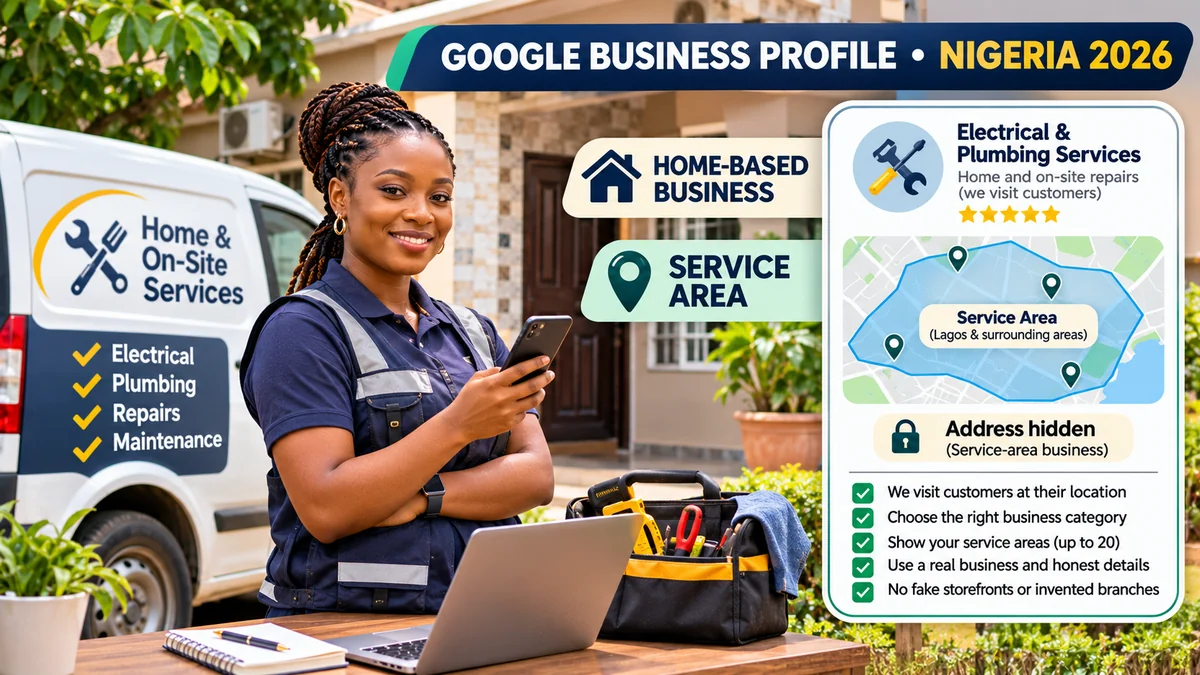
Yes, a home-based business in Nigeria can qualify for Google Business Profile—but running a business from home does not automatically make it eligible. Google generally requires a business to meet customers face-to-face, either at a legitimate customer-facing location or by visiting them. A plumber operating from a home office who repairs customers' pipes can usually create a service-area business profile and hide the residential address. A fully online business that never meets customers in person generally cannot create a local listing simply to appear in Google Maps.
The crucial decision is whether customers come to you, you go to customers, or both. Google's eligibility guidelines and business representation policy distinguish storefront, service-area and hybrid operations and reject fake branches, unattended virtual offices and lead-generation listings. This guide applies those rules to Nigerian traders, artisans, technicians, tutors, cleaners and small business owners without making unsupported claims that every example is automatically eligible.
Research verified on 2 November 2026. Business examples are hypothetical. Eligibility and verification depend on the actual business activity, premises and evidence accepted by Google.
What is a home-based or service-area business on Google?
A home-based business describes where the owner works; it is not a separate Google profile type. Google cares about customer interaction and the real operating model. Its service-area guidance recognises two relevant configurations:
- Service-area business (SAB): staff visit or directly serve customers at their locations, but customers do not visit the business base. Examples include cleaners, plumbers and mobile repairs. The address should be hidden from the public profile.
- Hybrid business: staff serve customers at a genuine, customer-facing and staffed premises and also visit or deliver to them. It can show the address if Google's storefront requirements, including permanent signage, are met.
A storefront receives customers at its location during the relevant customer-facing hours; it needs a genuine premises, proper signage and staff availability. A digital-only business without face-to-face customer interaction is normally ineligible, even if it has a registered company or website.
| Model | Customer contact | Address displayed? |
|---|---|---|
| Service-area | You visit customers | No; hide the operating address |
| Storefront | Customers come to an eligible staffed premises | Yes, when address rules are satisfied |
| Hybrid | Customers visit and you serve them elsewhere | Yes, if it qualifies as a genuine storefront |
| Online-only | Only websites, calls or remote sessions | Generally not eligible for a Business Profile |
Can Nigerian businesses run from a house and still be listed?
Often, yes. Google does not require a service-area business to rent a commercial shop. A home can be the genuine operating base for an artisan who travels to customers. What matters is that the services actually involve the necessary in-person contact and that the address is handled according to the right profile type.
Do not confuse a private home address used internally for location verification with permission to advertise that home as a customer-facing shop. Google's address instructions explicitly say that businesses which do not serve people at their address should turn off public address display. Hiding the address is not an attempt to deceive Google; claiming a storefront that customers cannot visit would be.
A home salon that genuinely receives clients may have a more complicated status. If it operates as a properly signed, staffed, customer-facing location, it may meet the storefront requirements. If it only travels to clients, it should be a service-area listing. If neither model can be substantiated, do not create a storefront merely because appointments are arranged online.
Seven Nigerian examples: which businesses may qualify?
These scenarios are illustrative and assume the person actually performs the stated activities. They are not Google-approved listings or legal determinations.
| Example | Likely treatment | Important condition |
|---|---|---|
| Electrician based at home in Abuja, visiting customers | Service-area business | Real site visits, correct local service areas, hidden home address |
| Cleaner travelling from a Lagos home office to clients | Service-area business | Direct on-site work, not merely a lead-referral website |
| Tailor operating an identifiable home studio where customers visit | Potential storefront or hybrid | Actual customer-facing premises with signage and staff during stated hours |
| Home catering business directly delivering prepared food | Potential service-area business | Actual delivery operations and any applicable food-service rules; third-party-only fulfilment requires review |
| Mobile tutor conducting in-person lessons at pupils' homes | Potential service-area business | Real recurring face-to-face delivery, not only Zoom lessons |
| Remote-only web developer working entirely online from Enugu | Generally ineligible | No face-to-face customer contact or eligible customer-facing premises |
| Seller with only an online shop and courier fulfilment | Generally ineligible | Online transactions and third-party shipping alone do not establish in-person business contact |
Google makes some special allowances, including for certain delivery-only food businesses, but those have separate conditions. An unusual activity—such as a home kitchen, regulated service, tutoring centre or professional practice—should be checked against current category-specific rules rather than approved from this table alone.
Step 1: Check eligibility before creating or claiming a listing
Ask four questions: Do we meet customers in person? Where does that happen? Is our business location genuine and under our control? Can we produce accurate evidence that the business operates as described? If you answered “no” to all face-to-face interactions, a Business Profile is normally not the right marketing channel.
Search for your trading name first to avoid duplicate listings. An eligible business can then use Google's Business Profile setup process to claim an existing profile or add one. Use an organisation-controlled Google Account. The service is free; Google does not charge to create an ordinary Business Profile.
Registering with the Corporate Affairs Commission may be important for the legal operation of your business, but it does not make an otherwise ineligible online-only company a Google Maps storefront. FlyingEze's CAC business-registration guide covers that distinct legal process.
Step 2: Enter your real operating address, then hide it when required
During setup or verification, Google may need the genuine physical address associated with the business. Use accurate information; do not substitute the nearest shopping plaza, a friend's office, a P.O. box or a location in an area where you merely hope to attract customers.
To hide a service-area business's address, Google's current instructions are: open your Business Profile, select Edit profile → Location, edit Business location, switch off Show business address to customers, then save. Add the legitimate service area as appropriate. The exact on-screen layout can change.
Hiding the address means it should not be displayed as the public profile's location; it does not mean Google's internal verification system no longer needs correct location details. It is also wise to check your own website and other directories if you do not want your home address publicly displayed elsewhere.
Where an official Nigerian street address is hard for the mapping system to locate, Google allows adjusting the map pin and using appropriate nearby landmarks or cross-streets in limited circumstances. Do not invent a prestigious office address to solve a geocoding problem.
Step 3: Set realistic service areas, not every Nigerian state
A service area describes where a business actually travels or delivers. Google's instructions permit up to 20 named service areas—cities, postcodes or other supported geographic units, rather than a custom kilometre radius. The overall boundary should generally remain within approximately two hours' driving time from the business base, although some exceptional business models reasonably cover more.
A cleaning team based in central Enugu might list a selection of Enugu neighbourhoods that it can serve consistently. A mobile mechanic based in Lagos should not list Abuja solely to appear in an additional market when nobody actually works there. Long-distance coverage must reflect real operations and customer expectations.
Important: adding 20 areas does not create 20 physical branches or guarantee rankings in each area. Google's local search results are influenced by relevance, distance and prominence, not by the number of towns added. Google's ranking guidance does not offer a paid shortcut to higher organic local placement.
Step 4: Choose the accurate business name, category and hours
Use your real trading name—the name reflected in customer-facing materials—not a phrase stuffed with cities and service keywords. “BrightSpark Electrical Services” is a more defensible name than “BrightSpark Best Electrician Abuja 24/7 Cheap Repairs” unless the longer wording genuinely is the established real-world name.
Select one primary category that best describes what the business is. Add only genuinely relevant secondary categories. Google's editing guidance permits one primary and up to nine additional categories, but it does not encourage filling them all.
Display hours when customers can actually reach the business or obtain the service, not automatic 24-hour availability. Use holiday and temporary schedule changes where relevant. A mobile worker can advertise evening emergency call-outs if those are real; an owner who stops answering after 5 pm should not claim 24/7 service simply to attract more calls.
Step 5: Prepare home-based video verification correctly
Google selects the available verification methods; you may see video recording, phone, email, live video or mail options depending on the profile. If video recording is required, the official requirements specify an unedited, continuous video of at least 30 seconds, recorded and uploaded through the mobile Business Profile verification flow.
For a service-area business, Google expects evidence in three areas: location (recognisable street signs or nearby landmarks around the real base); business existence (tools, equipment, branded materials or work area); and authority (proof that you manage the operation, such as access to work assets, an appropriately branded vehicle or suitable business documents).
For example, a home-based air-conditioner technician could show a local street sign, their professional tools, a branded vehicle and access to equipment under their control. Google explicitly allows using neighbourhood landmarks when a service-area business operates from home.
Do not film private account numbers, customers' faces or sensitive identity details. Don't upload a montage of old clips, fake signage or borrowed machinery. A storefront or hybrid business has different video requirements, including showing permanent premises signage, so follow the instructions displayed for your actual model.
Step 6: Avoid virtual offices, fake branches and duplicate profiles
Google's location guidelines reject a virtual office that is only a mailing address. An office in a shared workspace is not automatically eligible either: it must meet the relevant customer-facing, signage and staffing rules. Renting a desk one afternoon per month does not create a continuously staffed storefront.
One service-area business generally has one profile for its operating area. Separate profiles may be appropriate only when there are genuinely distinct operating locations with separate staff and service coverage that meet Google's policy—not because one employee drives between neighbourhoods or the company wants more map pins.
A franchise or multi-branch operation should review each location individually. If the same company runs two independently staffed service bases in different cities, there may be a basis for distinct profiles; if all work is dispatched from one home, there usually is not. Duplicate or deceptive locations can trigger verification demands or suspension.
Step 7: Build trust without pretending your home is a shopfront
Add a reliable business-controlled phone number, a functioning website and a factual description of what you do. Google's description field allows up to 750 characters and should focus on services rather than links, exaggerated rankings or promotional slogans. List the real work you perform, such as air-conditioner servicing, post-construction cleaning or plumbing repairs.
For photographs, use authentic tools, work vehicles, permitted before-and-after project images or employees with consent. Do not show a fictional shop interior generated by AI as proof you have a physical premises. If you work from a residence, do not reveal family rooms, identifying documents or household security details unnecessarily.
After real work is completed, ask customers for honest reviews through Google's official link or QR code. Google prohibits incentives such as cash or discounts for posting, changing or removing reviews. Reply politely to feedback and keep complaint discussions private where personal details are involved.
For broader discoverability beyond the profile itself, FlyingEze explains why local SEO matters for businesses . A clear website service page and trustworthy business details complement a Google listing but cannot make an ineligible address legitimate.
Step 8: What to do when Google asks for re-verification or suspends a profile
Changing a profile's address, name or other important details may trigger new checks. If verification fails, read Google's specific notice and correct genuine discrepancies. Repeatedly opening new profiles for the same business usually makes matters worse.
If Google suspends a profile, follow the official appeal process rather than inventing a replacement address. The appeals tool may accept evidence such as business registration, appropriate licences, tax documents and utility bills. Details should accurately correspond with the profile and support the claimed business activity.
Timing matters: where Google offers an appeal evidence form, its instructions say to submit the evidence within 60 minutes after opening that step. Prepare your documents first. Google specifically warns against creating a new duplicate Business Profile while an appeal is being reviewed.
Evidence does not guarantee reinstatement, particularly if the underlying business does not meet eligibility rules. The right outcome may be correcting the model from storefront to service area, removing an invalid location, or using other marketing channels instead.
Nigeria-specific pre-publication checklist for a home-based profile
| Check | What “ready” looks like |
|---|---|
| In-person contact | Real customers are visited or received under an eligible model |
| Profile type | Service-area, storefront or hybrid matches the actual operation |
| Location privacy | Home address is hidden when customers do not visit |
| Geographic reach | Up to 20 genuinely served areas, without invented branch locations |
| Business identity | Real trading name, correct category and reliable phone |
| Opening hours | Actual customer-facing or service availability, not invented 24/7 hours |
| Verification evidence | Legitimate operating location, equipment and proof of management |
| Media and reviews | Real photos and un-incentivised customer feedback |
| Ownership | Business retains account control and avoids duplicate profiles |
| Performance | Enquiries, calls, bookings and actual service outcomes reviewed monthly |
How to measure results without chasing false map rankings
Once verified, review your Business Profile's performance reporting for searches, profile views, calls, directions requests and website interactions where available. A call-button click is not proof that somebody spoke to you; a website visit is not a booked job. Keep a simple enquiry log indicating how customers found you and whether the enquiry led to a legitimate appointment.
For service-area businesses, prioritise contacts from towns you actually serve and job types you offer. A high view count from distant locations is not necessarily useful. Maintain the business hours, services, photos and location details monthly and check for user-suggested edits.
No particular number of reviews, service areas or uploaded photographs guarantees a first-page Google Maps position. Real customer experience and accurate information should drive optimisation decisions.
Frequently asked questions
Can I use my residential address to verify a business and hide it from customers?
Yes, a genuinely eligible service-area business may operate from home, provide accurate location information for verification and hide the address from its public listing when customers do not visit. Google may still need internal proof of the operating base.
Can I list my home salon as a shop?
Only if the actual operation satisfies Google's customer-facing storefront requirements, including the appropriate permanent signage and staffing. Otherwise, assess whether a service-area model genuinely applies; don't list a private residence as a walk-in salon when it isn't one.
Can I set all of Nigeria as my service area?
Google recommends up to 20 specific geographic areas with a total footprint generally within about two hours' drive from the base, although exceptions exist. Enter where you really provide direct services, not markets you hope to reach someday.
Do I need a CAC registration certificate to make my business eligible?
Business registration and Google profile eligibility are separate. Google may ask for supporting legal or operating documents during verification or an appeal, but CAC registration alone does not turn an online-only operation into a qualifying local business.
Can a remote consultant or online-only tutor have a Business Profile?
A purely remote provider with no customer contact in person is generally ineligible. Someone who regularly visits clients or students in person may qualify if all other policies are satisfied.
Why did Google reject my home-based verification video?
Possible reasons include missing location evidence, insufficient proof of genuine business activity, inadequate management evidence, a video that does not meet the continuous-recording requirements or inconsistency with the profile. Use Google's actual review notice rather than guessing.
Conclusion
The safest Google Business Profile strategy for a Nigerian home-based business is to represent the real way the company serves people. If your team visits customers, use a genuine service-area setup and hide the home address. If people visit a legitimate staffed and signed premises, use the qualifying storefront or hybrid model. If the business is entirely online, do not invent a shopfront. Accurate location data, reasonable service coverage, verifiable operations and honest reviews are more sustainable than fake branches or keyword tricks.