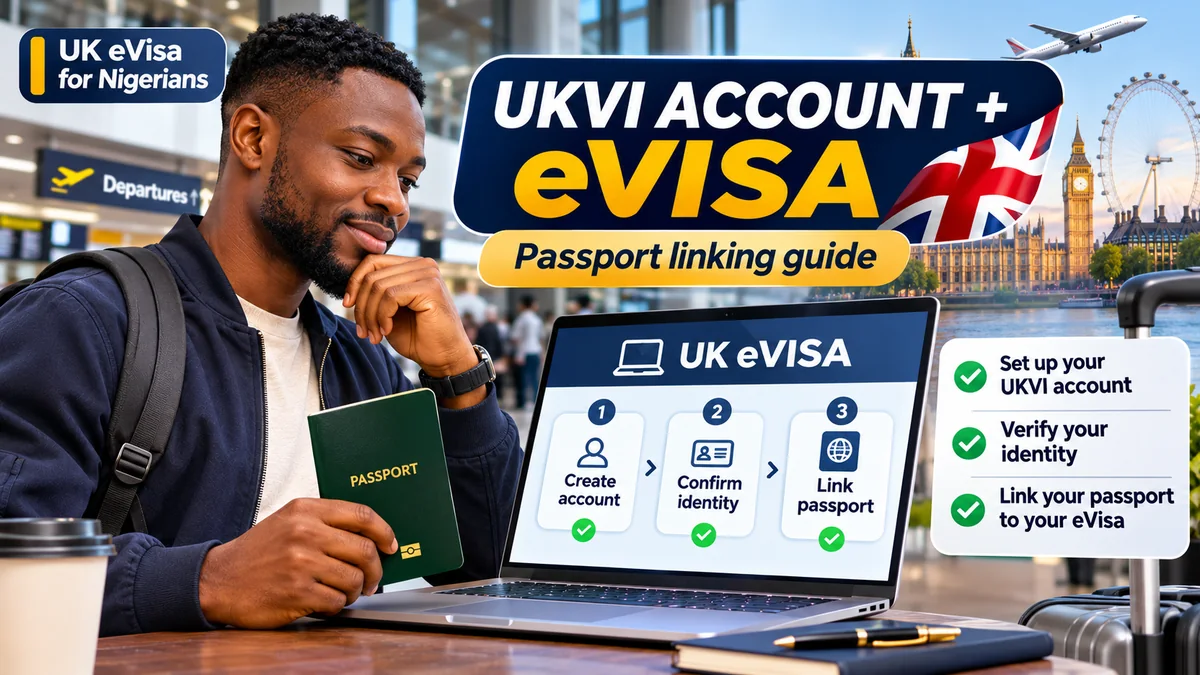
To create a UKVI account and link your Nigerian passport to your UK eVisa, first check whether you already have a UK Visas and Immigration account. If not, use the official GOV.UK eVisa account service, enter the requested contact and identity details, complete identity verification, link your immigration record and check that the passport you will use for travel is recorded correctly. If you already have an account but renewed your passport, use the separate Update your UKVI account service instead of creating another account.
An eVisa is a digital record of your UK immigration permission, including the type of permission and applicable conditions. An account is not a visa application and does not grant permission to enter the UK. Nigerian nationals generally require the appropriate UK visa, as confirmed by the UK's visa requirements for carriers . Creating or updating an account is free; applying for a visa is a distinct process and may involve application fees.
This 2026 guide follows official Home Office instructions for new visa holders, residents replacing older documents, students, workers, visitors and dependants. Research verified on 3 November 2026; the exact screens may change, so use the links to the live GOV.UK services rather than relying on an old screenshot.
What changed for UK visas in 2026?
The Home Office says that successful new UK visa applicants have received digital eVisas rather than new visa vignettes since 1 July 2026 . Previously issued valid visa stickers remain usable until their expiry, according to GOV.UK. Some successful applicants may also be issued a form for accompanying an eVisa (FAV); where UKVI directs you to collect one from a Visa Application Centre, follow those instructions. This is an exception to the assumption that every traveller will depart with a passport alone.
Replacing physical evidence with an eVisa does not itself change the visa conditions or extend its validity. An electronic travel authorisation (ETA) is a different system for eligible visa-exempt travellers; it is not a replacement for the visa that an ordinary Nigerian passport holder needs. Check your own permission and nationality circumstances rather than relying on social-media claims.
Step 1: Check whether you already have a UKVI account
Before registering, go to GOV.UK's UKVI account setup guidance and try the link to view your eVisa. You may already have an account if you used the UK Immigration: ID Check app, created an account during your visa application, linked a former biometric residence permit (BRP), or applied through the EU Settlement Scheme.
Search your email inbox and spam folder for a UKVI account confirmation. If you can sign in with your existing identity document, date of birth and verification code, continue with that account. Do not create a second account just because you obtained a new passport or forgot an old email address. Duplicates can complicate access to the correct record.
If your visa application is still awaiting a decision, account creation does not establish that permission has been granted. The Home Office says you must wait for approval before travelling .
Step 2: Prepare the documents and contact details you need
For a new account, UKVI says you need a usable email address and mobile phone number for future sign-ins. Where applicable, prepare one of the combinations below:
| Situation | Documents or details to prepare |
|---|---|
| New visa holder with a passport | Valid passport and visa application reference: GWF or UAN |
| Passport and previous UK BRP | Valid passport and BRP number |
| Former BRP holder without a valid passport | Eligible expired BRP and the identity-verification route UKVI offers |
| Account already exists | Existing sign-in document, date of birth and access to registered phone or email |
| Renewed Nigerian passport | Current passport details and existing UKVI account login, using the update service |
There is an important date-specific rule: at the time of this article, an expired BRP may be usable to create the account for up to 24 months after its printed expiry or until 31 December 2026, whichever comes first. That does not mean it is valid for travel; UK guidance says BRPs can no longer be relied on as travel documents. See the current eligibility instructions .
Use a phone number and email that you personally control, and keep account recovery details safe. Never give your one-time verification codes or visa credentials to a travel agent or someone claiming to offer guaranteed boarding.
Step 3: Create the UKVI account through GOV.UK
- Open the official Set up a UKVI account to access your eVisa page on
gov.uk. - Read the eligibility and account-existence checks. Select the official Create a UKVI account link if you do not already have one.
- Enter the contact and identity information requested by UKVI, including the appropriate passport/BRP and application-reference details.
- Confirm access to the email address and mobile number using the service's secure verification process.
- Follow the instructions to prove your identity and connect the account to your immigration record. Do not assume the eVisa is accessible merely because a username was created.
Screen names and the identity route can differ according to your passport, immigration history and device. Follow the prompts actually shown on the UKVI service. There is no charge to create a UKVI account or view an eVisa, as the Home Office confirms on its eVisa information page .
Step 4: Confirm your identity using the offered verification route
UKVI commonly asks account creators to verify identity through a smartphone using an approved app, such as UK Immigration: ID Check. Depending on the documents and the route offered, the process may involve scanning an identity document, checking its electronic chip or submitting a suitable photograph. UKVI also publishes official videos for the app and Web ID Check pathways .
Do not assume every Nigerian passport or phone will follow an identical scanning procedure. If the app cannot be used, read the alternatives shown by UKVI. Its account guidance specifically provides other methods if you do not have the required passport/BRP or cannot use the smartphone verification route.
Use a well-lit space, a clean document and stable internet. If the passport scan repeatedly fails, check the app's device instructions and use the official support route instead of uploading sensitive passport photographs to an unauthorised website.
Step 5: Link your UKVI account to your eVisa
Creating the account and accessing an eVisa are connected but not identical. After confirming your identity, follow the UKVI service's link-account-to-eVisa stage. If you stopped before finishing, return to the official account setup page and use its separate link for connecting an existing UKVI account to your eVisa.
UKVI says access is usually available immediately once the account and eVisa are linked, although it may take up to 24 hours. If your account works but the eVisa does not appear, first check that the identity confirmation and linking stage are complete; do not create a duplicate account or assume your visa was refused.
When it appears, use View your eVisa and get a share code to check your name, date of birth, nationality, permission type and visa conditions. If the immigration status itself is incorrect, use the official error-reporting route rather than attempting to change a visa decision through the contact-details editor.
Step 6: Link or update the passport you will actually use for travel
This is the step that matters most when a Nigerian passport has been renewed after a visa application. Your eVisa is a digital permission record; your physical passport is the identity document that an airline and border officer will examine. Both need to connect to the same correct immigration record.
- Sign into the official Update your UKVI account details service with the account you already have.
- Open the section for passport or travel-document information and follow the available options to add another passport or update the existing document.
- Enter your new passport number, expiry date and other details exactly as printed in the document.
- Complete any additional identity checks requested and submit the change.
- Sign in again to confirm the current passport or travel document is reflected in the account before booking or boarding travel.
The Home Office instructs travellers to use a valid passport already added to their UKVI account and ensure that their identity details match the airline's passenger information. If you have more than one nationality, the account can hold more than one passport, but you must add the one you intend to use for the journey.
Important exception: UKVI says you cannot change your name or passport/travel-document details through this update process while a visa application decision is pending. Follow UKVI's instructions for your application circumstances rather than forcing a change that the system does not permit. Updating a passport record also does not extend or vary immigration permission.
What if you are outside the UK when your passport changes?
The Home Office's travel guidance distinguishes holders of biometric and non-biometric passports. A person abroad with a biometric passport can update specified details such as passport number, expiry, name or nationality through the permitted process. For a non-biometric passport, self-service changes while abroad are more restricted, generally to passport number and expiry.
Other identity changes may require direct UKVI assistance and, sometimes, an appointment to provide biometric information. This is particularly important if a traveller has changed their name or nationality at the same time as renewing a passport. Do not assume that adding a new passport number will resolve mismatched personal information.
Step 7: Verify your eVisa before booking or flying
Log into View and prove your immigration status and confirm that the permission corresponds to your actual reason for travel—such as visiting, studying, working or returning as a resident. Check the validity period and any conditions. A digital record should never be treated as approval for activities that your visa does not authorise.
Match the name, nationality and passport details on your eVisa/UKVI account against the passport and the passenger details supplied to the airline. Do this in advance, not for the first time at airport check-in in Lagos or Abuja. If you have a valid physical immigration document that official guidance allows as additional evidence, follow the relevant instructions for carrying it.
UKVI says airlines and other carriers may verify immigration permission digitally. If the records do not match, a carrier may be unable to confirm permission and boarding may be delayed or refused. Refer to the Home Office's carrier guidance of 23 July 2026 for the latest process where automated checking fails.
Step 8: Get a share code if additional proof is requested
GOV.UK's View and Prove service lets eligible account holders generate a share code to demonstrate their immigration status to a person or organisation for the relevant purpose. A travel share code is valid for 90 days, can be reused during that period, and can be generated before the journey.
A share code is additional evidence; it is not a visa, passport or automatic substitute for the passport-linking requirement. Treat it as sensitive because a person using the code with your date of birth may be able to see specified personal information. Use the appropriate share-code purpose and give it only to a genuine organisation requesting it.
UKVI setup checklist for Nigerian students, workers and visitors
| Task | What to confirm |
|---|---|
| Immigration permission | A real visa or eligible UK immigration status has been granted |
| Account check | No existing UKVI account is unnecessarily duplicated |
| Contact details | Working personal email and mobile number available for sign-in |
| Identity verification | Passport/BRP or offered alternative verification successfully completed |
| eVisa connection | Account is linked and eVisa can be viewed |
| Passport | Current valid Nigerian passport added and accurately recorded |
| Travel booking | Airline passenger details match passport and UKVI identity |
| Status check | Visa type, validity and conditions read and understood |
| Additional proof | Travel share code available if needed; any instructed FAV collected |
| Support plan | Official support and error-reporting links bookmarked |
Common UK eVisa problems and how to resolve them
You can sign in, but no eVisa is displayed
Check whether the identity and linking stages were completed. UKVI allows up to 24 hours after linking for access. If it still does not appear or a technical error persists, use the official Report an error with your eVisa service.
Your new passport is missing from the account
Use Update your UKVI account details rather than beginning a new account. If a visa decision is still pending or the change cannot be completed, follow UKVI's guidance for that restriction and get help early.
Your visa type or personal details appear wrong
Use the error-reporting service when the eVisa immigration record is incorrect. UKVI distinguishes this from changes to ordinary account contact details. Its current guidance says it aims to resolve most reported eVisa errors within five working days, with complex cases potentially taking up to 15 working days. These are aims, not guaranteed deadlines.
You changed your phone number or lost access to your email
Use the official account-recovery process linked from the GOV.UK eVisa guidance. Do not repeatedly attempt to register separate accounts. Update your contact details once access is restored.
The airline cannot verify your permission
Check that the passport and passenger details match the UKVI record. Show an appropriate share code or other permitted evidence if asked. UKVI says the carrier can contact the UK Border Force carrier support hub for verification problems; see Travel with your eVisa .
Do children and dependants need separate accounts?
Yes. GOV.UK states that partners and children joining a main applicant as dependants need their own UKVI accounts to access their own eVisas. An adult can help manage a child's account where authorised, but each person's digital immigration status is separate. When the child becomes able to manage the account or reaches 18, update the sign-in contact details as instructed by UKVI.
This is relevant to Nigerian families travelling together for study, employment or settlement. A main applicant's eVisa does not automatically cover their spouse's or child's permission. Check every traveller's documents separately before departure.
Avoid scams and unnecessary UKVI account fees
Creating a UKVI account and accessing an eVisa are free. Avoid websites charging a “mandatory eVisa activation fee” or pretending that a private agent can guarantee approval, faster access or airline boarding. Access the account through gov.uk and verify any payment request against the genuine government service.
Never send a passport scan, verification code, login password or share code to an unsolicited social-media account. A legitimate adviser or family helper may assist with authorised tasks, but you remain responsible for reviewing the result and protecting account access.
Frequently asked questions
Can I create a UKVI account before my visa is approved?
An account may be created during the application process, but it does not mean a visa has been approved. Do not travel until you have the required permission, and follow the instructions for any application that is still pending.
How much does it cost to create a UKVI account?
There is no fee to create the account or access an eVisa. Visa applications are separate and may have fees.
Do I need a new UKVI account when I renew my Nigerian passport?
No. Use the existing account and update or add the new travel document through the official UKVI update service.
How long does it take for my eVisa to appear?
UKVI says it is usually available straight away after the account and eVisa have been linked, but access can take up to 24 hours. Report persistent errors through the official service.
Can I travel with a screenshot of my eVisa?
A screenshot is not a replacement for the valid passport linked to your UKVI account. Check the live digital record, follow carrier instructions and use an appropriate share code if additional proof is requested.
Is a UK eVisa the same as an ETA?
No. An eVisa records granted immigration permission, while an ETA is a separate travel-authorisation system for eligible people who do not require a visa. Ordinary Nigerian passport holders remain visa-required.
Conclusion
For Nigerians with permission to visit, study, work or live in the UK, the safest process is to use one correct UKVI account, complete identity verification, access the eVisa and confirm that the passport used for travel is linked and accurate. Check the permission details early, update renewed passports promptly and prepare an appropriate share code if requested. The most avoidable travel problems often arise not from the existence of an eVisa, but from incomplete linking, expired contact details or mismatches between a passport, account and airline booking.