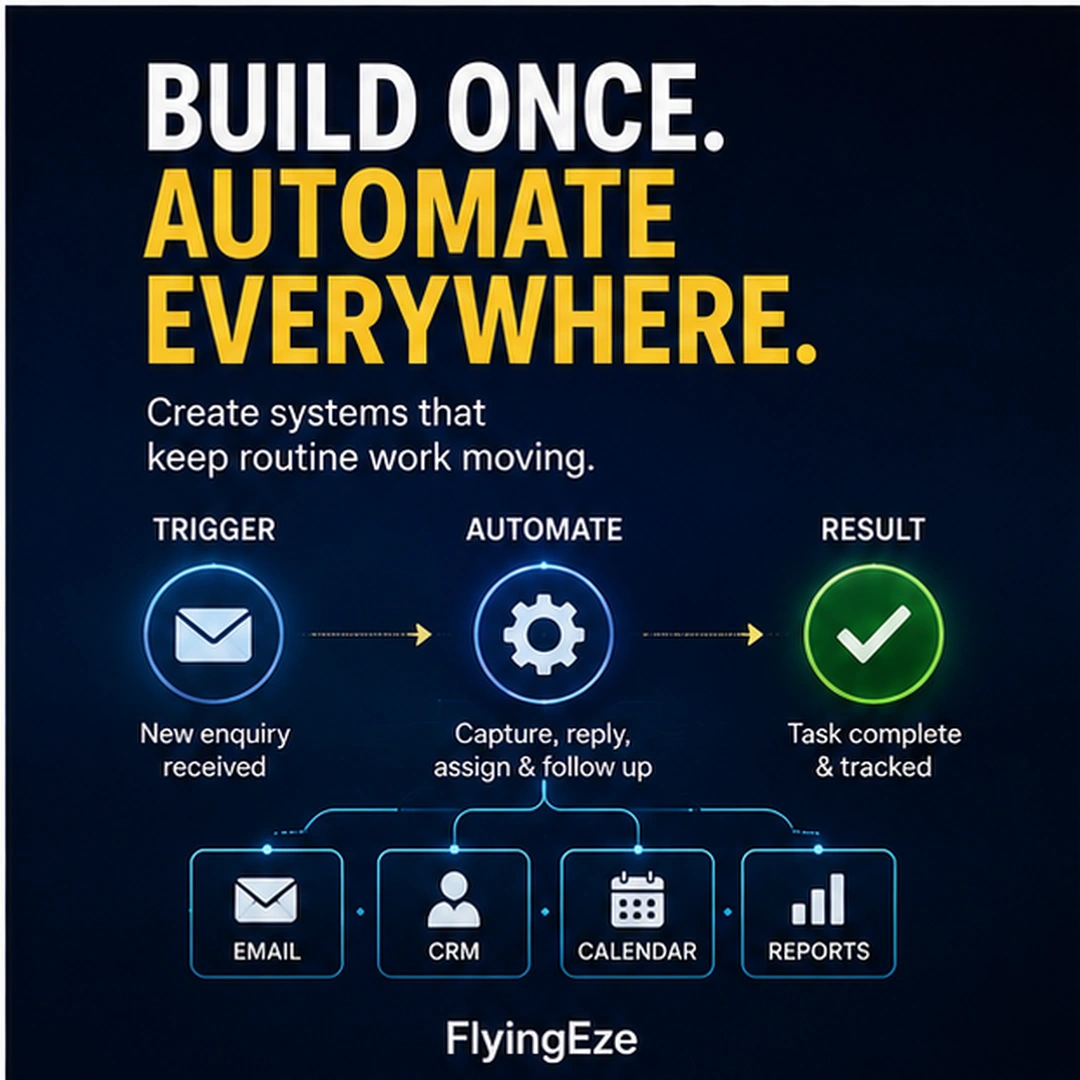
Imagine a customer sends an enquiry to your business.
An AI tool reads the message and produces an excellent reply in seconds.
That sounds like automation.
But what happens next?
An employee may still have to:
- copy the customer's name into a CRM;
- enter their phone number manually;
- create a sales opportunity;
- assign the enquiry to a team member;
- update a spreadsheet;
- create a follow-up task;
- schedule a reminder;
- notify another department; and
- remember to check whether the customer eventually responded.
One task has become faster.
The process has not necessarily become better.
This is an important distinction for businesses investing in artificial intelligence, automation and digital transformation.
The biggest opportunity is often not:
“Which task can we automate?”
It is:
“How should this entire process work from beginning to end?”
That is the difference between task automation and workflow automation.
What Is Task Automation?
Task automation uses technology to perform a specific repetitive activity with little or no manual intervention.
Examples include:
- generating an invoice;
- sending an appointment reminder;
- resizing an image;
- creating an email draft;
- extracting information from a form;
- calculating a total;
- scheduling a social-media post;
- copying a file into cloud storage; or
- sending a standard confirmation email.
These automations can be extremely useful.
There is nothing wrong with automating individual tasks.
The problem begins when a business automates one task without examining everything that happens before and after it.
You can make one step extremely fast while leaving the rest of the process fragmented.
What Is Workflow Automation?
Workflow automation looks at the sequence of work required to move something from a starting point to a completed outcome.
Instead of asking only:
“Can AI write this email?”
workflow design asks:
What caused the email to be needed?
Where did the information come from?
What needs to happen after the email is sent?
Which system should store the result?
Who needs to know about it?
What happens if something goes wrong?
When should a person intervene?
That wider perspective is where automation can start producing meaningful operational improvement.
Think From Trigger to Outcome
Every useful workflow has a beginning and an intended result.
A simple way to map one is:
TRIGGER → INFORMATION → DECISION → ACTION → REVIEW → OUTCOME
Consider a customer enquiry.
Trigger
A potential customer submits a contact form.
Information
The system collects:
- name;
- email;
- telephone number;
- company;
- service requested;
- message; and
- source of the enquiry.
Decision
The workflow determines:
- Is this a sales enquiry?
- Is it technical support?
- Is it spam?
- Which service is the customer interested in?
- Which team should receive it?
- Is human review required?
Action
The system could then:
- create or update the CRM contact;
- create the enquiry record;
- categorise it;
- assign an owner;
- draft an appropriate response;
- schedule follow-up;
- notify the responsible person; and
- record the activity.
Review
If the enquiry is unusual, sensitive or high-value, a person can review the recommendation or response before anything consequential happens.
Outcome
The enquiry is:
- answered;
- assigned;
- tracked;
- followed up; and
- available for reporting.
That is a workflow.
The email itself is only one step inside it.
Why Automating Only One Step Can Create New Problems
Partial automation can sometimes move a bottleneck rather than remove it.
Imagine a company previously received 100 enquiries per day.
Employees manually wrote responses.
AI now allows the business to generate drafts much faster.
The company can suddenly process 500 enquiries.
That sounds like progress.
But suppose every enquiry still needs to be manually:
- entered into the CRM;
- assigned;
- tagged;
- scheduled for follow-up; and
- recorded in a spreadsheet.
The business has accelerated the first stage while increasing pressure on everything downstream.
The bottleneck simply moved.
This is why process design should come before large-scale automation.
Automation Should Reduce Hand-Off Friction
Every unnecessary hand-off is an opportunity for delay or error.
Consider this process:
Website form → email inbox → employee → spreadsheet → CRM → task manager → reminder app
The same information may be copied repeatedly.
Now compare it with:
Website form → workflow → CRM → assignment → follow-up
The second model does not necessarily require fewer applications.
It requires clearer connections between them.
The objective is not:
“Use one tool for everything.”
It is:
“Give each tool a defined responsibility and make information move between them intentionally.”
Give Every System a Clear Responsibility
Automation becomes difficult to maintain when nobody knows which system owns which information.
Suppose a customer's telephone number appears in:
- a spreadsheet;
- the CRM;
- an email marketing platform;
- a helpdesk;
- an accounting system; and
- someone's personal notes.
Which one is correct?
A good workflow establishes a source of truth for important information.
For example:
CRM: customer identity and relationship history
Accounting system: invoices and payment records
Helpdesk: support cases
Project system: delivery tasks
Email platform: campaigns and communication preferences
Other systems may receive copies of relevant information, but responsibility should be clear.
Otherwise automation can make inconsistency spread faster.
Do Not Automate a Bad Process
There is an old automation problem:
A business has an inefficient process.
Someone automates it.
Now the business has an automated inefficient process.
Before automating, ask:
Does this step need to exist at all?
For example, suppose employees:
- receive an online order;
- print it;
- sign the paper;
- scan it;
- email the scan;
- manually enter the information into another system.
You could use AI to read the scanned document automatically.
But the better question may be:
Why is the information being printed and scanned in the first place?
Sometimes the best automation is removing a step rather than making the step faster.
Start With the Process, Not the Tool
Businesses frequently begin automation projects backwards.
They discover a new AI tool and ask:
“What can we automate with this?”
A stronger starting point is:
“Where does work currently get delayed, duplicated or lost?”
Look for processes containing:
- repeated data entry;
- copying and pasting;
- manual reminders;
- repeated status checking;
- duplicate records;
- unnecessary approvals;
- information moving through multiple inboxes;
- employees repeatedly asking for the same information;
- manual report preparation;
- avoidable re-keying between systems; or
- frequent errors caused by hand-offs.
Once the problem is understood, choose technology that fits the workflow.
Do not redesign your organisation simply to justify a tool you have already purchased.
Not Everything Should Be Fully Automated
Good automation does not mean removing humans from every process.
Some decisions require:
- judgement;
- empathy;
- negotiation;
- accountability;
- contextual understanding;
- approval;
- ethical consideration; or
- risk assessment.
This is particularly important when AI is involved.
For example, AI may be useful for:
Drafting a response
while a person approves a sensitive complaint.
AI may:
Extract invoice information
while a finance officer approves an unusual payment.
AI may:
Classify a support ticket
while a specialist handles a high-risk customer issue.
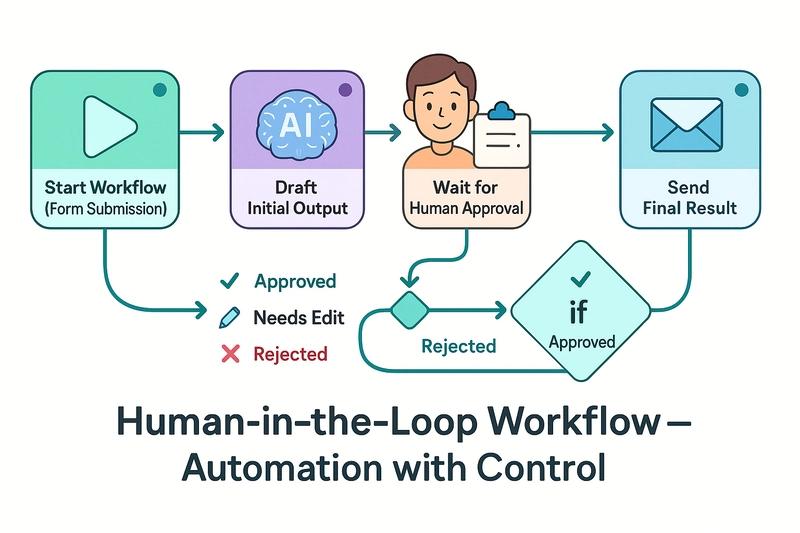
This is known as a human-in-the-loop approach.
The important design question becomes:
Where does automation stop and human judgement begin?
That boundary should be intentional.
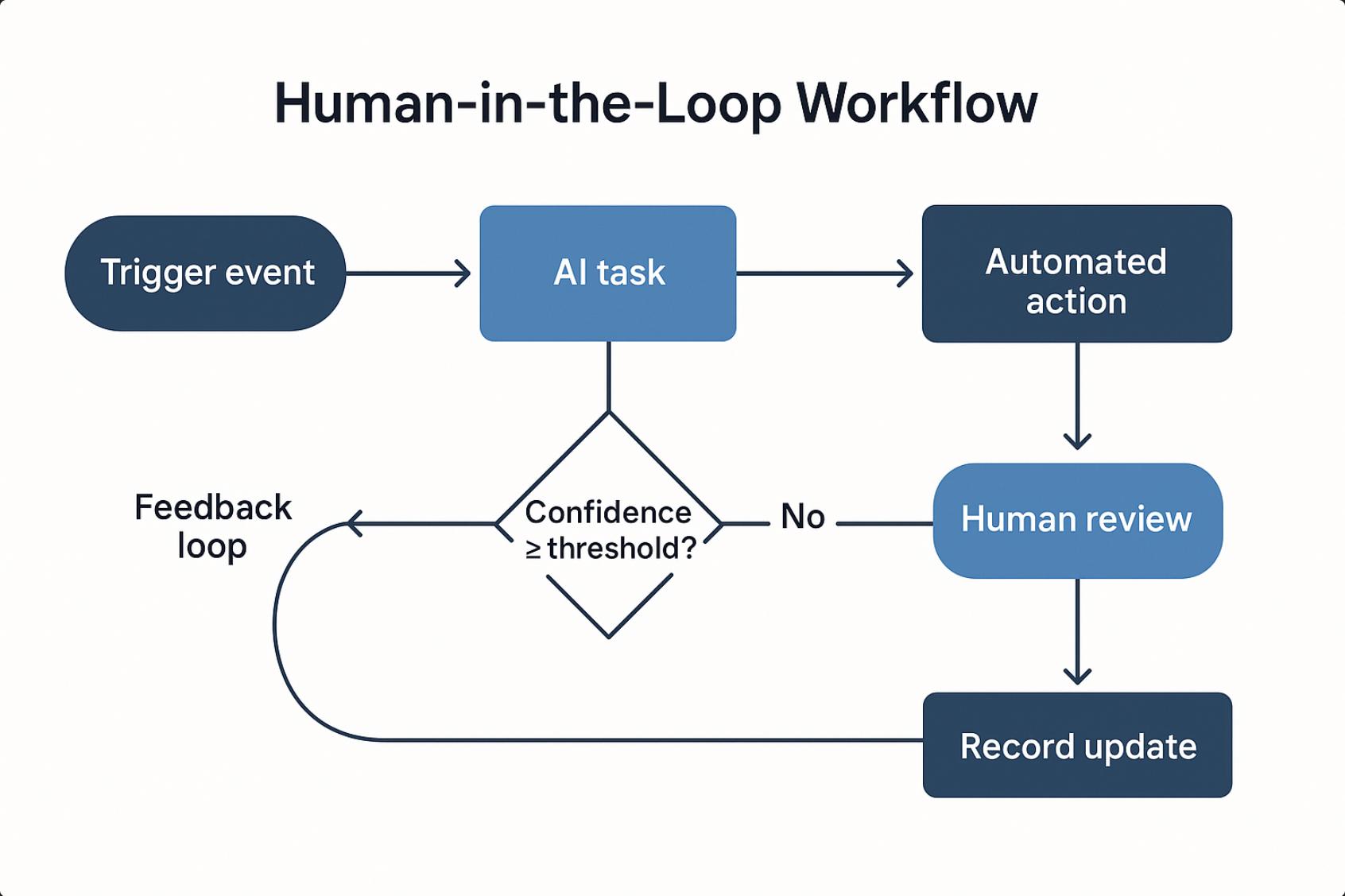
Use Human Review Where It Adds Value
Human involvement should not simply mean:
“A person checks everything.”
If humans must manually verify every automated action, much of the benefit can disappear.
Instead, businesses can define specific conditions that require intervention.
Examples include:
- unusually large transactions;
- low-confidence AI results;
- legal or regulatory issues;
- customer complaints;
- unusual refunds;
- incomplete information;
- conflicting records;
- high-value sales opportunities;
- security alerts; or
- actions that cannot easily be reversed.
Routine cases can move through the normal workflow.
Exceptions receive appropriate attention.
That allows people to focus on situations where their judgement is genuinely useful.
A Workflow Must Know What to Do When Something Fails
Happy-path automation is easy to demonstrate.
Real businesses operate in the messy path.
What happens if:
- the CRM is unavailable;
- the email cannot be sent;
- an API reaches its limit;
- a customer's address is incomplete;
- the same enquiry arrives twice;
- an AI system cannot confidently classify a request;
- a payment fails;
- a user submits invalid data; or
- one application changes its integration?
A production-ready workflow needs an exception path.
For each important step, determine:
What could fail?
Can the system retry safely?
Should someone be notified?
Should the process stop?
Can it continue using another route?
How will someone know that intervention is required?
A workflow that works perfectly only when nothing goes wrong is not a resilient workflow.
Avoid “Automation Spaghetti”
Automation can become difficult to maintain when businesses keep adding one connection after another.
For example:
Form → spreadsheet
Spreadsheet → email
Email → CRM
CRM → another spreadsheet
Spreadsheet → WhatsApp notification
WhatsApp → employee manually updates CRM
CRM → accounting platform
Eventually nobody understands what triggers what.
Changing one field can break three other processes.
This is sometimes described informally as automation spaghetti.
To reduce it, document:
- triggers;
- inputs;
- outputs;
- system owners;
- dependencies;
- decision rules;
- human approval points;
- exception paths; and
- destinations.
Your workflow should be understandable by someone other than the person who originally created it.
Automation Needs Observability
A manual process often fails visibly.
Someone notices the document sitting on a desk.
Digital automation can fail silently.
For example:
A scheduled integration stops running on Monday.
Nobody notices until Friday.
Hundreds of records are missing.
That is why important workflows should be observable.
Depending on the process, businesses may need:
- execution logs;
- error notifications;
- dashboards;
- retry records;
- audit trails;
- processing timestamps;
- success and failure counts; and
- alerts when expected activity does not occur.
Do not only automate the work.
Automate your ability to know whether the work actually happened.
Measure Outcomes, Not Automation Counts
“120 tasks automated” sounds impressive.
But it does not necessarily tell you whether the business improved.
Instead, measure outcomes such as:
- response time;
- processing time;
- error rate;
- number of manual hand-offs;
- percentage of cases completed automatically;
- number of exceptions;
- customer waiting time;
- cost per transaction;
- conversion rate;
- employee time recovered; and
- number of cases requiring rework.
The objective is not to maximise the number of automations.
The objective is to improve how the business operates.
An Example: Automating a Customer Enquiry Properly
Consider the original customer-enquiry example.
Before
Customer submits form.
↓
Employee receives email.
↓
Employee copies details into CRM.
↓
Employee writes response.
↓
Employee sends response.
↓
Employee creates task.
↓
Employee updates spreadsheet.
↓
Employee sets calendar reminder.
↓
Employee manually checks later.
There may be seven or eight separate manual actions.
Task Automation Only
Add AI:
Customer submits form.
↓
Employee receives email.
↓
AI drafts response.
↓
Employee copies details into CRM.
↓
Employee sends response.
↓
Employee creates task.
↓
Employee updates spreadsheet.
↓
Employee sets reminder.
The business improved one action.
Workflow Automation
Now redesign the complete process:
Customer submits form.
↓
Data is validated.
↓
CRM is searched for an existing customer.
↓
Customer record is created or updated.
↓
Enquiry is categorised.
↓
Responsible team member is assigned.
↓
AI prepares a draft where appropriate.
↓
Human approval occurs if required.
↓
Response is sent.
↓
Follow-up task is created automatically.
↓
If the customer does not respond within the defined period, the next action is triggered.
↓
Outcome is recorded in the CRM.
Now automation is supporting the process, not merely one task.
The process became connected.
A Simple Framework for Designing Better Automation
Before automating your next business process, work through these seven questions.
1. What Triggers the Process?
Examples:
- a new customer enquiry;
- an order;
- a payment;
- an invoice;
- a booking;
- an employee request;
- a support ticket;
- a new lead.
Be specific about where the process actually starts.
2. What Is the Desired Outcome?
Do not define the outcome as:
“Send an email.”
That may only be an action.
A better outcome might be:
“The customer receives an appropriate response and the opportunity is correctly tracked for follow-up.”
This prevents the automation from becoming narrowly focused on one intermediate task.
3. What Information Is Required?
Identify:
- required fields;
- where those fields originate;
- where they should be stored; and
- which system owns them.
Avoid collecting the same information repeatedly.
4. Which Steps Are Repeatable?
Look for deterministic, high-volume or repetitive actions such as:
- transferring data;
- creating records;
- sending notifications;
- scheduling tasks;
- checking conditions;
- generating routine documents; and
- updating statuses.
These are often strong automation candidates.
5. Where Is Human Judgement Necessary?
Define where people should:
- approve;
- review;
- negotiate;
- resolve ambiguity;
- handle sensitive communication; or
- manage exceptions.
Human review should be designed into the process rather than added as an emergency afterthought.
6. What Happens When Something Fails?
Every important workflow should have an answer for:
retry, escalate, stop, notify or recover.
Do not leave failure behaviour undefined.
7. How Will You Know It Worked?
Choose measurable indicators.
For example:
Before automation: Average enquiry processing time: 22 minutes
After automation: Average processing time: 7 minutes
That tells you much more than:
“We installed an AI tool.”
Automation Architecture Should Remain Understandable
Good automation should make a business easier to understand, not harder.
Someone should be able to look at the process and answer:
What starts it?
Which systems participate?
Where is information stored?
What happens automatically?
Where does a person intervene?
What happens if something fails?
What marks the process as complete?
If those questions cannot be answered, the workflow may already be too complicated.
The Bigger Digital-Growth Lesson
Automation should not simply make employees click buttons faster.
Used well, technology changes how work moves through a business.
It can reduce repetitive data entry.
It can connect systems.
It can make responsibilities clearer.
It can surface exceptions.
It can prevent follow-ups from being forgotten.
It can give people more time for decisions, relationships, creativity and judgement.
But that improvement begins with understanding the process.
The most useful question is therefore not:
“What task can AI do for me?”
Ask:
“What outcome are we trying to achieve, and how should information, technology and people work together from beginning to end?”
That shift changes automation from a collection of clever shortcuts into something much more valuable:
a better operating system for the business.
FlyingEze Digital-Growth Principle
Automate the process, not just the obvious task.
Use technology to build better systems of work — not merely faster individual actions.