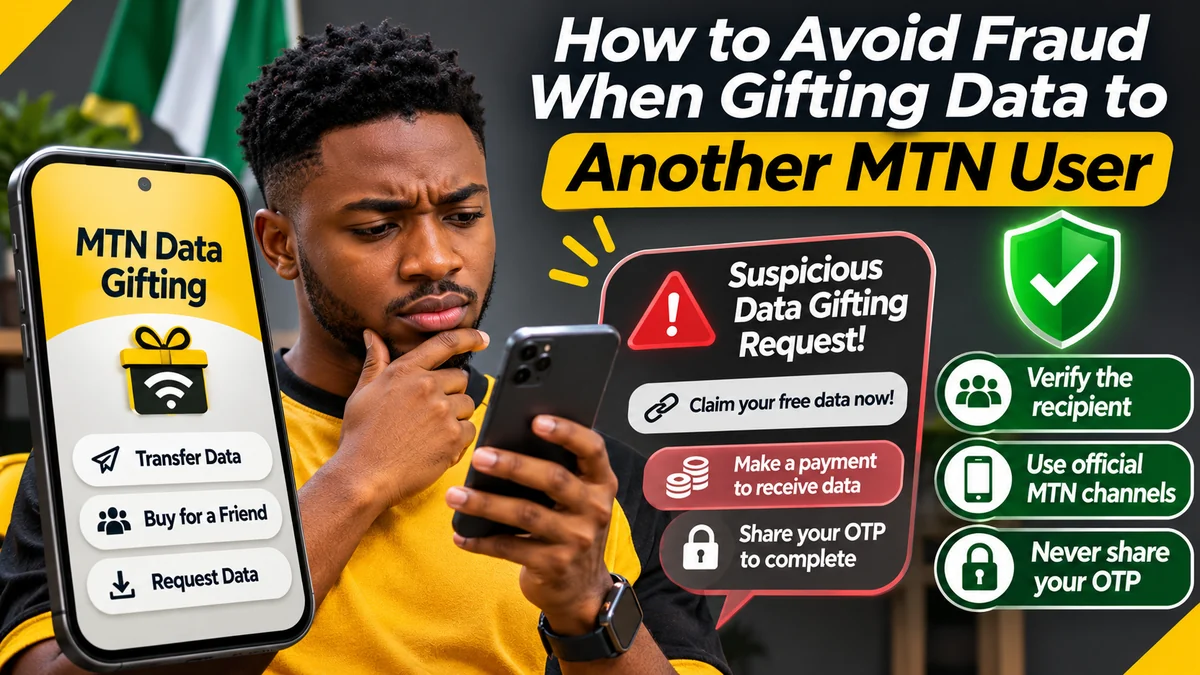
The safest way to gift MTN data in Nigeria is to start the transfer yourself through MTN's official USSD, SMS or myMTN channels, verify the recipient's number, and never share your account password, app PIN or one-time code with someone claiming to help. A genuine MTN Data Gifting transfer does not require a separate gifting PIN on the USSD service; a recipient does not need to pay an unknown individual to “release” data already sent to their number.
Customers searching for how to share data on MTN often encounter unsolicited WhatsApp offers, “free data” links, fake receipts and requests to send data to unfamiliar numbers. Some are simply mistakes or misleading promotions; others may be attempts to obtain personal information, money or data. The MTN Data Gifting FAQ explains the genuine process, while Nigeria's telecom regulator and national cybersecurity team warn of mobile impersonation and phishing tactics.
This guide focuses on fraud prevention rather than simply listing transfer codes. You will learn how to verify an MTN data-gifting request, spot suspicious payment demands, handle unexpected OTP prompts, protect your SIM and act quickly if data or money has already been sent. Fact-checked on 12 November 2026; MTN may change menus, offers and charges, so read live transaction prompts before authorising them.
Know the legitimate MTN Data Gifting options first
MTN's network service supports three different actions: Transfer Data from an eligible existing balance, Buy for a Friend to purchase a new plan for a chosen MTN line, and Request from a Friend to ask another customer to help. These distinctions matter because scammers can use the general phrase “data gift” to conceal what a person is actually being asked to authorise.
| Action | Official entry point | What to check |
|---|---|---|
| Transfer existing data | *321*2# → Transfer Data, or *312*RecipientNumber*Amount# | Recipient, eligible balance, amount and any fee |
| Transfer by SMS | Send Transfer RecipientNumber Amount to 312 | Complete number and amount; confirm a successful response |
| Buy a new data bundle for someone | *321*2# → Buy for a Friend | Plan, price, validity and beneficiary |
| Ask someone to send you data | *321*2# → Request from a Friend | The donor's identity and whether the request is expected |
| Use the official app | myMTN NG → Share → Data Share | Correct account and any in-app authentication |
| Check data balance | *323*4# or SMS 2 to 323 | Balance, bundle type and validity |
These are documented methods, not a guarantee that every balance can be transferred. MTN excludes certain special-purpose and promotional bundles, while its Manage Data guidance states that Smart Bundles cannot be shared or gifted. Avoid anyone who offers a “secret code” to convert a restricted bundle into transferable data.
Ten red flags of a suspicious MTN data-gifting offer
| Warning sign | Why it matters | Safer action |
|---|---|---|
| “Claim free 100GB now” through an unfamiliar link | A form may imitate MTN and harvest personal details | Check the offer independently on MTN's website or app |
| “Pay a release fee before we credit your gift” | An unsolicited payment demand may be unrelated to MTN's service | Do not pay; check your MTN balance and official support |
| “Send me your OTP to approve the data” | Codes may authorise another action or account access | Never relay OTPs; authenticate only inside your own trusted app |
| “Dial this unknown code without reading it” | USSD can initiate actions on your line | Use MTN's published codes and inspect the on-screen steps |
| “Transfer to this number first to unlock your reward” | You may be giving away a real data balance for nothing | Refuse unverified advance-transfer requests |
| “Install our enhanced MTN gifting APK” | Unofficial apps may request risky permissions or steal credentials | Use the genuine myMTN app and official store links |
| “Guaranteed unlimited transfers with no restrictions” | MTN publishes eligibility and transfer limits | Check the current FAQ and your own plan terms |
| Only a screenshot of “transfer successful” is provided | Images can be altered or from another transaction | Confirm the balance or transaction directly |
| An unsolicited caller claims to be “MTN security” | Caller identity can be imitated | Hang up and contact MTN through its verified number |
| An unfamiliar account requests repeated small gifts | Small losses can accumulate | Verify identity, set boundaries and decline further requests |
These are illustrative scam patterns, not claims that every example represents a specific verified MTN fraud case. Nigeria's Computer Emergency Response Team (ngCERT) has documented phishing through SMS, WhatsApp, email and impersonated websites; those tactics can be adapted to telecom services. Its August 2026 advisory also describes attackers manipulating payments and trusted identities.
How to verify a data request before you send anything
A legitimate Request from a Friend feature does not establish that the request is genuine, affordable or wise. A real MTN subscriber can ask for data, including someone you do not recognise or someone whose account is being misused.
- Confirm who is asking. If the request appears to come from a friend through WhatsApp or social media, contact them using a number or channel you already trust, not merely the one in the message.
- Ask what they need. Confirm the MTN line, the amount and whether a transfer or separate bundle purchase is appropriate.
- Inspect the number yourself. Read the full recipient number twice; do not assume a saved nickname is enough if the account has changed hands.
- Check what your plan can share. Review your shareable balance, eligible data amount and expected remainder before sending.
- Use the official menu or app. Start the process yourself instead of obeying an unfamiliar series of USSD commands copied from a message.
- Read the final confirmation. Stop if the recipient, volume, purchase price or transfer charge is different from what you intended.
- Verify afterwards. Save the transaction notification, check the sender's balance and ask the recipient to confirm on their line.
If a message appears to come from a relative needing urgent data for an examination, trip or emergency, it can still be reasonable to help. The safety step is to verify the intended beneficiary independently, especially when the number is new or the request is unusually urgent.
Do you need a PIN or OTP to gift MTN data?
MTN's Data Gifting FAQ says a separate Data Gifting PIN is not required to transfer data using its documented service. That does not mean every MTN-related app or purchase will always complete without authentication. MTN's Share Data With Friends & Family page explains that myMTN NG may ask customers to authenticate with an app PIN, an OTP or no additional step, depending on the transaction.
The critical distinction is who is entering the code, where and why. A code requested inside an official application that you opened and whose transaction you recognise is not the same as a stranger asking you to forward the code in chat. Never read an OTP to an unsolicited caller or paste it into an unverified website. Do not give anyone your app PIN, SIM PIN, email password or mobile banking credentials to “activate” Data Gifting.
MTN's airtime-sharing service, MTN Share, also has different security arrangements from Data Gifting. A person who insists you must disclose an airtime-transfer PIN to receive a simple data gift may be confusing the products—or attempting to obtain access. Confirm the exact service in MTN's official support material.
How to spot a fake MTN website, app or promotion
Fraudulent links often exploit familiar names and urgent headlines. A copied logo, matching colours and even an HTTPS padlock do not demonstrate that a page is controlled by MTN Nigeria. Always inspect the browser's complete hostname and whether you navigated there from the verified MTN website, mtn.ng , or its official app.
Consider a fictional lookalike address such as mtn.ng.free-gift.example.invalid. The real hostname ends in example.invalid, not mtn.ng. It is provided solely as a non-working illustration of domain deception. Similarly, shortened links and QR codes can hide their eventual destinations. Do not sign into an unexpected site merely because the message uses an MTN banner.
Some promotions really are run by MTN. For example, its Y'ello Data Gifting promotion terms explain that promotional campaigns may take place only when MTN announces them and through specified channels. That means you should verify the campaign date, eligibility, offer terms and authorised participation method from MTN itself. An authentic promotion does not make every third-party “claim your reward” page legitimate.
Install myMTN NG through the links on MTN's app page rather than side-loading a file shared in a group. Review unusual permissions, keep the phone updated and close unexpected login or payment requests.
Know the limits so fake “unlimited gifting” claims are easier to detect
MTN's current detailed Data Gifting FAQ lists standard transfer volumes of 100MB, 200MB, 500MB, 1GB, 2GB, 3GB and 5GB. Customers must retain at least 100MB in an eligible balance after a transfer, and the total transferred in a day is capped at 5GB.
The same detailed FAQ says that the first ten eligible transfers per calendar month are free of transfer fees and that later transfers may continue with a fee when the customer accepts a USSD/SMS consent prompt. Some older MTN overview pages still describe a ten-transfer monthly stop rather than a free-transfer threshold. Therefore, treat the live confirmation and latest detailed FAQ as the basis for any proposed charge; do not assume that all transfers are permanently free or that a caller can remove the limits for money.
MTN also limits which bundle types can be transferred and excludes XtraByte borrowed data under its published guidance. If the sender cannot transfer a particular balance, Buy for a Friend may be available for a new purchased bundle. That purchase has a legitimate bundle price, but it is not a fee that the beneficiary needs to send to an unknown individual before receiving an already completed gift.
Fake payment requests and “data vendors”: what is the difference?
Legitimate companies and individuals sometimes sell airtime or data as a separate commercial service. Their existence does not mean every reseller is fraudulent. However, a reseller's promise is not the same as MTN directly confirming a data gift. Compare the merchant's identity, displayed price, refund rules and payment method, and verify delivery to the intended line.
For personal transfers, the simplest route is to use MTN's own channels directly. If someone claiming to be an MTN representative asks you to make a separate transfer to their personal bank account, buy a verification code or deposit money to unlock a giveaway, stop and confirm independently with MTN.
A suspicious payment request is more serious if it arrives with a fake invoice, an unsolicited link or demands for your banking OTP. If you have already sent money to a suspected fraudulent account, FlyingEze's step-by-step guide to reporting a suspected fraudulent bank transfer in Nigeria explains why contacting your bank promptly and preserving the transaction record matters. A successful reversal is never guaranteed.
Protect your MTN SIM and phone from unauthorised gifting
An unauthorised transfer might occur without a fake “gift” link if another person has access to an unlocked phone, the MTN SIM or a compromised account. Use your device screen lock, protect account passwords, keep the myMTN app updated and sign out of shared devices when possible.
Be especially alert if your phone unexpectedly loses network service while you receive notices of account changes. The Nigerian Communications Commission warns that SIM-swap fraud can give attackers control of a victim's number, potentially affecting messages and access to other accounts. FlyingEze also has a dedicated explainer on how SIM-swap fraud can threaten mobile banking accounts .
If you suspect a SIM-swap or account takeover, contact MTN quickly through an official channel and separately protect linked financial and email accounts. Do not attempt to resolve it with a stranger's remote-access software or a request to disclose one-time codes.
What to do if you have already transferred data to the wrong person
First, determine whether the transfer actually succeeded. Check MTN's transaction message, your data balance and the recipient number displayed. Avoid sending more data in an attempt to “reverse” the original transaction.
- Record the date, time, amount, sender and beneficiary number shown in the official transaction.
- Contact MTN's support through its published contact page or by calling 300 from an MTN line.
- Explain whether it was a wrong-number error, a transfer induced by deception or an activity you did not authorise.
- Ask whether any recovery, restriction or investigation is possible; do not assume that transferred data can be reversed after it has been credited or used.
- If the incident also involved a bank payment, make a separate fraud report to your bank without delay.
Do not post the full beneficiary number or sensitive account details publicly while trying to obtain help. Preserve proof for support teams, and share details only through channels you have independently verified.
What if you clicked a scam link or disclosed a verification code?
| What happened | Immediate response |
|---|---|
| You opened a suspicious link but entered nothing | Close it; do not install anything; update/scan your device if a download occurred |
| You entered your myMTN or email password | Change it through the genuine service, review active sessions and secure the linked email |
| You gave someone an OTP or app PIN | Secure the affected account immediately and notify MTN; protect any other services the code could affect |
| You installed an unknown APK or remote-access tool | Disconnect from suspicious sessions, uninstall with appropriate guidance, scan the device and reset affected credentials using a trusted device |
| Your SIM suddenly stopped working | Contact MTN urgently to check for SIM replacement or account changes; secure linked financial accounts |
| You sent money to a suspected fraudster | Contact the bank or payment provider immediately, retain evidence and ask about available investigation or recall options |
For a credible suspected phishing incident, retain the complete URL, messages and dates as evidence, but remove passwords, full card information and private identity data from any screenshots shared for general discussion. ngCERT's phishing advisory advises the public to avoid unexpected attachments and unverified links and to report suspicious activity.
How to contact MTN or report a suspected data-gifting scam
MTN Nigeria lists 300 as a customer-care number on its official contact page , along with recognised WhatsApp, social-media and shop channels. Use the contact details directly from that page rather than relying on an unsolicited message's number or clickable “complaints desk” button.
When you contact support, describe the specific transaction or suspicious approach: which official method you used, the amount of data, approximate time, any confirmation message and whether another party requested credentials or money. Ask for a complaint or case reference if the support process provides one.
For suspected financial theft, notify your bank immediately through its own published fraud channel. For broader phishing or impersonation activity, the NCC's consumer fraud guidance and ngCERT's reporting advice offer additional prevention context. Neither telecom support nor law enforcement can promise instant return of transferred data or stolen funds.
A practical checklist to use before every MTN data gift
- Recognise the request: Is it from somebody I know, and have I confirmed their identity through an independent channel?
- Check the recipient: Is this the intended MTN number, with all digits correct?
- Choose the right service: Am I transferring an eligible balance or buying a new bundle?
- Confirm the cost: Does the live prompt show an acceptable price or transfer fee?
- Protect authentication: Am I entering any requested verification code only into the trusted app I opened, not sending it to a person?
- Inspect links and apps: Am I using the MTN website, its official app or published USSD/SMS routes?
- Save confirmation: Have I checked that the transaction completed and the balance changed as expected?
- Know when to stop: Am I being pressured to pay a stranger, share an OTP or ignore a suspicious recipient?
These checks may take under a minute, but they address the most preventable risks: sending data to the wrong person, approving the wrong amount, accepting an unexpected fee, disclosing credentials and mistaking a fake claim for an official reward.
Frequently asked questions about MTN Data Gifting fraud
What is the safest way to share data on MTN?
Use MTN's published *321*2# menu, direct USSD, SMS to 312 or the official myMTN app. Confirm the recipient, amount and any applicable charge before completing the transaction.
Does someone need my OTP before they can receive an MTN data gift?
No recipient should need your OTP simply to receive data that has been credited to their own line. MTN's app can request authentication from the account owner, but you should enter it only in the trusted app or service—not send it to a caller or chat contact.
Can someone steal data from my line just by knowing my phone number?
Knowing a number alone does not automatically authorise a transfer. However, access to an unlocked phone, a compromised account or a hijacked SIM can create serious risks, so protect the device and report unexpected activity.
Are all MTN “free data” promotions fake?
No. MTN has run official, time-limited data-gifting promotions. Verify the announcement on MTN's own website or app, including any dates and conditions, instead of relying on a forwarded link.
Can I reverse a data gift sent to a scammer?
Recovery is not guaranteed. Contact MTN through its official support channel immediately with the transaction details and ask what assistance is possible.
Is there a separate PIN required for MTN Data Gifting?
MTN's Data Gifting FAQ says the network gifting service does not require a separate gifting PIN. The myMTN app can still have its own authentication step, which you should complete privately.
What if I paid someone for MTN data and received nothing?
Preserve the payment receipt and conversation, contact the seller through an established channel, and promptly report suspected fraud to your bank or payment provider. Use MTN support if the transaction was initiated through its own service.
Conclusion: verify the person, the channel and the confirmation
A safer way to approach how to share data on MTN is to check three things before any gift: who will receive it, which official service is being used and exactly what the transaction will deduct or charge. The real Data Gifting service does not require you to hand an OTP or password to someone else, pay a supposed “unlock fee”, or use a mysterious shortcut.
Whether you are helping a family member, responding to a friend or buying a data bundle for another line, keep control of your SIM and account, verify unexpected requests and use the support channels published by MTN. Acting cautiously before confirming is easier than trying to recover data or money after a mistake or scam.