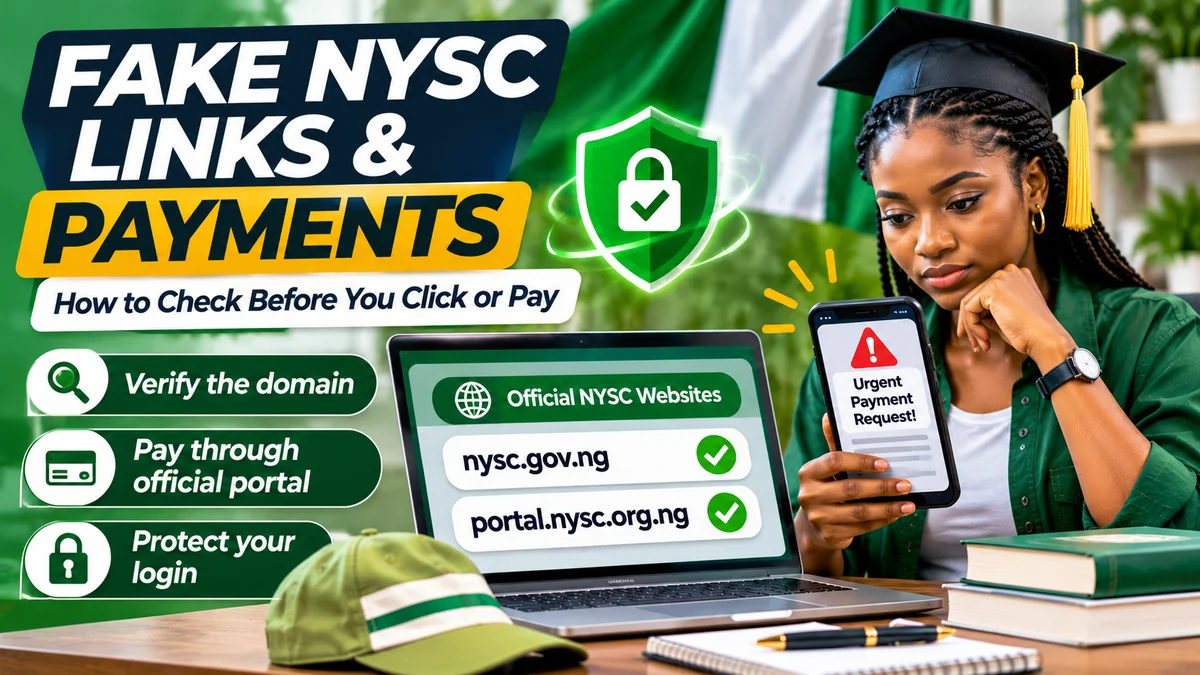
To avoid fake NYSC registration links and payment requests, use the websites identified by the National Youth Service Corps itself: nysc.gov.ng for official information and portal.nysc.org.ng for registration. Begin any authorised portal payment from your own logged-in account, follow NYSC's published Remita instructions, and refuse requests to transfer money to an individual's account to secure a posting, fix an error or “unlock” a registration window.
The NYSC Registration Portal handles sensitive information from prospective corps members, including account details, education records and personal identification. That makes it important to distinguish genuine services from convincing copies, misleading social-media notices and phishing messages. This guide explains the official links, how to recognise address and payment tricks, and what to do if you have already clicked, submitted information or sent money.
Research checked on 12 November 2026. Registration dates, portal menus and applicable charges may change; use current NYSC notices for your particular batch rather than old screenshots.
The real NYSC registration website and payment starting point
| Purpose | Official starting point | What to verify |
|---|---|---|
| Institutional news and current notices | https://nysc.gov.ng/ | Published by NYSC, not a search advertisement or copied image |
| Online registration and candidate account | https://portal.nysc.org.ng/ | Exact hostname and your authorised registration category |
| Official contact and social channels | https://nysc.gov.ng/contact.html | Links and handles listed by NYSC |
| Payment instructions | NYSC's Remita payment guide | Payment begins from your authenticated NYSC account |
| Payment confirmation | Official NYSC transaction-status page | Use the transaction ID or payment email to query Remita |
NYSC's contact page explicitly names the main site and registration portal. Its registration requirements also reference nysc.org.ng. The safest routine is to type the main website yourself and follow the official registration link rather than guessing between unfamiliar alternatives.
A page that loads, displays an NYSC logo or has a padlock in the browser is not automatically trustworthy. A fraudulent website can have HTTPS and professionally designed forms. The important questions are who controls the hostname and whether the link is supplied by an authoritative NYSC source.
How fake NYSC links and payment messages can reach applicants
Applicants may receive forwarded messages through WhatsApp groups, SMS, email, Facebook pages or direct messages. An apparent “mobilisation officer” could claim that registration is closing, a Senate-list record needs payment, or a preferred deployment can be reserved for a fee. These are illustrative warning scenarios, not claims that a particular newly identified NYSC fraud operation has been established.
Nigeria's Computer Emergency Response Team (ngCERT) has documented wider phishing campaigns that impersonate trusted organisations through messages and fraudulent websites to collect identity or financial information. Its January 2025 advisory identified WhatsApp, SMS and social networks among common delivery channels, while an August 2026 advisory described impersonation and manipulation of payment details. The danger is the technique, regardless of the logo in the message.
Common red flags include claims that you must pay immediately to keep an admission or call-up, requests for your email password or verification code, a “secret” registration link that differs from the official site, and payment details sent only in a private chat.
Read the website address carefully: five checks
1. Inspect the exact hostname
The actual NYSC registration hostname is portal.nysc.org.ng. In a web address such as https://portal.nysc.org.ng/NYSC/, the part after the first slash following the hostname is a page path. Different official page paths may serve different functions. What matters first is that the hostname remains under the correct domain and that you reached it through an authorised route.
By contrast, portal.nysc.org.ng.example.invalid is not the NYSC hostname: it belongs under example.invalid. That address is fictional and deliberately non-working; it illustrates the danger of seeing familiar words near the beginning of a much longer address.
2. Beware of lookalike spellings and extra words
A malicious site may add hyphens or words such as “secure”, “payment”, “batch” or “registration” to a separate domain. Others may change one letter or rely on a shortened link that hides the destination. Do not use how official a name sounds as proof. Compare it with NYSC's published links , character by character.
3. Do not mistake HTTPS for official ownership
HTTPS protects the connection to the site that owns the address; it does not establish that the owner is NYSC. A green padlock graphic inside a webpage is even less meaningful. Check the real browser address bar, not just the screenshot or decorative lock shown in the page itself.
4. Treat search ads and forwarded QR codes as unverified
Search results are useful for discovery, but paid placement does not make a website official. QR codes and shortened URLs can conceal a destination until opened. Rather than scanning an unknown code to register or pay, open a trusted bookmark or type the official portal directly.
5. Check dates and which batch a notice concerns
A genuine old notice can become misleading when shared as new. Verify the service year, batch, stream, date and registration category. NYSC's FAQs direct applicants to the official mobilisation timetable. Avoid paying anyone who claims to have opened a private registration window after the official one has closed.
How legitimate NYSC payments work through Remita
NYSC's published payment instructions describe an authenticated process. The prospective corps member signs into the portal, selects the relevant payment option, reviews the confirmation page and proceeds to the Remita payment engine. Depending on the options displayed, payment may be completed electronically or with an NYSC-generated Remita Retrieval Reference (RRR) at an approved bank branch.
- Visit portal.nysc.org.ng yourself and sign in with your account.
- Select the applicable payment service and review its purpose and charge before proceeding.
- Follow the hand-off from the verified NYSC portal to Remita; do not substitute payment details supplied in a chat.
- For the approved bank-branch route, use the RRR generated by the official NYSC transaction, not a reference or account invented by an intermediary.
- Save the receipt and RRR, then confirm the result through the official NYSC payment-status tool .
Not every service should be described as requiring a compulsory registration fee. NYSC's portal FAQ describes an optional payment associated with particular call-up-letter and notification conveniences. Confirm the specific service, amount and available options in the active dashboard rather than trusting figures from old videos. NYSC's official documentation also acknowledges approved bank payments with an official RRR, so the warning is against unverified personal transfers, not legitimate bank-branch payments initiated through NYSC.
Seven warning signs of a fake NYSC payment request
| What the message says or does | Why to stop and verify |
|---|---|
| “Transfer now to my account to reserve your posting” | It bypasses the portal-originated Remita process and offers an unsupported guarantee |
| “Send your password or OTP so I can correct your record” | It can give another person control of your account |
| “Pay to add your name to the Senate list” | Locally trained graduates' approved records are submitted through their institutions |
| “This screenshot proves your payment is approved” | An image alone is not a verified transaction in your own NYSC dashboard |
| “The fee expires in five minutes” | Extreme urgency is a common manipulation tactic, not proof of an actual NYSC deadline |
| “Use this new special link—ignore the official website” | Unverified replacement links are a common way to harvest account details |
| “Pay a second time before the first transaction can be traced” | NYSC provides a transaction-status service to query pending payments |
Some services may involve legitimate fees or administrative requirements, so the correct question is not merely “Does money change hands?” It is “Does this request originate from an official NYSC service and match its published payment route?” Never assume a payment demand is valid because it mentions Remita or displays its logo.
How to check if an NYSC Remita payment succeeded
A bank debit notification or a merchant receipt is not enough to establish that the payment has reached your NYSC account. On the official NYSC transaction-status page , candidates can enter the transaction ID or payment email, find the relevant transaction and use Get status to request the latest information from Remita.
The portal advises that bank confirmations can take up to 24 hours and that applicants should contact support if a payment remains pending beyond that point. A pending status is not proof of fraud, and neither is an unexpected debit always proof that a second payment is necessary.
Keep the reference, payment date, amount and receipt. If anything is inconsistent, use NYSC's official support links before attempting another transaction. Never publish your full transaction history, card number or personal identification information in a public group while asking for help.
Can an NYSC registration agent or cybercafé assist you safely?
Many applicants seek practical help because biometric capture may require compatible hardware, a reliable connection or a computer. Assistance with a device is not the same as transferring control of your identity to an unverified person.
Remain present while your information is entered and your own fingerprints are captured. NYSC's registration FAQ says biometric registration must not be done by proxy. Review the form before submission, and use an email address and telephone number you control. Do not let a helper retain access to your email, password, OTPs or saved payment details.
If you need help with a missing Senate-list record, begin with your institution's Student Affairs or mobilisation office. For a payment or account problem, use the support routes provided by NYSC. Be sceptical of anyone promising that a private fee can override the official eligibility or posting process.
How to verify an NYSC social-media announcement
NYSC's official contact page identifies several communication channels, including Facebook @officialnysc, X @officialnyscng and Instagram @officialnyscng. It also lists official WhatsApp and Telegram contact information. Check the current contact page before relying on a handle, since names or accounts can change and impersonators can create similar profiles.
Follow a simple verification chain: find the message, identify the original source, compare it with the latest official NYSC notice and check whether any payment instruction appears inside your authenticated portal. A message from a group administrator or someone using an NYSC logo is not equivalent to an official notice.
FlyingEze has previously covered NYSC rejecting a viral notice about a supposed special redeployment window . That illustrates why even a widely circulated notice should be checked before acting.
What to do if you already clicked a suspicious NYSC link
The response depends on what happened. Merely opening a page is different from typing credentials, downloading software, supplying bank details or sending money. Act promptly, but distinguish the type of exposure.
If you opened the page but entered nothing
Close it, do not download or grant permissions, and return to the verified NYSC portal from a fresh browser tab. If a file was downloaded automatically, avoid opening it and use your device's security tools to scan it. A suspicious page can be reported with the URL and relevant evidence to an appropriate authority.
If you entered your NYSC password or email login
Using the genuine service, change the exposed password immediately. Change the password of your email account too if the same password was reused or the mailbox was accessed. Enable multifactor authentication wherever supported, review account-recovery details and watch for unexpected messages, registrations or account changes. Contact NYSC support about suspected account misuse.
If you submitted bank-card details, a PIN or an OTP
Contact your bank immediately through its official app, website or published phone number. Explain the suspected compromise and ask about card blocking, transaction review and other available security controls. Never reply to the suspicious sender with more details. The Central Bank of Nigeria's consumer guidance advises customers to protect their credentials and promptly report suspected fraud or errors to their bank and the relevant authorities.
If you transferred money to a suspected scammer
Report the transfer to your bank or payment provider at once, providing the transaction reference, time, amount and beneficiary details through its recognised complaint channel. Ask whether a recall, restriction or investigation is possible; recovery cannot be guaranteed. Preserve the chat history, bank record, account number, link and messages without editing the evidence.
The Economic and Financial Crimes Commission (EFCC) advises the public to report suspected phishing and fraudulent activity to its commands or law enforcement. Cybersecurity incidents and phishing links can also be reported under the guidance from ngCERT . Use official reporting channels rather than sending sensitive evidence to an unknown “recovery agent”.
How to report a fake NYSC website or payment demand
- Preserve the evidence: the complete URL, message text, sender details, date and payment reference where relevant.
- Remove sensitive information: redact passwords, OTPs, full card details and unnecessary identification data before sharing screenshots for general advice.
- Notify NYSC: use its contact page or published support lines to check or report suspicious NYSC-branded instructions.
- Contact your financial provider: if a payment or card is affected, use the bank's official fraud reporting channel promptly.
- Report suspected fraud: consult the EFCC's published warning and reporting advice , or relevant police and cybersecurity channels.
- Warn others carefully: explain that an instruction is unverified or fraudulent when supported by evidence, without resharing a working malicious link as a clickable invitation.
Do not expect a private “refund specialist” contacted through social media to reverse a fraudulent transfer. Recovery scams can target people who have already lost money.
Safe NYSC registration checklist before you click or pay
| Check | What you should confirm |
|---|---|
| Official site | Started at nysc.gov.ng or portal.nysc.org.ng |
| Registration window | The year, batch and applicant category match a current NYSC announcement |
| Account control | You keep your own email, password, recovery options and OTPs private |
| Document handling | Only appropriate records are submitted through authorised forms and processes |
| Payment origin | The payment request starts inside your own authenticated NYSC account |
| Payment recipient | Remita or an approved bank payment uses the RRR generated for that official transaction |
| Confirmation | Payment status is checked inside the NYSC portal, not only from a forwarded receipt |
| Unexpected problem | Clarification comes from NYSC or your institution, not an unknown direct-message account |
For locally trained graduates, NYSC's requirements say the institution's approved Senate or Academic Board results list determines access to registration. That institutional verification cannot be replaced by a payment to an online stranger. Foreign-trained candidates should follow the additional credential and verification guidance published by NYSC for their category.
Frequently asked questions
What is the official NYSC registration portal?
NYSC lists https://portal.nysc.org.ng/ as its registration portal and https://nysc.gov.ng/ as its main website. Use the institutional site to verify current notices and links.
Is every website with the NYSC logo genuine?
No. Logos and designs can be copied. Inspect the complete browser hostname, confirm it against NYSC's contact page and avoid unverified shortened links or QR codes.
Does NYSC ask candidates to pay directly into personal accounts?
NYSC's published portal payment procedure directs users through authenticated account steps and Remita, with an approved bank-branch option using the official RRR. Treat a private personal-transfer demand as suspicious and verify it with NYSC rather than paying.
What if an NYSC payment was deducted but still says pending?
Use the official Remita payment-status page and contact support if it remains unconfirmed after the stated processing period. Do not automatically pay again.
Can an agent guarantee me an NYSC posting or special registration window?
Do not rely on such a claim without confirmation from NYSC. The legitimate registration and mobilisation process follows the applicable published rules and timetable, not an intermediary's promise.
What should I do after paying a suspected scammer?
Contact your bank or payment provider immediately, preserve evidence and report the incident through recognised law-enforcement or cybersecurity channels. Refunds or recovery are not guaranteed.
Conclusion: verify the link, the recipient and the transaction
The best defence against fake NYSC registration links and payment requests is to verify three things before acting: the website address, the official reason for the requested action, and the authenticated payment route. Do not let a copied NYSC logo, a supposedly urgent batch deadline or a convincing screenshot replace these checks.
Begin at the NYSC website, use the genuine registration portal, follow its Remita process when a payment applies and preserve your own account credentials. If something has already gone wrong, act promptly through NYSC, your bank and relevant authorities rather than trying another unofficial shortcut.