
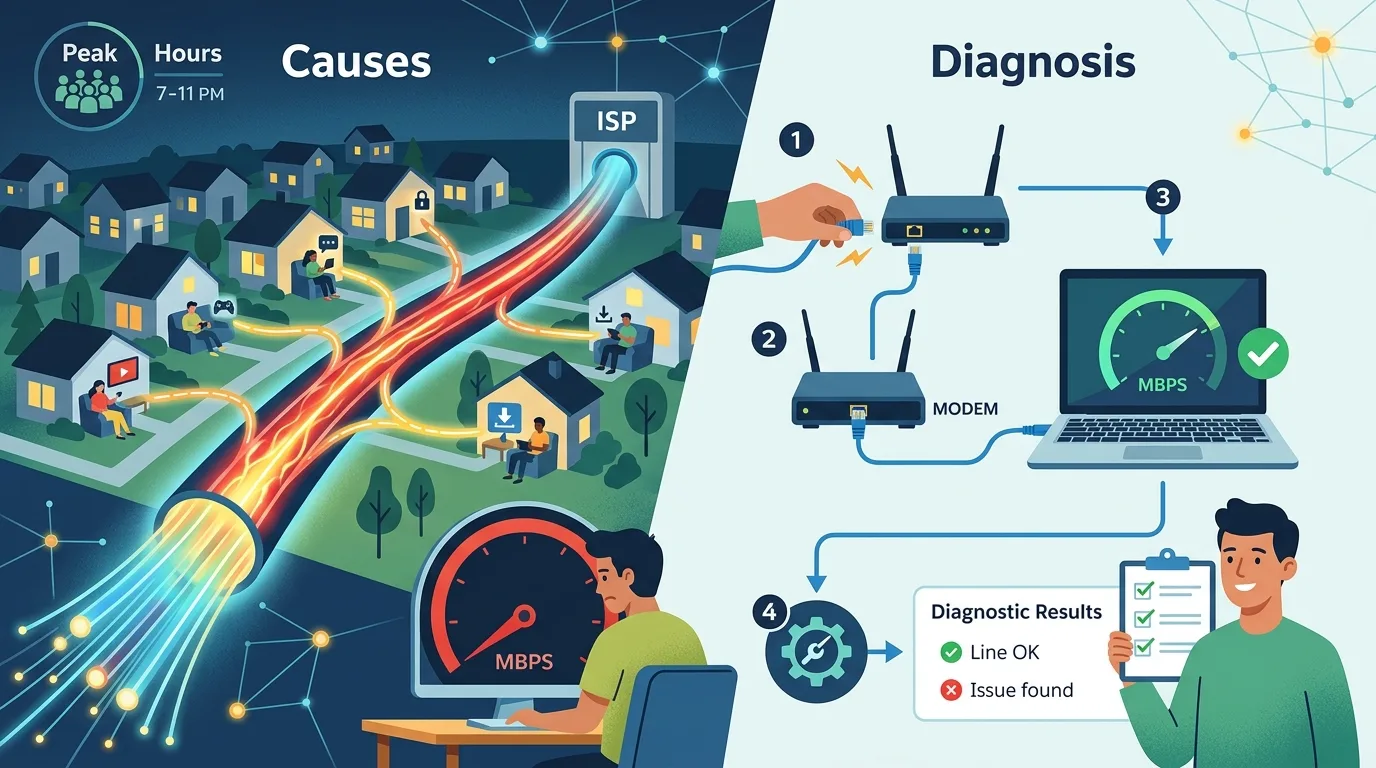
Internet speeds often fall at peak hours because more people are competing for the same network capacity—but congestion is only one possible cause. A crowded 4G or 5G cell, a busy shared fibre link, an overloaded home Wi-Fi channel, simultaneous uploads, a fair-usage speed restriction or a weak mobile signal can all make broadband feel slower in the evening. The fastest way to diagnose the problem is to compare reliable measurements at different times and separate the internet connection from your own router and devices.
For households, video calls may freeze just when everyone starts streaming. For Nigerian businesses, the consequences can be more serious: payment confirmations stall, cloud accounting feels sluggish, file uploads time out and customers experience unreliable Wi-Fi. Before paying for a faster plan or switching ISP providers in Nigeria, establish where the slowdown occurs and whether it repeats.
In its Q1 2026 network-capacity research , the Nigerian Communications Commission (NCC) examined differences between night-time and daytime mobile speeds as a way to identify constrained network areas. Its research confirms that capacity and congestion are genuine concerns, while its consumer guidance recommends recording slow-speed evidence and reporting faults through official channels. This guide shows you how to turn those principles into a practical troubleshooting routine for fibre, 4G and 5G broadband.
What are peak hours for internet usage in Nigeria?
Peak hours are the periods when the network serving your area is under heavier demand. For residential networks, that may be the evening when people return home, stream video, update devices and use social media. A commercial district might instead experience heavier traffic during the working day. There is no single nationwide clock time at which every Nigerian ISP becomes congested.
The NCC's Q1 2026 capacity study used a broad 00:00–06:00 night-time baseline and a 06:00–23:59 comparison period. For that research, it classified a geographic zone as capacity-constrained when measured daytime speed was below half its night-time speed, with more than ten observations required. That is a research methodology for sampled areas, not a regulatory speed guarantee or a diagnostic threshold for one household. A fall in your own speed does not, by itself, prove that your ISP failed a statutory standard.
For a useful home test, sample morning, afternoon and evening. If you experience the problem between 19:00 and 22:00, make that your priority window, and repeat the measurement across several days. A comparison taken at exactly the same time each day is more informative than a collection of isolated speed-test screenshots.
Seven reasons your internet becomes slower at busy times
1. Congestion on a shared 4G or 5G cell
Cellular networks divide finite radio resources among users connected to the same site or sector. When many devices transmit data simultaneously, each user may receive less capacity. Heavy demand, signal quality, radio interference and the amount of spectrum available all influence the result. A router displaying “5G” is not proof that it can sustain the advertised speed while a busy cell serves many customers.
A useful clue is strong performance late at night and much weaker performance at the same fixed location during evening demand. But also check whether the router changes between 5G and 4G or shows deteriorating signal quality; a radio problem can imitate congestion. Do not infer the cause from signal bars alone.
2. Contention or backhaul limits in fixed broadband
Fibre may provide substantial capacity, but not all fibre products are dedicated connections. Shared residential and business connections can be affected by an operator's access-network design, aggregation links, backhaul capacity and upstream interconnection. A good optical link into the building does not guarantee unlimited capacity at every point beyond it.
If multiple wired devices slow down together at the same time while local networking remains healthy, the bottleneck could be on the ISP side. It may be in the shared access segment, upstream routing or destination service; the customer normally cannot determine which without provider assistance.
3. Crowded or weak Wi-Fi inside the building
Wi-Fi is a separate radio link between your device and router. At busy hours, neighbours' routers, Bluetooth devices, thick walls and additional users in your own home can lower Wi-Fi performance. The internet service itself may still be working well. Test close to the router and, where possible, use Ethernet to determine whether the weakness is local.
A move from crowded 2.4 GHz Wi-Fi to a cleaner 5 GHz or 6 GHz Wi-Fi band may help compatible devices over short distances, but those bands can have different wall penetration. Note that 5 GHz Wi-Fi is not the same as cellular 5G.
4. Upload saturation and bufferbloat
Cloud backups, CCTV recordings, photo uploads and video calls can saturate the upstream connection. When packets wait too long in router queues, latency under load increases—a problem commonly called bufferbloat. Your download test might still look respectable, yet calls lag and webpages react slowly. Cloudflare's internet-quality research explains why loaded latency, jitter and packet loss must be measured alongside throughput.
Pausing a large upload during a test is a useful experiment. Where supported, appropriately configured Smart Queue Management (SQM) or traffic shaping can reduce latency under load, although it may trade some maximum throughput for better responsiveness.
5. Fair-usage throttling or an exhausted data allowance
A plan marketed as “unlimited” may apply a fair-usage threshold or reduce speed after heavy consumption. The NCC's 2026 consumer guidance on fair usage advises buyers to read data limits, restrictions and conditions. Unlike a recurring evening congestion pattern, throttling after a usage threshold may persist outside busy hours until the plan resets or another stated condition is met.
Check the provider's account portal for remaining data, usage history and the product's written Fair Usage Policy. Do not assume every unexplained slowdown is throttling; collect supporting evidence first.
6. Device, router, DNS or application problems
An ageing phone, an overheating router, an active software update or a misbehaving application can cause a problem that looks like a network outage. A slow DNS lookup can delay the first connection to a website, while a troubled content server or CDN can make one app slow even when other sites work. Changing DNS can help a genuine name-resolution issue, but it will not increase the capacity of a congested internet link.
Test two devices and more than one website or test server before concluding that your ISP has slowed the whole connection.
7. Power, maintenance and infrastructure faults
Routers, fibre optical terminals, towers and upstream equipment require power. A weak power supply, failing UPS, damaged fibre cable or an operator maintenance event can produce intermittent connectivity. Such faults may happen during peak hours by coincidence, or they may worsen when equipment is stressed. If the connection goes completely offline or shows frequent reconnects, treat it as a stability problem rather than just a speed problem.
Symptoms that point toward different causes
| What you observe | Possible explanation | Best next check |
|---|---|---|
| Wired and wireless speeds both fall every evening | Shared access, mobile-cell or upstream congestion | Repeat time-of-day tests on Ethernet or router-level connection |
| Ethernet is fast but distant-room Wi-Fi is slow | Wi-Fi coverage or interference | Move close to the access point and check Wi-Fi channel / band |
| Ping becomes much slower when someone uploads | Upload saturation and bufferbloat | Pause uploads and compare loaded latency |
| Speed stays low even at 03:00 after heavy usage | Possible data-cap throttling or a persistent fault | Check the plan and operator's usage counter |
| Only one website or application is slow | Destination, routing or DNS issue | Compare several destinations and different test servers |
| Router repeatedly disconnects or restarts | Power, equipment, signal or line fault | Inspect logs, supply voltage and link indicators |
| 5G device frequently falls back to 4G | 5G coverage, signal or network conditions | Check connection mode and measured signal quality |
These are clues, not conclusive diagnoses. More than one problem can exist at the same time.
A practical 30-minute diagnosis you can start today
Step 1: Establish what “slow” actually means
Write down which activities are affected. Is a website taking too long to open? Are large downloads slower than expected? Do video calls freeze? Does the entire connection drop? Note the date, time, device and room. Different symptoms call for different measurements; Mbps alone is not enough.
Step 2: Check the provider's outage and plan status
Use the provider's official app or support channel to check for a reported service incident, expired subscription, FUP restriction or data balance issue. The NCC's quality-of-service advice recommends looking for operator alerts before escalating a problem.
Step 3: Reduce interference from your own network
Pause nonessential downloads, uploads, system updates and cloud sync for a short comparison. Disconnect unused devices if practical. Do not change many router settings simultaneously; the aim is to isolate a cause. Avoid disrupting payment terminals, business monitoring or security equipment during working hours.
Step 4: Run a wired test
Connect a computer by Ethernet directly to the router or a suitable wired port. If the device lacks Ethernet, test near the router and clearly label the result as Wi-Fi. Use a reputable service such as Cloudflare Speed Test or Ookla Speedtest . Record download, upload, idle latency, loaded latency where available, jitter and packet loss. Speed tests consume data, so consider your allowance.
Step 5: Compare Wi-Fi and Ethernet
If Ethernet performs normally while Wi-Fi is poor, focus on access-point placement, interference, channel choice, wireless band and device limitations. If both are consistently slow, check the ISP connection, local upload saturation or broader network conditions. Where you have a separate optical terminal and router, avoid unapproved reconnection of fibre or changing provider-managed configurations.
Step 6: Check latency without and with traffic
On a computer, a basic command such as ping 1.1.1.1 can show round-trip delay, although some networks rate-limit diagnostic packets. Compare the average and variation while the connection is idle, then during a controlled upload or download. A substantial latency increase under load can suggest queueing pressure. Run a second test destination to reduce the risk of misinterpreting one endpoint.
Step 7: Preserve the results
Keep screenshots or export test results and record the device, connection type, date, local time, approximate location, test server and any concurrent activity. These details help you and the ISP compare like with like. One screenshot taken on congested Wi-Fi cannot establish the broadband line's performance.
Build a three-day peak-hour speed test log
Use the same device, test method, location and server where possible. Try a morning slot around 07:00–09:00, an afternoon slot around 13:00–15:00 and an evening slot around 19:00–22:00. Add a late-night test only if practical and safe. Take repeated measurements rather than relying on a single unusually high or low result.
Here is a fictional example for a fixed connection with the same test device and server. It is not a measurement of MTN, Airtel, Glo, ipNX, Spectranet or another Nigerian provider.
| Time | Download | Upload | Idle latency | Notes |
|---|---|---|---|---|
| 07:30 | 62 Mbps | 18 Mbps | 25 ms | No local backup running |
| 14:00 | 45 Mbps | 15 Mbps | 37 ms | Normal office activity |
| 20:30 | 16 Mbps | 7 Mbps | 92 ms | Evening slowdown reported |
| 01:30 | 68 Mbps | 19 Mbps | 23 ms | Light traffic |
The evening download is about 74% lower than the morning result: (62 − 16) ÷ 62 × 100. That repeatable pattern would justify investigating congestion, but it still does not establish whether the bottleneck is the local Wi-Fi, ISP access network, upstream interconnection, policy throttling or something else. Repeating it on Ethernet and ruling out local traffic are crucial next steps.
The NCC's capacity research used aggregated geographic samples and a defined night-versus-day methodology. Your personal log is valuable troubleshooting evidence, but it must not be presented as an NCC network classification or a provider-wide performance ranking.
How to tell whether Wi-Fi or the ISP is slowing you down
First, separate two networks: your local network between device and router, and the ISP connection beyond the router. A Wi-Fi access point can struggle despite an excellent fibre connection. Conversely, a perfectly strong Wi-Fi signal cannot fix a congested mobile cell.
A wired speed test is a useful isolation tool. On a router that supports it, a router-side speed test can sometimes provide a second reference, though test implementation matters. For Wi-Fi, compare performance beside the router with performance at the troublesome location. Check whether only one phone is affected; a device update or hardware limitation may be the real issue.
When multiple users share one access point, consider access-point capacity, sensible placement and guest-network segmentation. For larger offices, adding another correctly configured access point may help local Wi-Fi, but it will not add bandwidth to an overloaded ISP subscription.
How to diagnose 4G and 5G evening slowdowns
On mobile broadband, compare the router's current radio technology and signal-quality indicators. Depending on the equipment, useful indicators can include RSRP, RSRQ and SINR. Do not treat signal bars or one number as proof of congestion: stronger signal can coexist with poor throughput if the cell is heavily loaded.
Test at the exact location and orientation where the router is normally used. If moving it near a window or using an approved outdoor receiver improves performance at both busy and quiet times, signal conditions may be important. If the same strong signal gives much lower speeds every evening, investigate capacity and cell congestion with the operator.
Where your router switches between 5G and LTE, record the connection mode alongside the speed result. A 5G-labelled plan or 5G-capable device does not guarantee that the modem remains on 5G throughout the test. Ask whether the product is portable or tied to a registered address before moving it to another location.
Switching to a stronger cellular operator may help when the existing one is overloaded locally, but do not assume that the best network in one neighbourhood is best in another. Confirm real address-level performance and total plan terms before switching.
Bufferbloat: why your speed test looks fine but video calls lag
Suppose an office obtains 50 Mbps downloads and 10 Mbps uploads. A staff member starts uploading a large cloud backup, then everyone on video calls experiences delayed speech, frozen pictures and sluggish page loads. The bottleneck may not be insufficient download bandwidth; the 10 Mbps upload path can become saturated.
Queued traffic raises latency under load. Cloudflare explains that large router queues can cause bufferbloat and that packet loss, jitter and latency affect perceived quality beyond simple throughput. To investigate, compare idle latency with latency during controlled upload traffic. Pause the backup and repeat the call or test. If the symptom improves consistently, review traffic scheduling, upload limits and router queue management.
Smart Queue Management, where properly supported, can keep interactive packets responsive by shaping traffic slightly below the line's usable capacity. But the correct configuration depends on the router and changing ISP speed, especially on 4G/5G. Upgrading to a more capable router may be necessary for advanced queue management; turning on generic QoS without testing does not guarantee improvement.
When changing DNS, buying a new router or upgrading your plan will help
Changing DNS: It may help when domain lookups are slow or failing, but normally does not cure low throughput caused by shared network congestion. First compare multiple sites and determine whether delays happen before the website starts loading or throughout a file transfer.
Replacing the Wi-Fi router: It may help if Ethernet is fast but local Wi-Fi is consistently slow, if the device overheats or reboots, or if it cannot handle many connections. It will not fix an ISP's insufficient upstream capacity.
Upgrading the broadband tier: It can help if the current plan is consistently saturated and the provider has capacity to deliver the higher tier at your location. If even an uncapped wired test collapses at peak time because of network contention, buying a higher advertised tier may not solve the bottleneck.
Installing fibre or changing ISP: It can be worthwhile if repeated, properly controlled tests show an unresolved service problem, and another provider confirms real coverage and suitable terms. Read FlyingEze's broadband speed requirements guide to avoid buying far more speed than your actual workload needs.
Using a VPN: A VPN may change the route to a particular destination but adds overhead, may introduce latency and does not increase the access network's capacity. It is not a general fix for peak-hour congestion.
What to send your ISP when you report slow speeds
A good complaint is specific. Instead of “the network is very slow”, explain the access type, service address, plan, periods affected and how you tested. Provide both a quiet-period baseline and a representative peak-hour result, preferably from wired or router-level tests where feasible. Include latency, packet loss and the activities failing, not just download speed.
Ask the provider to verify the account's FUP status, signal or line health, local site capacity, outages, access-link errors and any upstream fault. Also ask for a complaint ticket and a realistic follow-up time. The NCC's consumer QoS guidance recommends keeping records and using speed-test evidence.
If the issue remains unresolved, follow the NCC's June 2026 complaint procedure : first contact the service provider, obtain and save a reference number, allow the applicable resolution period, then escalate with your documentation. The NCC lists toll-free 622 and its consumer channels for unresolved cases. Do not share router passwords or sensitive account data with unverified people claiming to be support agents.
Business internet: keep operations running while investigating
A hotel, restaurant, POS outlet or remote-work team may not have the luxury of diagnosing an outage during customer transactions. Set up a tested fallback where business continuity matters: for example, a fibre primary connection and a separate mobile-broadband link. Configure the network so essential payment, booking and cloud systems take priority when the backup has a small allowance.
Where the router supports dual-WAN failover, test that it detects real internet failures, not merely an unplugged cable. Active video sessions and VPNs may still drop during route changes. Keep guest Wi-Fi separate from operational systems and schedule large backups outside busy periods when feasible.
When considering a new provider, verify the written service-level agreement, installation commitments and fair-usage restrictions rather than relying on a promise of faster evening speeds. Read your contract's fault-remedy rules before making claims for compensation. A backup connection and clear escalation process are often more valuable than another speed-tier upgrade.
Frequently asked questions
Why is my internet fast in the morning but slow at night in Nigeria?
Increased demand on an ISP's shared network is one possible explanation. Busy Wi-Fi, uploads, mobile signal changes and fair-usage restrictions can produce similar symptoms. Compare Ethernet and Wi-Fi tests at consistent times across several days, then ask the ISP to inspect capacity if the slowdown persists.
What time is the internet slowest in Nigeria?
There is no universal slowest hour. Residential connections may face higher evening demand, while business districts can be busy during office hours. Use a three-day test log to identify the pattern for your own location and provider.
Does 5G get slower at peak hours?
Yes, it can. 5G shares radio and network capacity among users, and performance depends on signal quality, spectrum, network load and the plan. A 5G-capable router does not guarantee constant 5G speed.
Will moving my router to a window improve speeds?
It may help 4G/5G reception, especially if the original position has weak signal. It will not fix all network congestion. For fixed fibre, moving a Wi-Fi access point may improve indoor coverage but does not change the fibre line's external capacity.
Can I prove ISP congestion with one speed test?
No. A single result is affected by Wi-Fi, device, test server, traffic and time. Repeated comparable measurements provide useful evidence, but identifying the bottleneck usually requires ISP network diagnostics.
Can I make my internet faster by switching DNS?
Changing DNS can improve faulty domain-name lookups. It cannot normally overcome a saturated ISP link or radio cell. Diagnose the delay before changing settings.
Where do I complain about recurring slow internet in Nigeria?
First report it to your provider and obtain a ticket number. If the complaint is not resolved within the applicable process, use the NCC's consumer channels, including 622, and supply your speed-test evidence and complaint reference.
Conclusion
Peak-hour internet slowdowns are easiest to solve when you identify the bottleneck instead of guessing. Shared network congestion may be real, and the NCC's 2026 research shows why comparing low-demand and busy-period performance matters. But local Wi-Fi, weak cellular signals, upload queues, device faults and fair-usage policies can all look similar from a user's perspective.
Start with repeatable time-of-day measurements, compare Ethernet against Wi-Fi, monitor loaded latency and check the plan's limits. If the connection remains consistently poor under controlled testing, submit the evidence to your ISP and escalate an unresolved complaint through the NCC. For businesses, a proven backup and sensible traffic management can reduce disruption while the underlying problem is investigated.
Research checked: 18 November 2026. Provider performance, capacity and data-plan policies vary by location and time. The example test results are fictional and do not represent measurements of a named Nigerian ISP.