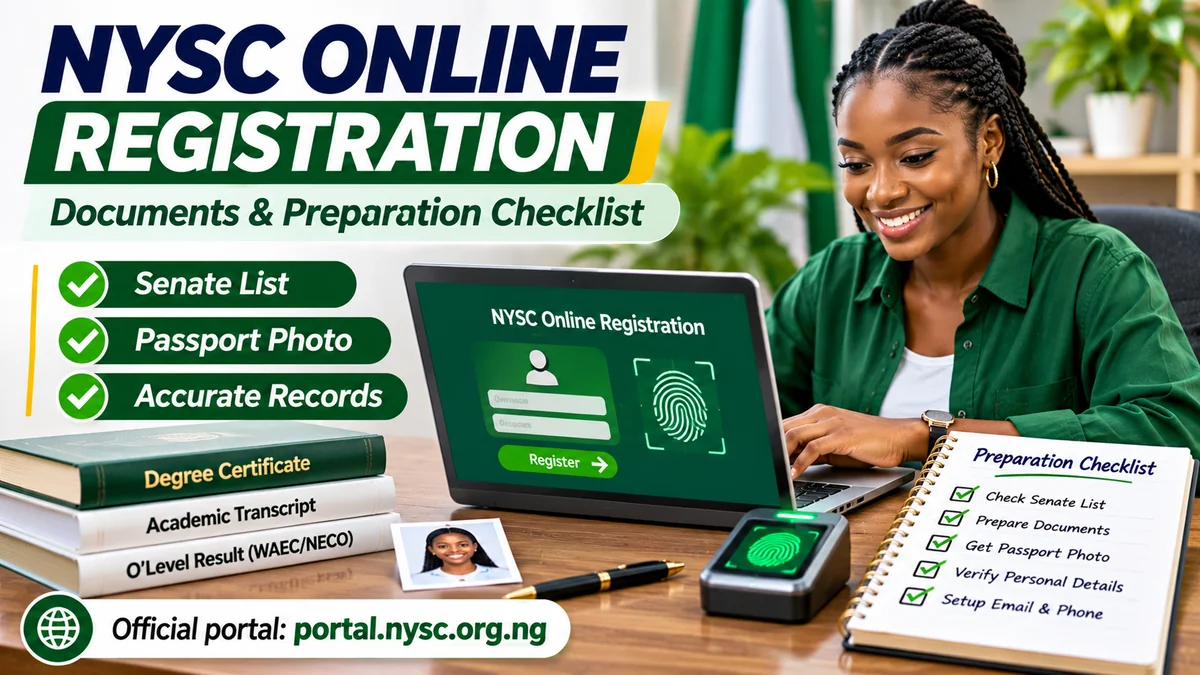
Before using the NYSC registration portal, confirm that your records are eligible, prepare a working email and Nigerian phone number, check your passport photograph, and understand the biometric requirements. Locally trained graduates must first verify their details on the Senate or Academic Board-approved list uploaded by their institution. Foreign-trained Nigerian graduates have an additional and more extensive set of academic and travel documents to assemble.
This practical NYSC online registration documents and preparation checklist separates what every prospective corps member needs from documents that apply only to particular categories. It also explains how to check the official NYSC registration portal , prepare an acceptable photograph, avoid registration by proxy, make authorised payments and review your application before submitting it.
Research verified on 12 November 2026. Registration windows, document-upload fields and equipment support may change. Confirm the current batch instructions before acting; this article does not claim that general NYSC registration is open for every applicant.
NYSC online registration preparation checklist at a glance
| What to prepare | Who needs it? | What to check |
|---|---|---|
| Approved Senate/Academic Board result-list entry | Locally trained graduates | Your details appear correctly in the institution's approved submission |
| Correct matriculation and academic details | Locally trained graduates | Name, matriculation number, course and graduation records match institutional data |
| Accessible email and Nigerian GSM number | Prospective corps members | You control the inbox and registered number |
| Recent compliant passport photograph | Applicants when required by portal | White/off-white background, visible face and current image specifications |
| Your own biometric fingerprints | Applicants subject to biometric registration | Use NYSC-supported capture system; no proxy fingerprints |
| Degree/HND, transcript, O'Level and travel records | Foreign-trained Nigerian graduates | Correct originals, applicable copies and online submission requirements |
| Marriage/health evidence | Applicants claiming relevant concessions | Records support the claim under current NYSC instructions |
| Professional registration/licence | Relevant health professionals | Valid evidence from the appropriate professional body |
| Payment method and receipt plan | Where official portal payment is required or selected | Pay through the portal-linked Remita process; save reference |
Do not misread this table as a list of documents that every graduate must upload. For example, NYSC's published list of original degree certificates and full transcripts is specifically directed at foreign-trained graduates. Nigerian-trained candidates rely first on the institutional Senate/Academic Board record, although they should keep their own academic documents available for checking details and later instructions.
Step 1: Check the genuine NYSC portal and your registration window
NYSC names nysc.gov.ng as its official main website and portal.nysc.org.ng as its registration service on the NYSC contact page . Type either address directly or follow links from the institutional homepage. A sponsored search listing, forwarded WhatsApp link or convincing logo is not proof that a site belongs to NYSC.
Next, confirm the service year, batch, stream and registration category. NYSC registration is not a permanent open enrolment system. Its mobilisation timetable and the active services listed on the portal are the relevant starting points. Some portal paths displayed different registration closing dates during research on 12 November 2026, so do not rely on an undated graphic or assume that an older deadline governs your application.
Check whether your option is fresh registration, revalidation, remobilisation or part-time exclusion-related registration. They are different processes. If your record already exists, do not create a second account merely because a previous attempt encountered a problem.
Step 2: Verify your Senate list and academic details
For Nigerian-trained graduates
NYSC's registration requirements state that only locally trained graduates whose names appear in the approved Senate or Academic Board results lists submitted by their institutions can access registration. This is an eligibility data check, not a document you can replace with a letter from a friend or an unofficial screenshot.
- Open the official portal and use the Senate-list checking option where displayed.
- Find the appropriate institution and verify your name and graduation details using the requested fields.
- Compare the details against your school records, particularly spelling, matriculation number and programme.
- If your name is missing or the data are wrong, contact your school's Student Affairs or mobilisation office before attempting registration.
Prepare your matriculation number and any other student details required for verification. It is wise to have your certificate or statement of result available to cross-check spelling and course details, but do not assume that a locally trained applicant must upload the foreign-graduate transcript bundle. Check the actual portal prompts for your category.
NYSC's FAQs also direct graduates to their institution for issues such as a missing Senate-list entry or a conflicting matriculation/JAMB number. Correcting those problems through official records is safer than paying someone who promises an instant “manual upload”.
Step 3: Set up an email, phone and reliable identity records
NYSC requires a functional email address and a Nigerian GSM telephone number for registration. The email is used for account activation and subsequent access, so make sure it is an inbox you control and can recover. Check spam or junk folders for genuine activation messages, but examine the sender and destination carefully before following a link.
Prepare a private list of your correct personal and school information: full name, date of birth, matriculation number, programme, graduation details and other data requested by the official form. Where identification documents use different spellings or dates, investigate the discrepancy before submission rather than guessing.
Use a strong, unique password and keep it private. Do not give an agent access to your email, OTPs or entire portal dashboard. NYSC's official FAQ describes account creation, activation, form completion, review and submission as distinct stages. Completing the first stage is not confirmation that the entire registration is successful.
Step 4: Prepare a passport photograph that passes the portal checks
The current NYSC pre-registration page gives specific guidance for a photo that can be used in registration:
- Keep the head straight and face centred, with the eyes, nose, ears, mouth and jaw visible.
- Use a white or off-white background, even lighting and minimal shadows.
- Use a recent passport-size image; the guidance describes 2 × 2 inches.
- Remove caps and glasses for the sample format; keep an unobstructed view of the face.
- For the current page's image-preparation tool, the stated file target is under 15 KB, using JPG or PNG. Follow whichever specification the live registration form actually enforces.
Ask a photographer for a clean digital copy rather than scanning a tiny print if the resulting image is blurry. Do not manipulate the photo to change facial features. Save it somewhere secure and verify that you can locate the file before starting.
Step 5: Understand NYSC fingerprint and biometric registration
Biometric capture is not something a helper can complete using their own fingers. NYSC says fingerprints must belong to the prospective corps member and may be checked again during orientation.
As checked on 12 November 2026, NYSC's official registration requirements page specifies a Windows computer, the portal's desktop registration application and a Digital Persona U.are.U 4500 fingerprint scanner. It also says older Java-based browser capture is no longer supported. These are technical specifications from the current NYSC portal, not a recommendation to download random drivers from search results.
If you do not own a compatible system, use a legitimate registration setup and remain present for your own biometric capture. The goal is not to buy unnecessary equipment but to ensure that the process uses approved software, the correct identity and your fingerprints. Never allow another person's biometrics to be attached to your application.
Step 6: Extra checklist for foreign-trained Nigerian graduates
Foreign-trained graduates have substantially different verification obligations. The official NYSC foreign-trained requirements and the portal's foreign-graduate guidance specify original academic records, travel information and verification procedures. These records should be assembled well before a registration window opens.
Academic records
- Original first degree or HND certificate.
- Complete official academic transcript for that degree or HND.
- Original O'Level certificate or recognised equivalent; an online result print-out is not a replacement for the original in NYSC's foreign-trained guidance.
- Mark sheet where applicable, including the stated requirement for Indian universities.
- Foundation qualification if the award followed a relevant top-up programme.
- Professional registration certificates, practice licences and other category-specific documents where required for medical or allied-health graduates.
NYSC warns that statements of result, general attestation letters and downloaded certificates may not substitute for the original academic credentials it requires for foreign-trained mobilisation. Documents issued in languages other than English may need translation through the stated official channels. Do not assume a privately translated document will automatically be accepted.
Travel and nationality evidence
Prepare your Nigerian international passport and the relevant passport data pages, visa or residence evidence, dates of travel and other records demonstrating the period of study abroad. Graduates who used several passports or hold dual nationality should consult the official instructions for all applicable data pages and passport evidence.
If a passport or credential has been lost, NYSC lists a formal process involving reports, affidavits and supporting evidence. Do not fabricate replacement scans or submit altered documents.
Physical verification
Uploading documents is not the same as completing physical verification. NYSC may require foreign-trained graduates to appear with original credentials and travel documents at a designated verification centre or orientation camp, depending on their dashboard instructions. Keep originals secure and readily available; do not send them away before NYSC has completed the required check.
Step 7: Additional evidence for marital or health-related consideration
Not every applicant will need these records. NYSC's FAQs identify special documentation for candidates seeking consideration on marital or serious health grounds.
Marital grounds
Married female prospective corps members seeking the applicable posting consideration are told to provide their marriage certificate, evidence of change of name where relevant, evidence of the husband's domicile and his means of identification. Exact documents may differ for an initial concessional posting request and a later relocation application, so follow the service shown in your dashboard.
Health grounds
Candidates asking for health-related consideration should state their circumstances accurately and prepare a supporting medical report from the level of hospital specified by NYSC, with the doctor's details where required. Do not exaggerate or invent a condition. The paperwork supports consideration under the applicable process; it is not an automatic guarantee of posting to a particular location.
There may also be additional requirements for certain regulated professions. Check the appropriate professional registration and practice-licence rules if you completed medicine, nursing, pharmacy or another relevant health course.
Step 8: Prepare for the official payment and keep the reference
NYSC's Remita payment guidance tells applicants to start payment from their authenticated NYSC account and follow the linked payment flow. Where payment is required or a paid printing service is selected, save the transaction reference, receipt and confirmation screen.
Some older official pages mention specific amounts for optional call-up-letter printing. Because charges and services can change, this guide does not present a historical amount as a guaranteed current fee. Verify the payee and exact charge in the active portal before paying. Do not transfer money to a personal account on the promise of faster mobilisation, a preferred posting or a guaranteed call-up number.
If a transaction appears unsuccessful, check the official payment-status service before attempting another payment. A bank debit alone may not mean that NYSC has recorded the transaction successfully.
Final pre-submission review: mistakes to catch
| Potential problem | Check before submission |
|---|---|
| Incorrect name or date of birth | Compare official records and use the designated correction path where needed |
| Missing Senate-list record | Ask the institution to verify its approved submission |
| Wrong matriculation number or course | Recheck original academic and school records |
| Photo rejected | Correct the background, framing or file requirements |
| Biometrics captured by proxy | Stop; ensure your own fingerprints are captured through an approved process |
| Incomplete foreign-graduate documentation | Prepare originals, transcripts, travel evidence and any required translations |
| Payment status unclear | Use NYSC's official status check and keep the RRR |
| Wrong registration category | Confirm fresh registration, revalidation, remobilisation or exclusion route |
Before pressing Submit, preview every field, check that the selected batch is appropriate, and confirm all necessary uploads have succeeded. The NYSC FAQ also mentions reviewing the form, accepting the required terms, adding a signature and then submitting. Record any confirmation generated and retain your login securely.
What happens after NYSC registration?
Registration is a stage in a wider mobilisation process, not a guarantee of immediate posting. Depending on eligibility and the batch timetable, candidates may subsequently receive a call-up number, a call-up letter, placement instructions or a requirement for further verification. Part-time graduates may use an exclusion-letter process instead of the ordinary orientation route.
Check the official dashboard for subsequent actions rather than relying on third-party promises. FlyingEze previously covered the release of call-up letters for a 2026 Batch B Stream II group , which illustrates why later mobilisation announcements are separate from initial registration preparation.
Be sceptical about messages claiming an extra “special window” or unofficial shortcut. FlyingEze reported an instance in which NYSC disowned a viral redeployment notice . When the stakes involve sensitive documents and payments, the extra verification is worthwhile.
Frequently asked questions about NYSC registration documents
Do all NYSC applicants need to upload a degree certificate and transcript?
No universal rule should be inferred. NYSC expressly lists original degree/HND certificates and full transcripts for foreign-trained Nigerian graduates. Locally trained graduates must primarily confirm the approved institutional Senate/Academic Board record and follow the actual portal prompts.
What should I do if my name is missing from the Senate list?
Contact your institution's Student Affairs or mobilisation office to check the approved submission. Creating another account or paying an intermediary does not resolve an absent or incorrect institutional record.
Can NYSC biometrics be completed entirely on a mobile phone?
The current pre-registration instructions specify a supported Windows desktop application and fingerprint scanner. A phone may help you read notices or manage some portal services, but do not assume it replaces the required biometric equipment.
What passport photo is suitable?
Use a recent clear photo with a white or off-white background and an unobstructed, centred face. NYSC's current photo-preparation page describes a 2 × 2-inch image and a file under 15 KB; always follow the active form's requirements.
Can I use a statement of result if I studied abroad?
NYSC's foreign-trained instructions generally reject statements of result and attestation letters as substitutes for the original degree or HND certificate. Consult the full applicable guidance and resolve missing credentials before registration.
Where can I check the correct batch deadline?
Start at nysc.gov.ng , consult the latest mobilisation timetable and compare it with portal.nysc.org.ng . If two official pages disagree, seek clarification rather than treating a cached date as definitive.
Conclusion: prepare your records before the registration window opens
A successful NYSC registration starts before the first form is filled. For Nigerian-trained graduates, the priority is an accurate approved Senate-list record, accessible contact details, a compliant photograph and properly captured biometrics. For foreign-trained graduates, the priority additionally includes original academic credentials, transcripts, O'Level evidence, passports, travel records and any necessary verification.
Use the genuine NYSC registration portal, verify every batch instruction, protect your login and pay only through authorised channels. A careful checklist can reduce avoidable errors and make the next stage of mobilisation easier to manage.