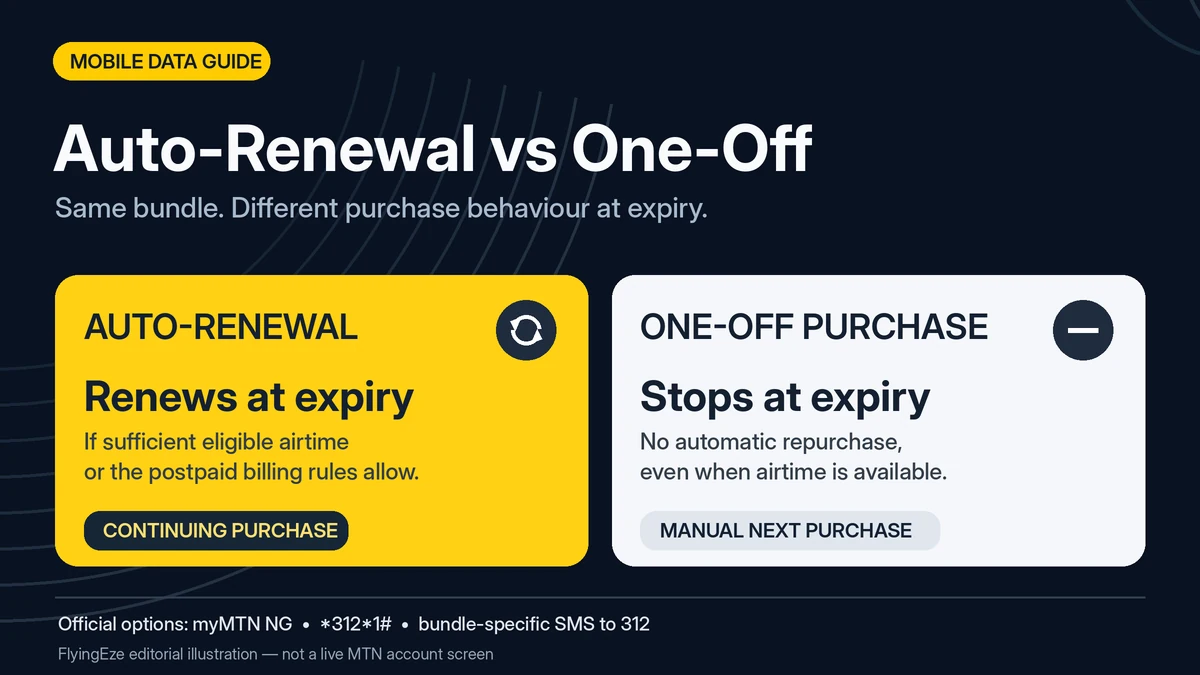
MTN auto-renewal and one-time data plans can offer the same selected bundle, but they behave differently at expiry. Choosing Auto-renew Purchase allows MTN Nigeria to purchase the bundle again automatically at the end of its validity when funding conditions are met. Choosing One-off Purchase—also called a one-time plan—means no replacement bundle is automatically bought, even if your prepaid SIM has enough airtime. These definitions come from MTN's official data-bundle guidance .
For Nigerians searching how to cancel auto renewal on MTN, the difference matters because a recurring data purchase can use airtime that you intended to spend on calls or another service. On the other hand, a one-off purchase can expire while you are busy and leave you without the next bundle until you renew manually.
This detailed comparison explains what changes in billing, convenience, expiry and purchase control; what stays the same in data use and rollover; and how to switch between the two modes. Fact-checked on 13 November 2026. MTN can change bundle prices, activation codes, product names and app menus, so confirm the live offer before taking action.
MTN auto-renewal versus one-time data plans: quick comparison
| Feature | Auto-renewal | One-time / One-off |
|---|---|---|
| Purchase today | The chosen data plan | The chosen data plan |
| At the bundle's expiry | Automatic next purchase when conditions are met | No automatic next purchase |
| Prepaid airtime | Can fund a new bundle at renewal | Not used to buy another copy unless you choose to purchase |
| Postpaid account | May be billed according to postpaid plan rules | No recurrence from the one-off instruction |
| Convenience | Less manual renewal effort | More manual control |
| Unexpected repeat charges | Possible when the setting is forgotten | Less likely for that particular plan |
| Risk of a service break at expiry | Lower when the renewal succeeds | Higher when you forget to repurchase |
| Main data rollover | Subject to qualifying category and timing rules | Still possible with a qualifying new purchase |
| Cancel or change | myMTN NG or the correct NO + bundle code to 312 | Choose a new preference in myMTN NG or use the correct R + bundle code to 312 |
The fundamental difference is consent to buy the next bundle. This is not, by itself, a difference in network speed, unlimited browsing or extra data allowance.
What is MTN data auto-renewal?
Auto-renewal is a recurring purchase instruction attached to an eligible data subscription. MTN's Data Autorenewal page explains that when customers select the option, the plan is automatically renewed after its stated validity if there is enough prepaid airtime. For postpaid customers, renewal can be billed under the applicable account rules.
For illustration only, suppose a seven-day plan costs ₦1,500. If it is set to auto-renew, a subscriber with sufficient eligible airtime may have another ₦1,500 bundle purchased after seven days without selecting the plan again. This fictional price is not a claim about MTN's current bundle tariffs; the principle is that the same purchase instruction repeats when conditions allow.
Auto-renewal is useful for predictable internet needs. It also makes it easier to overlook repeat spending if the subscriber no longer needs the plan or changes usage habits. MTN does not say that the mere presence of the auto-renewal setting guarantees the next purchase when the necessary funding is absent.
Nor does recurring purchase mean unlimited internet. Each renewed plan still has its advertised volume and validity, and its restrictions remain relevant.
What is an MTN one-time or one-off data plan?
MTN calls this choice One-off Purchase. You buy the selected plan once, with its advertised size, validity and special conditions, but that transaction does not authorise MTN to buy the same plan again at expiry.
The distinction matters even when airtime is available: MTN explicitly states that one-off bundles do not automatically renew simply because the prepaid line has sufficient balance. When the plan ends, the customer must decide whether to buy another one.
This can be useful if you use free Wi-Fi most of the week, purchase mobile data for an occasional trip, or need internet only during a temporary project. It also reduces the risk of a repeat purchase consuming airtime set aside for voice calls. However, if a one-off plan expires while you are working, you may need to open the MTN data menu and buy another bundle before browsing again.
One-off is not the same as data without an expiry date. The selected plan still expires according to its normal terms. One-off also does not automatically disable every other recurring subscription on the same SIM.
Do auto-renewing and one-time MTN plans cost different amounts?
The choice of renewal behaviour does not establish a universal discount or surcharge. If the exact same advertised plan is offered under both options, the key distinction in MTN's documentation is whether the customer has authorised a future repeat transaction.
That said, MTN offers different bundles, validity periods, customer-specific promotions, bonuses and purchase channels. The terms of a particular offer can affect the actual price or allowance. Therefore, neither “auto-renewal always costs less” nor “one-off always gives more value” is an accurate universal claim.
Think about the total spend over time rather than only the first price. A person buying an eligible weekly plan four times may pay for four separate purchases, regardless of whether they happened automatically or manually. Someone who only needs it for one week can avoid the later purchases by using one-off. That is spending control, not an automatic lower tariff for the one-off bundle itself.
Check the current price, main data, restricted bonuses, validity and renewal setting together through MTN's official data-plan catalogue or the live USSD purchase menu.
Does auto-renewal prevent your data from running out early?
No. MTN's bundle FAQ says data access may be suspended when a bundle is exhausted before its normal expiry and no other usable allowance is available. Automatic renewal is tied to the plan's scheduled expiry, not simply to the moment a user consumes its last megabyte.
If you buy a monthly bundle and exhaust it after a week through large downloads or streaming, switching on auto-renewal does not promise a new monthly allowance immediately. You may need to purchase another bundle, use other available eligible data or choose a separate browsing option.
The same is true of one-off plans. Both options have the same practical need to manage consumption and monitor expiry. MTN's data-management guidance identifies video streaming, automatic backups, software updates and hotspot connections as common reasons data depletes faster than expected.
For time-sensitive work, even an auto-renewing plan needs sufficient funding and a fallback connection. Convenience is not a service-level guarantee.
Does the choice change data validity, speed or bonus offers?
The normal validity and advertised data volume come from the bundle you select, not solely from whether the purchase is recurring. A seven-day plan has its own expiry and data allowance; selecting one-off does not turn it into a 30-day plan. A monthly bundle on auto-renewal still has a fixed monthly allocation.
MTN's ordinary data FAQ also describes promotional benefits such as device offers and YouTube night or day bonuses. Those may depend on customer eligibility and the specific bundle. Some are restricted to particular apps or times and are not freely transferable or rollable. You should compare the product details rather than assuming the renewal setting always adds a bonus.
Similarly, 4G or 5G connection speeds depend on device, network conditions and applicable service terms. There is no basis to promise that auto-renewal is inherently faster than one-off for the same eligible bundle.
The safe approach is to keep two questions separate: What am I buying? and Will MTN buy it again automatically?
What happens to unused data? MTN rollover rules explained
A common misconception is that only auto-renewing bundles can roll over. MTN says eligible unused main data can roll over if a qualifying new bundle from the right category is purchased before expiry or within the allowed grace period. A customer who previously chose one-off may still qualify by making a timely manual repurchase.
| Original plan group | Qualifying rollover group | Published grace period |
|---|---|---|
| One-day bundles | Eligible one-day bundles | 1 day |
| Above one day but below 30 days | Eligible two-, three-, seven- or 14-day group | 3 days |
| 30-day or longer bundles | Eligible 30-day or longer group | 7 days |
For example, suppose you have unused main data in a monthly bundle that has just expired. Buying another qualifying monthly-category bundle within the seven-day grace period may carry the balance forward, even if the previous plan was a one-off purchase. Buying an unrelated one-day bundle would not satisfy the same-category requirement.
There are important limitations. MTN says expired unused data cannot be used for browsing during the grace period until an eligible new purchase occurs. MTN also excludes unused bonus data from ordinary rollover, even where the main data qualifies.
Some products such as social and Always-On bundles have their own particular conditions. Check the relevant product page before relying on an old example. The principle remains: automatic renewal may make a timely new purchase more convenient, but it is not the thing that creates rollover eligibility.
How to choose Auto-renewal or One-off when buying data
MTN lists *312*1# as a main USSD path for buying data, alongside the myMTN NG app and other official channels. The standard bundle purchase flow lets eligible customers select Auto-renewal, One-off or Buy for a Friend.
- Dial
*312*1#from your MTN SIM, or open the official myMTN NG app. - Select the data-plan category and the specific bundle. Read its price, volume and expiry.
- Choose Auto-renewal Purchase if you want it to repeat at expiry subject to funding, or One-off Purchase if you want only the current purchase.
- Confirm the transaction and save the acknowledgement.
- Where available, open myMTN NG → Manage Subscription to confirm the plan's renewal status.
MTN documents a small but useful difference in incomplete prompts. If an SMS-initiated purchase confirmation times out, MTN says the resulting purchase is treated as one-off; in its normal USSD process, a user must select a purchase option before proceeding. Do not deliberately rely on a timeout. Choose the intended option and check the confirmation instead.
Buy for a Friend is a separate service and not a synonym for one-off. It purchases a data plan for an eligible recipient. It is not necessarily a transfer from the main data balance on your own phone.
How to switch an existing MTN bundle from auto-renewal to one-off
MTN's official instructions say customers can open the myMTN NG app, select Manage Subscription, choose the relevant active bundle and toggle auto-renewal Off. This changes the future renewal instruction for that bundle.
For ordinary data bundles, its FAQ gives an SMS alternative: send NO followed by the exact bundle activation code to 312. For instance, if an authentic plan used the fictional code XYZ, the example cancellation text would be NOXYZ; do not send this illustrative command as if it were a live MTN code.
The + shown in documentation as NO+bundle code describes joining two text parts. Do not type a literal plus sign, and do not substitute the bundle's price for its actual activation code.
After making the change, verify the saved status in myMTN NG or retain MTN's confirmation SMS. Do not assume that switching off renewal erases your already purchased allowance. The bundle remains subject to its original validity.
FlyingEze has a separate detailed guide, How to Cancel MTN Data Auto-Renewal Using Official Methods, scheduled for 24 December 2026. Because its public URL is not yet verified, it is intentionally not linked from this article at creation.
How to change a one-time MTN data plan to auto-renewal
You can also switch in the other direction. MTN's official bundle FAQ describes sending R followed by the actual bundle code to 312 to opt into or renew a suitable plan. In myMTN NG, use the same active bundle's renewal controls and turn the setting On where supported.
Check the current activation code in your genuine plan message or MTN's current documentation. Some social, education, postpaid and specialist products use different formats. A random old code may fail or affect the wrong product.
Only enable renewal if you are comfortable with a repeat purchase at the appropriate expiry. You do not need auto-renewal simply to finish using your current data. Monitor the actual next billing date and keep the necessary funding available if continuity matters.
Multiple active MTN bundles can create unexpected repeat charges
MTN allows several data bundles to be active on one SIM, with different expiry dates. Its official FAQ explains that bundles in different categories can have separate renewal schedules. When more than one plan is active within the same category, MTN says the most recently purchased plan in that category is normally the one selected to auto-renew.
For example, a subscriber may hold a daily bundle and a monthly bundle simultaneously. Turning off renewal for the daily plan does not necessarily stop the monthly plan's future purchase. Similarly, an unrelated social bundle may have its own recurring setting and specific cancellation keyword.
To avoid confusion, review the active subscription list and note the bundle name, price, expiry and renewal state. Use *323*4# or text 2 to 323 for data balances and validity, and the actual subscription controls to confirm whether renewal is on. A balance enquiry alone is not proof that a recurring instruction has stopped.
For separate questions about giving data to another MTN user, FlyingEze's published MTN data-sharing troubleshooting guide explains a different type of transaction.
One-off versus PAYG browsing: do not confuse the two
One-off controls whether MTN purchases another bundle for you automatically. Pay-as-you-go (PAYG) browsing is different: after eligible bundled data runs out, a subscriber who has opted in may continue using airtime to pay for internet traffic.
MTN publishes *312*201# or SUSPEND to 312 to opt out of PAYG. This is separate from the NO plus bundle-code instruction for cancelling recurring bundle purchases. Conversely, *312*200# or RESET to 312 is listed for opting into PAYG.
If airtime keeps decreasing after you switched to one-off, the cause might be a different auto-renewing plan, PAYG usage or an unrelated paid value-added service. MTN's *305# menu is intended to manage active value-added services, not ordinary data bundles.
Identify the charged service rather than trying unrelated USSD commands. Your goal is to stop the actual unwanted charge without accidentally altering services you still use.
Which MTN data purchase option suits your situation?
| Situation | Likely better fit | Why |
|---|---|---|
| Student mostly using school Wi-Fi | One-off | A recurring mobile-data purchase may not be needed every week |
| Remote worker using MTN daily | Auto-renewal with monitoring | Can reduce manual renewal work if funded |
| Family buying data for a short trip | One-off | Future cycles may be unnecessary |
| Critical business line | Auto-renewal plus backup connection | Useful convenience, but not an absolute guarantee of uninterrupted service |
| Subscriber topping up airtime mainly for calls | One-off | Helps protect that airtime from repeat purchases of the selected bundle |
| User comparing offers each month | One-off | Keeps the decision about price, validity and quantity manual |
This is practical advice rather than an eligibility rule. A frequent data user can still prefer one-off for financial discipline. A less-frequent user can consciously enable recurring purchases during a temporary project. Consider your monthly budget, the importance of uninterrupted data access and your ability to monitor renewal dates.
What if MTN charges you after you cancel auto-renewal?
Save the bundle name, date of cancellation, confirmation SMS or screenshot, time and value of the later debit, and the transaction reference if one is available. First check whether it was charged before the cancellation took effect, or whether another active subscription made the purchase.
MTN's contact page lists 300 as its customer-care number. Explain what happened and ask for a complaint reference so that any further follow-up can be tracked.
The Nigerian Communications Commission's directions state that automatic data renewal requires prior consumer consent and that subscribers must have auto-renewal and one-off purchase options. The NCC's June 2026 complaint guidance recommends reporting to the operator first, keeping its ticket number and escalating unresolved cases to the NCC on 622 or through an official complaint channel.
Do not disclose your banking PIN, security code or email password to someone claiming privately that they can reverse an MTN data charge. Protecting your phone number matters for other services too; FlyingEze's SIM-swap fraud guide explains that broader account-security risk.
Common myths about MTN one-time and auto-renewal plans
| Claim | Reality |
|---|---|
| “One-off data cannot roll over” | Eligible main data can roll over following a qualifying new purchase within the allowed time |
| “Auto-renewal means unlimited data” | Every purchased bundle has defined allowance and validity |
| “Auto-renewal always gives more gigabytes for less” | No universal benefit is established; compare the actual product and offer |
| “One-off ends every MTN deduction” | PAYG and other subscriptions may still generate charges |
| “Auto-renewal tops up immediately when data runs out” | Its repeat purchase is normally linked to bundle expiry, subject to funding |
| “Turning off renewal deletes my current data” | Renewal preference and remaining bundle validity are separate issues |
Frequently asked questions
What is the difference between MTN auto-renewal and one-time data?
Auto-renewal attempts to repurchase the plan at expiry when the applicable funding rules are met. One-time or one-off does not repurchase that plan automatically, even if eligible airtime remains.
Is MTN auto-renewal cheaper than one-off?
Not inherently. The core difference is whether another purchase is authorised. The real cost and allowance depend on the particular bundle, promotion and tariff displayed.
How do I cancel auto renewal on MTN?
Open myMTN NG → Manage Subscription, select the active plan and turn renewal off. For ordinary bundles, MTN also documents NO followed by the exact plan code sent to 312. Special products may use different instructions.
Can one-off MTN data roll over?
Yes, unused eligible main data may carry forward if the next purchase meets the category and grace-period requirements. Unused bonus data can be excluded.
Will MTN auto-renew immediately when I exhaust my data?
Not merely because you ran out before the expiry date. You may need a new purchase or another available allowance to continue browsing.
How do I switch one-off data to auto-renewal?
MTN documents R plus the valid bundle code to 312 for eligible plans, or use the setting in myMTN NG. Verify the code for your specific bundle.
Will One-off stop airtime PAYG charges?
No. PAYG is a separate setting. MTN lists *312*201# or SUSPEND to 312 for opting out of PAYG browsing.
Can several MTN bundles renew separately?
Yes. Bundles from different categories may follow separate renewal schedules. MTN says the latest purchased plan in the same category normally determines which plan in that category auto-renews.
How can I check MTN data balance and expiry?
Dial *323*4#, text 2 to 323, or check myMTN NG. To verify the recurring setting itself, inspect the plan in Manage Subscription or the relevant confirmation SMS.
Final verdict: convenience versus control
Auto-renewal is better for people who actively want a funded recurring purchase of the same MTN bundle. One-off is better for people who want to decide on each future purchase. Neither setting guarantees more data, faster speeds, uninterrupted access without eligible funding, or a special rollover privilege.
If your main concern is how to cancel auto renewal on MTN, identify the precise recurring bundle, use the official app or correct cancellation SMS, verify the result, and review PAYG and other subscriptions independently. The most useful change is knowing exactly when another data purchase can happen—and keeping that decision aligned with your needs and budget.