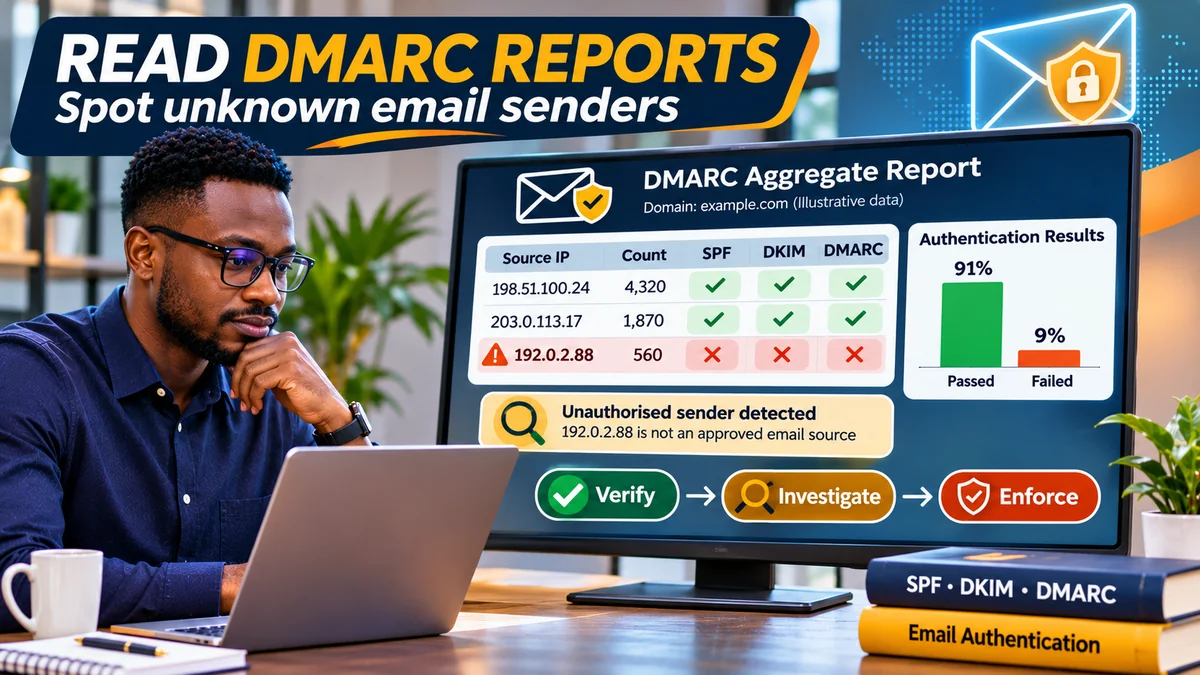
To read a DMARC report, identify the sending IP address, count the messages it represents, check whether SPF or DKIM passed and aligned with the visible From domain, then compare the source against your organisation's approved email services. A high-volume source failing both aligned checks deserves investigation, but a failed DMARC result alone does not prove that the sender is malicious. It could be a forgotten newsletter provider, a misconfigured billing application or a forwarded message.
DMARC—Domain-based Message Authentication, Reporting and Conformance—helps owners of email domains such as example.com see who is sending messages that claim to come from them. Recipients that support reporting can send aggregated authentication results to the address in the domain's DMARC rua tag. For a business in Nigeria using Google Workspace, Microsoft 365, website notifications and third-party marketing platforms, this visibility is especially valuable before setting p=quarantine or p=reject.
The IETF updated the standards in May 2026: RFC 9989 now describes DMARC, and RFC 9990 specifies aggregate reporting. Both supersede the older RFC 7489 material frequently quoted in older tutorials. This guide uses the current standards alongside Cloudflare's DMARC Management documentation and Microsoft and Google troubleshooting guidance. Verified on 2 November 2026; all example domains, IP addresses and numbers below are fictional.
What a DMARC aggregate report actually tells you
An aggregate report, often called an RUA or RPT report, summarizes a receiving provider's observations over a time range, usually around one UTC day. It lists connecting IP addresses, message counts, the claimed From domain, raw SPF/DKIM results, DMARC alignment results and the receiver's recorded policy disposition. You generally receive reports only from participating receivers, so absence of an IP is not evidence that it never sent mail.
Aggregate reports do not normally contain a message's subject, body, recipient identity or full individual-message history. They cannot independently identify the person who sent an email, demonstrate that every message was delivered, or prove that a particular sender is an attacker. The 2026 aggregate-reporting specification also warns that malicious or malformed report submissions can be used to mislead a processor; treat third-party reports as evidence to assess, not unquestionable truth.
Failure or forensic reports requested with ruf are different. They may contain details about individual messages, have limited receiver support and pose greater privacy concerns. For routine sender discovery, start with aggregate reporting.
Step 1: Make sure your domain is receiving reports
In Cloudflare, open your domain's DNS → Records and inspect the TXT record at _dmarc. A simplified monitoring example for a domain you own would be:
Type: TXT
Name: _dmarc
Value: v=DMARC1; p=none; rua=mailto:dmarc@example.com
Replace the reserved example.com address with a working reporting mailbox. p=none asks participating receivers to monitor without imposing a DMARC policy-driven quarantine or rejection; their other antispam controls still apply. If your domain already has a DMARC record, edit it rather than publishing a second policy at the same hostname.
If using a third-party reporting vendor, follow its instructions for the rua address and any required cross-domain reporting authorisation. Do not assume a mailbox on an unrelated domain automatically accepts externally requested aggregate reports. RFC 9989 defines the report destination and external authorisation mechanisms.
Alternatively, enable Cloudflare DMARC Management in Email → DMARC Management. Cloudflare scans the zone and can add its own aggregate-report destination to an existing record, allowing the service to process reports. As documented in May 2026, Cloudflare's beta capability requires a supported apex domain and Cloudflare DNS; it is not universally available for standalone subdomain setups. The first report can take up to 24 hours to appear, and sometimes there will be nothing to display until receivers have observed traffic.
Step 2: Read reports from Cloudflare or a dedicated inbox
Cloudflare's Statistics and details guide provides the current navigation: sign in, select the zone and open Email → DMARC Management. The chart shows activity over a selected period of up to 30 days. Choose View reports for daily summaries, or View all under sending sources, then open a source's details to investigate its authentication results.
If you receive raw reports via email, you may find an XML attachment, commonly GZIP-compressed as .xml.gz; some older report generators use other packaging. Store incoming reports in a controlled mailbox or reputable report-processing service. A GZIP/XML report is meant for machine processing, so visual dashboards are often more usable for non-specialists.
Security warning: never indiscriminately execute or open unknown attachments from an unverified sender. If you build a report parser, validate inputs, restrict archive expansion sizes, disable unsafe XML entity expansion and prevent duplicate ingestion. RFC 9990 specifically addresses malicious XML and decompression-related resource exhaustion risks.
Step 3: Understand the important DMARC fields
| Report field | What it means | What to investigate |
|---|---|---|
report_metadata/org_name | Receiving organisation that generated the summary | Whether the reporter is expected and credible |
report_id and date_range | Report identifier and period, expressed in UTC timestamps | Duplicate reports and mismatched comparison periods |
policy_published | DMARC policy and alignment settings observed by the receiver | Whether the receiver used the intended current policy |
row/source_ip | Connecting mail server's IP address | Owner, hosting or forwarding service, actual relationship |
row/count | Messages summarized by this report row | Unexpected volume, spikes or uncommon dates |
policy_evaluated/spf and dkim | DMARC-relevant aligned pass/fail results | Whether at least one authenticated identity aligns with From |
disposition and any reason | Recorded treatment and potential policy override | Why the disposition differs from the requested policy |
identifiers/header_from | Domain presented in the visible From field | Comparison against authenticated domains |
auth_results | Underlying SPF and DKIM tests, including tested domains | Technical pass without alignment, key or SPF failures |
Microsoft's DMARC troubleshooting table confirms a subtle but essential point: policy_evaluated/spf=fail can coexist with auth_results/spf/result=pass. The latter means an SPF identity authenticated, but the former says that successful identity did not satisfy DMARC alignment with the message's visible From domain. The same distinction exists for DKIM.
Step 4: Understand authentication pass versus DMARC alignment
Imagine a legitimate company sends an invoice with From: accounts@example.com, while a billing platform uses bounce@mailer.vendor.example as the envelope sender. SPF may successfully authenticate the platform's own domain. However, that does not automatically align with example.com. If DKIM also signs using the platform's unrelated domain, the message can fail DMARC even though the provider itself authenticated correctly.
Under DMARC, at least one of SPF or DKIM must both pass and align with the From domain. Relaxed alignment—normally the default—can permit suitable subdomains sharing the organisational domain, while strict alignment requires a closer match. See RFC 9989 and Microsoft's DMARC alignment guidance .
For a legitimate third-party sender, fix the platform's custom DKIM signing domain, an appropriate custom return-path setup or another provider-supported configuration. Do not add every unfamiliar IP to SPF merely to eliminate red warnings. Doing so can authorise unwanted systems and may not even solve alignment.
Step 5: Walk through a fictional DMARC XML example
The abbreviated XML fragment below shows the relationship between an observed IP, count, evaluated DMARC failure and underlying authentication that passed for an unrelated domain. It is an explanatory excerpt, not a complete RFC 9990 document:
<record> <row> <source_ip>192.0.2.88</source_ip> <count>42</count> <policy_evaluated> <disposition>none</disposition> <dkim>fail</dkim> <spf>fail</spf> </policy_evaluated> </row> <identifiers> <header_from>example.com</header_from> </identifiers> <auth_results> <spf> <domain>mailer.vendor.example</domain> <result>pass</result> </spf> </auth_results>
</record>
192.0.2.88 is a reserved documentation IP, not a real suspicious server. The row represents 42 observed messages for the shown combination of results. The raw SPF check passed for mailer.vendor.example, but the message claimed to be from example.com; neither aligned path passed DMARC. The none disposition is consistent with a monitoring policy, not evidence the messages reached inboxes.
Before labelling the source hostile, ask whether the fictional vendor is approved, whether it sends your invoices, and whether its DKIM configuration has been set to sign with an aligned domain. If it is unrecognised, investigate ownership and volumes further.
Step 6: Build a sender inventory and classify unknown IP addresses
Make a short register of every approved system: Google Workspace or Microsoft 365, your website's mail API, marketing provider, helpdesk, billing or POS software, and any internal server with an SMTP relay. For each, record the service owner, authorised From domain, return-path domain, DKIM signing domain and documented sending infrastructure.
When you encounter an unknown source_ip, use a reputable IP ownership or ASN lookup as a starting clue, then compare the result with provider documentation, SMTP logs, job history and the same source's DMARC results over time. An IP may belong to a shared cloud host or forwarder, so a recognised cloud provider name is not enough to prove authorisation. Reverse DNS, ASN and geolocation alone are not definitive identity checks.
Classify sources as follows:
| Classification | Typical evidence | Response |
|---|---|---|
| Authorised and healthy | Known provider and an aligned SPF or DKIM pass | Continue monitoring |
| Authorised but misconfigured | Known provider, authentication mismatch, business logs confirm sending | Fix DKIM/return-path alignment and retest |
| Forwarded or mailing-list traffic | Intermediary server and known forwarding route | Investigate SPF breakage, DKIM preservation and receiver override |
| Unrecognised, pending investigation | Unknown IP and insufficient ownership or business evidence | Correlate with logs, provider records and repeat activity |
| Suspected unauthorised spoofing | Unknown origin, no approved relationship, both aligned methods fail, suspicious pattern | Preserve evidence, investigate, maintain appropriate enforcement |
Step 7: Prioritise the findings that matter most
Start with legitimate messages at risk of being blocked: payroll notices, customer receipts, account verification emails and support replies. Next investigate new high-volume unknown sources, sudden changes in pass rates, and potentially compromised third-party accounts. A small unknown source claiming to be your domain also deserves review, but risk and business impact should determine the order.
For illustration, suppose a company sees 4,000 messages from its known mailbox provider with aligned passes, 300 from a documented invoicing service with alignment failures, and 900 from an unknown host failing both checks. The invoicing service warrants a configuration fix; the unknown host warrants a source investigation. Those counts cannot establish the amount of fraud, the number of affected people or the number of delivered emails.
DMARC monitoring is not a replacement for detecting account compromise. An attacker abusing a genuine authenticated mailbox or approved sending platform may produce aligned passes. Where a source is new but apparently authenticated, investigate account logins, API keys, access permissions and provider alerts instead of marking it automatically safe.
Step 8: Read policy disposition and overrides correctly
The policy_published section shows what the receiver observed in DNS; policy_evaluated/disposition records the treatment it applied to the summarized messages. Common values are none, quarantine and reject. These are policy-related results, not a delivery receipt or proof of where a message landed.
Receivers can apply local rules or forwarding-related exceptions, sometimes recorded in a reason element. A report showing disposition=none under a published rejection policy could indicate an override, a receiver implementation detail or changing observed policy. Inspect the reason and reporting interval before assuming the domain's DMARC record was ignored.
Because DNS and policies can change within a reporting period, keep a dated change log. Compare policy results with your recorded _dmarc TXT value, rather than comparing today's DNS against reports generated under last week's configuration.
Step 9: Avoid double-counting and over-interpreting report volume
The report's date_range is usually expressed as Unix seconds for a UTC interval. It describes the window covered, not necessarily the timestamps of the first and last individual emails. Each receiving organisation reports only traffic it observed, and the same mail journey can create multiple observations through forwarding or separate receiving systems.
When importing files, deduplicate appropriately using the reporter, policy domain, report ID and reported period; retain original files for audit. Count row/count values only after explaining the reporting scope. An aggregate across several receivers is a reported observation total, not necessarily unique messages sent, unique recipients, successful deliveries or business transactions.
Also watch missing coverage. Not every receiver issues aggregate reports, so a flat chart may reflect a low-volume day, delayed feedback or a mailbox/reporting configuration issue. Cloudflare's enablement guidance says the initial dashboard can take up to 24 hours to populate.
Step 10: Fix legitimate failures before tightening DMARC
For known senders with DMARC failures, first verify SPF and DKIM configuration, then inspect alignment. Google's DMARC troubleshooting guidance recommends checking live email headers, DNS records, approved third-party sources and any message modifications during forwarding. Google separately notes that SPF records should cover all authorised sending services and not exceed the relevant lookup constraints.
Keep a monitoring policy while the approved mail estate is still incomplete. After a representative period of healthy authentication and follow-up tests, consider progressing towards quarantine and reject in consultation with your email administrator. Do not switch to strict enforcement only because a chart shows most observed messages passing: rare but important automated mail may be absent from that period.
For business-critical deployments, test direct mail, invoices, customer notifications, newsletters and forwarding scenarios against major recipients before and after each policy change. Google and Microsoft may apply additional spam filtering even where DMARC passes.
A weekly DMARC reporting checklist for business owners
- Confirm reports are arriving and check the latest complete reporting period.
- Review total reported volume and significant changes from the prior comparable week.
- Group senders by IP, provider, claimed From domain and alignment results.
- Compare every unfamiliar source against the current approved-sender inventory.
- Investigate high-risk unknown sources without assuming they are attackers.
- Fix known legitimate senders with SPF/DKIM or alignment problems.
- Review policy overrides, forwarding cases and changes to observed DMARC policy.
- Check message logs for complaints, undelivered receipts or other business impacts.
- Record decisions and retain necessary evidence securely.
- Reassess policy enforcement only after all important legitimate flows have passed testing.
Frequently asked questions
Does an unknown IP in a DMARC report mean someone hacked my domain?
No. It can represent spoofing, an overlooked vendor, shared infrastructure or a forwarding system. Determine ownership and compare with authorised sending records before classifying it.
Why does a report say SPF passed but DMARC failed?
SPF may have passed for a bounce or envelope domain that does not align with the visible From domain. DMARC also checks aligned DKIM, so the message fails if neither aligned mechanism passes.
Can I see the exact message or person behind a DMARC aggregate report?
Normally not. Aggregate reports summarise sending infrastructure, policies and authentication results rather than individual recipient identities or full email contents.
What if Cloudflare DMARC Management shows no reports?
Check that the correct apex domain is enabled, a DMARC record exists, Cloudflare's rua destination has been configured, and receiving organisations have actually observed relevant traffic. Allow for the initial reporting delay.
Should I immediately add an unknown sending IP to SPF?
No. Verify that the source belongs to an approved sender and that adding it is required by your provider's documented authentication setup. Blindly authorising unknown infrastructure can make abuse easier.
Do DMARC failures prove that an email was rejected?
No. Policy choices and recipient overrides affect handling. A monitoring policy can report failure without DMARC-driven rejection, while other spam controls may still block or filter a message.
Conclusion
DMARC reports are most useful when treated as an investigation tool rather than a simple green-or-red security score. Begin with the source IP, message count and From domain; distinguish authentication from alignment; compare the source with your approved mail services; and investigate unexplained traffic before changing DNS. Regular reporting helps reduce spoofing risk while protecting legitimate invoices, account notices and support messages from avoidable delivery failures.